EasyManua.ls Logo

Major Science MP-300 - User Manual

Default Icon
16 pages
Print Icon
To Next Page IconTo Next Page
Loading...
Instruction Manual
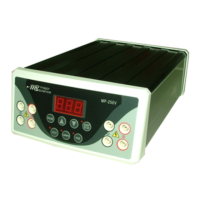
PowerPoint Power Supply,
Model MP-300

Questions and Answers

  • K
    Kelly ClarkAug 2, 2025
    What to do if the Major Science Power Supply operation stops with an alarm?
    • L
      Lisa BrownAug 3, 2025
      If the screen displays an alarm and the operation stops, it could be due to a few reasons: * The electrophoresis leads might not be properly connected to the power supply or the electrophoresis unit, or there could be a broken circuit in the electrophoresis cell. To fix this, check all connections to ensure they are intact and inspect the wires in the electrophoresis unit. Reconnect any loose cables to close the circuit, and then press START/PAUSE to restart the run. * High resistance might be present due to tape left on a pre-cast gel, an incorrect buffer concentration, or incorrect buffer volumes in the electrophoresis cell. Ensure the tape is removed from the pre-cast gel, the buffers are correctly prepared, and the recommended volume of buffer is added to the electrophoresis unit.
  • J
    Jennifer HahnAug 13, 2025
    How to troubleshoot no display or lights on a Major Science Power Supply?
    • G
      griffinshaneAug 13, 2025
      If your Major Science Power Supply shows no display or lights, start by checking the AC power. Ensure the mini power supply is plugged in and that there are no issues with the AC power source. Next, verify the AC power cord connections at both ends, making sure they are correctly connected and that you are using the appropriate cords. Finally, check the fuse and replace it if it has blown.
  • R
    raymondparkerAug 22, 2025
    Why does the Major Science Power Supply fuse keep breaking?
    • G
      gibsonterriAug 23, 2025
      If the fuse in your Major Science Power Supply repeatedly breaks, this indicates a hardware failure. In this case, you should contact your supplier's service department for assistance.

Summary

Packing list

Warning

Safety Information

Environmental Conditions

Specifies environmental conditions for instrument installation and operation.

Avoiding Electrical Shock

Provides guidelines and precautions to prevent electrical shock.

Avoiding Damage to the Instrument

Equipment Operation

Guidelines for safe and correct operation of the unit.

Symbols

Explanation of symbols used on the MP Power Supply.

Product Specifications

Product Descriptions

Introduction

Overview

General description of the MP-300 Power Supplies and their capabilities.

Controls and Features

Front Control Panel

Details the controls and features on the front panel of the unit.

Installation Instructions

Operation Instructions

Step-by-step guide for operating the power supply unit.

Troubleshooting Guide

Error Messages

Details specific error codes and their corresponding solutions.

Maintenance

Information on routine maintenance for reliable operation.

Warranty

Major Science MP-300 Specifications

General IconGeneral
BrandMajor Science
ModelMP-300
CategoryPower Supply
LanguageEnglish