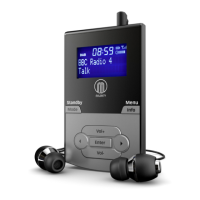
6
Press the ‘Mode’ button (Ref�4
use it will automatically scan all stations and save them�
Fully extend the antenna (Ref�13)�
A DAB scan should have already occurred upon setting up, however if a
DAB scan has not occurred or you wish to rescan for available stations,
press and hold the ‘Info/Menu’ button (Ref�5) to open radio settings�
Use the ‘Prev/Next’ buttons (Ref�8/9) to scroll through to “Full Scan” and
Ref�10)�
station stored�
To browse through all stations that have been stored, use the ‘Next’
(Ref�9) and ‘Prev’ buttons (Ref�8) to scroll through them� When on
the chosen station, press the ‘Enter/Snooze’ button (Ref�10) to begin
listening to that station�
The radio will display station information when you press the ‘Info/
Menu’ button (Ref�5)� Press it multiple times to view all information�
Please see page 9 for further details�
automatically tune to the same station (DAB or FM) that was last
selected�
Instructions Guide
DAB/DAB+ Radio


 To Next Page