11
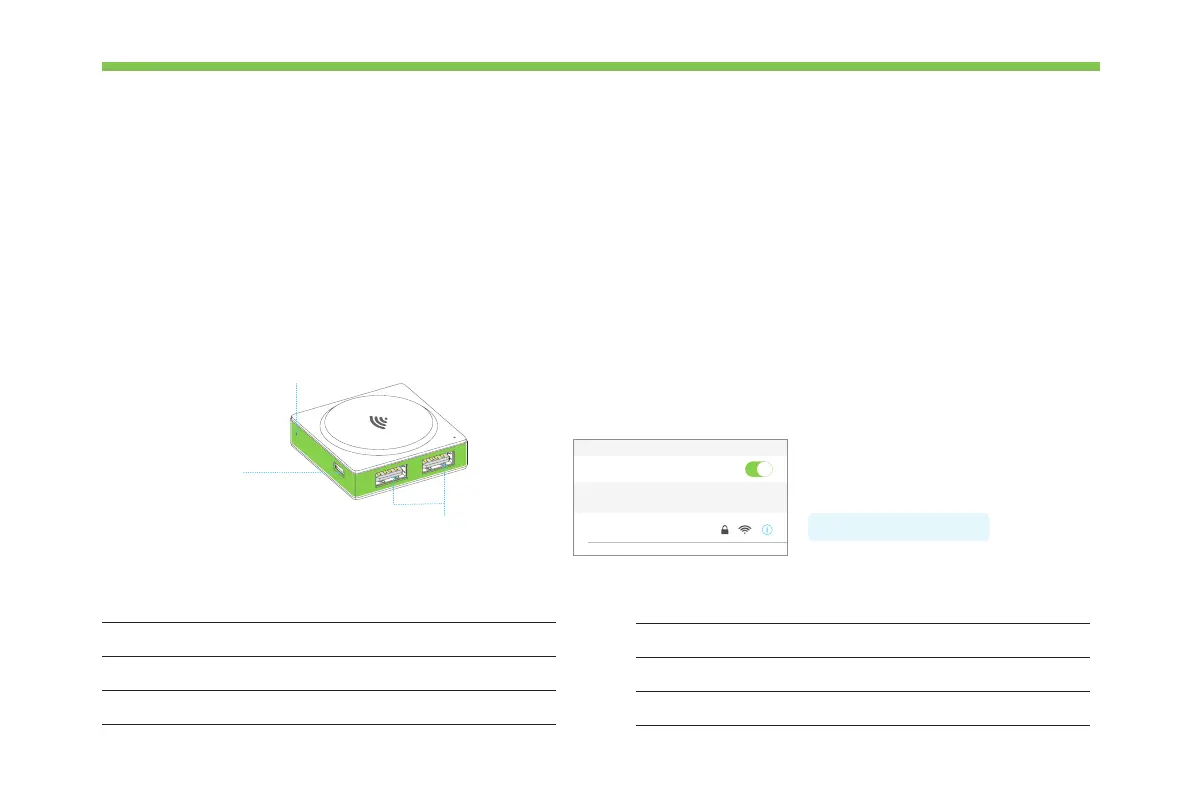
The Wi-Fi block has three functions:
·Establish a wireless connection between the blocks and your mobile device, then you can program the blocks via Makeblock Neuron app.
·Connect to your router to use more features, like IoT(Internet of Things).
·Provide power to other blocks. It contains a Micro USB interface, you can connect the block to power bank or power adapter via USB
cable to power the other blocks.
Appearance How to use?
Wi-Fi
Reset Button
Micro USB interface
USB interface
Connect to camera block or Mic & Speaker block
Connect your tablet or smart phone to the Wi-Fi block by using the
network name (neuron-xxxxxx) and wireless password (makeblock).
Then launch the Makeblock Neuron app and follow the instructions on
the screen to use the Wi-Fi block.
Specications
Wireless Standards
Operating Voltage
Working Mode
Communication Distance
IEEE 802.11b/g/n(HT20)
DC 5V
STA/AP/STA+AP
Operating Current
Operation Temperature
200mA
10m (Open environment)
0° C ~ 45° C
Password: makeblock
Wi-Fi
CHOOSE A NETWORK...
neuron-xxxxxx



 To Next Page