06
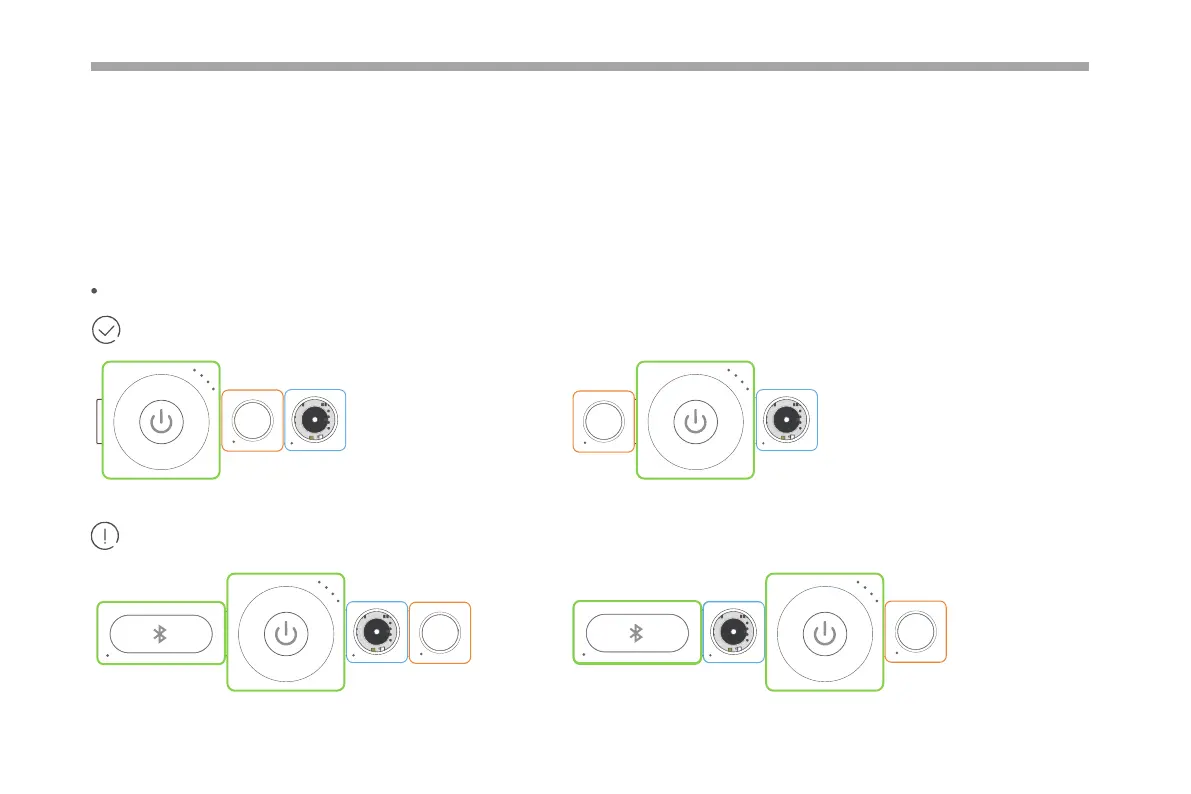
The input block (orange) must be connected on the left side of the output block (blue).
Working normally!
When you use the Neuron without any software, you can create rich eects with the preset program. In this mode, the Neuron block
will behave according to the data it received from the previous block.
Connection rules in this mode:
Only working when you program the blocks via Makeblock Neuron app or mBlock.
Oine Creating
B
u
z
z
e
r
P
o
w
e
r
B
u
t
t
o
n
B
u
z
z
e
r
P
o
w
e
r
Bluetooth
B
u
t
t
o
n
P
o
w
e
r
B
u
z
z
e
r
Bluetooth
B
u
z
z
e
r
Bluetooth
B
u
t
t
o
n
B
u
z
z
e
r
P
o
w
e
r
B
u
t
t
o
n



 To Next Page