20
ABOUT THE MAKERBOT DIGITIZER
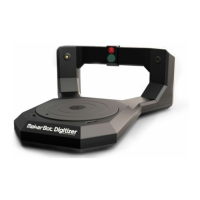
The MakerBot Digitizer Desktop 3D Scanner creates a digital 3D model of a physical object
by taking a rapid sequence of pictures as the object rotates on the MakerBot Digitizer
turntable. Here is how it happens:
1. Two lasers, mounted on the le and right corners of the MakerBot Digitizer, create laser
lines that outline the profile of the object, while a camera takes a series of photographs.
2. MakerWare for Digitizer soware takes the photographs of the laser lines and combines
them to create a point cloud.
3. If a completed scan still needs improvement, MakerWare for Digitizer can rescan
the object from a dierent angle and combine the two sets of scan data using
MakerBot MultiScan™ Technology.
Your final scan will be a manifold 3D mesh that can be printed on your MakerBot,
shared on Thingiverse.com, or modified in almost any 3D modeling soware.
i
Note: The MakerBot Digitizer has a dimensional accuracy of up to 2 mm.
How it Works


 To Next Page