DIVIDE/MULTIPLY
SEQ LENGTH
SEQ MODE
KEY
ROOT
ROOT + 1
ROOT + 2
ROOT + 3
ROOT + 4
ROOT + 5
ROOT + 6
ROOT + 7
ROOT + 8
ROOT + 9
ROOT + 10
VARIGATE 8+
CLK IN
CLK OUT
TRACK
RESET
PROB
CLEARMUTE
RPT
DLY
PW GLIDE
SONG
FREEZE
RND
TEMPO
GATE 1
NOTE
END
SAVE
GATE 3
RECALL
GATE 2
GATE 5
GATE 6
GATE 4 GATE 8GATE 7 CV 2
CV 1
BANK/ALL
ROOT + 11
B
A
G
F
E
D
C
QUANTIZED CV OUTPUTS, KEY AND SCALE
MALEKKOHEAVYINDUSTRY.COM
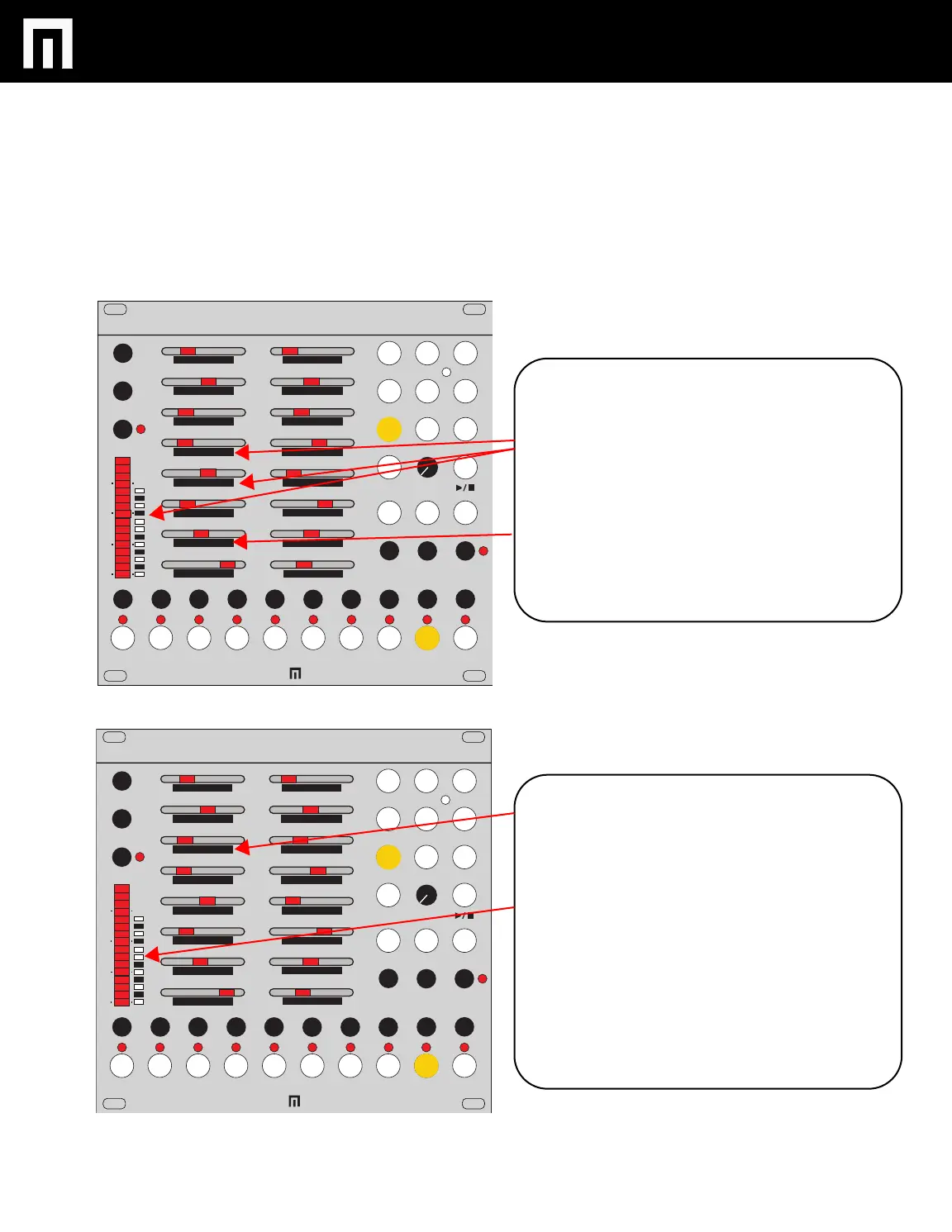
While in TRACK MODE you can access the KEY and dial
in other notes
NOTE: THE CV KEY, ROOT AND INTERVAL SETTINGS
CAN BE SAVED PER A BANK OF PRESETS.
KEY: To change the KEY that your bank is in, select the
TRACK button + one of the CV buttons and then move the
KEY slider to the right. The LED will indicate which key
you are now in (C-B on the LED bar graph).
Now you can also add the ROOT+ additional notes by
moving the sliders to the right (thus creating scales).
While in TRACK MODE you can also change the CV
CHANNEL PLAYBACK DIRECTION: FORWARD,
REVERSE, PENDULUM AND RANDOM. Each of these
modes is displayed on the LED bar graph; 2 bars repre-
senting the different modes.
CV LINK MODE: You can tie a CV channel to a
corresponding gate channel. To enter this mode: Select
TRACK, a CV channel button and then move the
SEQUENCE MODE slider to the right until you reach the
last 8 LED’S in the bar graph. In this mode the CV channel
is only progressed when a gate on the linked channel is
active.
NOTE: In CV LINK MODE, DIVIDE/MULTIPLY is disabled
(SEQUENCE LENGTH can still be changed).
DIVIDE/MULTIPLY
SEQ LENGTH
SEQ MODE
KEY
ROOT
ROOT + 1
ROOT + 2
ROOT + 3
ROOT + 4
ROOT + 5
ROOT + 6
ROOT + 7
ROOT + 8
ROOT + 9
ROOT + 10
VARIGATE 8+
CLK IN
CLK OUT
TRACK
RESET
PROB
CLEARMUTE
RPT
DLY
PW GLIDE
SONG
FREEZE
RND
TEMPO
GATE 1
NOTE
END
SAVE
GATE 3
RECALL
GATE 2
GATE 5
GATE 6
GATE 4 GATE 8GATE 7 CV 2
CV 1
BANK/ALL
ROOT + 11
B
A
G
F
E
D
C
PG. 11
VARIGATE 8+ MANUAL V.2


 To Next Page