EasyManua.ls Logo

Manfrotto MHXPRO-BHQ2 - User Manual

Manfrotto MHXPRO-BHQ2
4 pages
Print Icon
To Next Page IconTo Next Page
Loading...
J RUE KOCN
Cod. 106930 - 05/14 Copyright © 2014Manfrotto Bassano Italy
INSTRUCTIONS
MHXPRO-BHQ2
11,5 cm
4.5”
0,5 kg
1.1 lbs
10 kg
22 lbs
简介
专业球型云台设计用于中画幅相机。
架设
使用3/8”母螺纹“A”将云台装配在三脚架上。
曼富图三角架上的顶板配备有一组螺钉“B”,其卡夹在云台底座上,以确保有
效安全地锁紧。
从云台上拆下快装板
要拆下快装板“G”,必须打开锁杆“H”。
当安全杆“I”处于闭合位置时,不可打开锁杆“H”。
要取下安全锁扣,旋转锁杆“H”并向下推安全杆“I”,直至锁杆“H”触及止块。
将相机装配在快装板上
要将相机固定在快装板“G”上,使用锁环“Q”将相机螺钉“M”拧入相机的螺纹孔
中,切记不可用力过大。完全锁紧前,将相机与快装板“G”上的“镜头”标记对齐。
使用前请确保相机已牢固锁定于快装板上。
将相机安装在云台上
&
推动锁环“Q”,使其平放在快装板“G”上。
将相机快装板“G”(图4)插在云台的顶部,直至锁杆“H”发出咔嗒声并闭
合。
推动锁杆“H”以确保快装板“G”(图5)已完全锁定,检查并确认相机已牢
牢固定在云台上。
从云台上拆下相机
需将相机从云台上取下来时,一手握紧相机,一手旋转锁杆“H”并按下安全
杆“I”,直至锁杆“H”触及止块。
使用
云台带有全景和球头独立移动件。
杆“E”用来锁定全景移动件。
要释放移动件,逆时针旋转解锁杆“E”即可。
一旦达到所需位置,顺时针完全旋转杆“E”来锁定云台。杆“C”用来锁定球头移动
件。
要确保安全地使用球型云台,当松开球头时始终用一只手紧握相机。
要松开球头“D”来定位相机,逆时针旋转解锁杆“C”即可。一旦达到所需位置,顺
时针完全旋转杆“C”来锁定球头“D”。
云台带有一个用来调节球头移动的独立式阻力调节装置,在云台锁定之前,其使得对
云台的定位控制变得更容易。要调节阻力,必须确保球头“D”未被锁定(逆时针旋转
锁杆“C”)。
之后,一手握紧相机,一手顺时针旋转旋钮“F”来拧紧阻力调节装置,逆时针旋转来
拧松阻力调节装置。
阻力调节装置不可用来锁定相机:建议通过完全旋转杆“C”来锁定球头“D”。
1
2
3
4 5
6
1
INTRODUCCIÓN
Una rótula de bola profesional diseñada para cámaras de tamaño medio.
PREPARACIÓN
Acoplen la rótula al trípode utilizando una rosca hembra 3/8” “A”.
La plataforma superior de los trípodes Manfrotto viene equipada con tres torni-
llos hundidos “B” que presionan contra la base de la rótula para asegurar un
eficaz y seguro bloqueo.
QUITE EL PLATO DE LIBERACIÓN RÁPIDO DE LA RÓTULA
Para quitar el plato “G” es necesario abrir la palanca “H”.
La palanca “H” no se podrá abrir mientras el seguro “I” este´cerrado.
Para abrir el seguro, gire la palanca “H” y presione hacia debajo el seguro “I”. Hasta
que la palanca “H” alcance la posición de parada.
ACOPLAR LA CAMARA AL PLATO
Fije la cámara al plato “G” enroscando el tornillo “M” en la rosca hembra que lleve
la cámara SIN APLICAR FUERZA utilizando el anillo “Q”. Antes de bloquear del todo
alinee la cámara con la marca “LENS” en el plato “G”
Por favor, asegúrese de haber bloqueado la cámara segura sobre el plato antes
de trabajar.
MONTANDO LA CÁMARA EN LA RÓTULA
Y
Presione el anillo “Q” hasta que esté plano contra el plato “G”.
Inserte el plato “G” (fig. 4) sobre la parte superior de la rótula hasta que la pa-
lanca de bloqueo“H” haga click y cierre.
Asegúrese que el plato “G” (fig. 5) está completamente bloqueado presionando
la palanca “H” y comprobando que la cámara está asegurada sobre la rótula.
QUITE LA CÁMARA DE LA RÓTULA
Cuando necesite quitar la cámara de la rótula, mantenga la cámara firmemente
con una mano mientras gira la palanca “H” y presiona hacia abajo el seguro “I”
hasta que la palanca “H” alcance la posición de parada.
UTILIZACIÓN
La rótula trabaja con movimientos de bola y panoramicos autónomos.
El eje panorámico puede bloquearse utilizando la palanca “E”.
Para librar el movimiento, suelten la palanca “E” rodeando en sentido antihorario.
Una vez obtenida la posición deseada, bloquéen la rótula girando la palanca “E” com-
pletamente en sentido hórario. El mando “C” bloquea el movimiento de la rótula.
Para utilizar con seguridad la rótula de bola, mientras sueltan la bola sujeten
siempre la cámara con una mano.
Para librar la bola “D” y colocar la cámara, suelten la palanca “C” rodeando en sen-
tido antihorario. Una vez obtenida la posición deseada, bloquéen la bola “D” girando
completamente la palanca “C” en sentido hórario.
La rótula incorpora un ajuste de fricción separado para el movimiento de la bola, que
hace más fácil controlar la posición de la rótula antes de bloquearla. Para ajustar la
fricción asegúrese que la bola “D” no está bloqueada (rotando la palanca de bloqueo
“C” en sentido contrario a las agujas del reloj). Luego sujete la cámara en una mano y
gire con la otra el pomo “F” en sentido de las agujas del reloj para aumentar la fricción,
en sentido contrario a las agujas del reloj para reducir la fricción.
La fricción no permite bloquear la cámara: les recomendamos bloquear la bola
“D” girando completamente la palanca “C”.
1
2
3
4 5
6
1
はじ
中判カのために設計されたボール雲台です
ット
3/8”ネジ穴”A”を使三脚に雲台を付け
のManfrotto製三脚のププレーにはネジ”B”が備れ、雲台底部に押
付けで効果的かつ確実に雲台を固定すができます
らクイック ートを
レー“G”を外すには、レバー”H”を開ける必要がます
レバー“H”はセーレバー”I”が閉じた位置にる状態では開きせん。
セー機構を解除すには、セーレバー”I”を押下しながレバー”H”を止ま
る位置まます
カメラへのクイリースプレトの取り付
グ”Q”を使ー“M”を力を入れ過ぎずに底部のネジ穴に締め
で、レー”G”をラに固定ます完全に固定する前に、レンズ方向
”G”底面の“LENS”マーの矢印の向きを合わせておき
ご使用前に、レーがカっか固定されてを確認ださい。
メラ取り付
&
レー”G”の底面が平坦になグ”Q”を倒ます
図4のに、レバー“H”がカチでカレー”G”を雲台上部に挿
入します。
レバー”H”を押レー”G”が完全にロラが雲台に固定
されを確ます(図5)
カメラ 取り外
を雲台か外す際は、片手っかカメを持セーフテレバ
ー”I”を押下しながレバー”H”を止で回ます
使用
雲台は、マの動きボール独自の動きがあます
レバー”E”はラマの動ます
を解除するには、反時計回レバー"E"をます
希望の位置を決めた時計回レバー”E“を止まで回した状態で雲台をロ
ますレバー”C”でボールの動きをロます
ボール雲台を安全に使ために、ボールの動きを解除きには、
方の手でカメラを必ず支えうにださい。
ラの位置きめるのにボール”D”を解除するには反時計回に回レバ
ー”C”を解除ます希望の位置が決ったレバー”C”を時計回に止ま
で回た状態でボール”D”をロます
雲台はボールの動きに別のンを組み込でいるので、をする前に雲台の
位置を調整やすいまンを調整するには、ボール"D"がロ解除
れてを確認ださい。反時計回レバー"C"をます
それか片手で持ち、一方の手でブ”F”をつか時計回に回転
クション やし 回りでフリクションす。
ンにカメラをができますバー”C”を止ま
までることでD クすることをめしす。
1
2
3
4 5
6
1
제품 소개
중형 카메라를 위해 디자인된 전문가용 볼 헤드.
셋업
헤드를 삼각대의 3/8” 암컷 나사 “A”에 결합시킵니다.
맨프로토 삼각대의 상단 플레이트에 3개의 스크류 “B”를 조여 헤드를 안전하고
효과적으로 결합시킵니다.
헤드에서 퀵 릴리즈 플레이트 제거
플레이트 “G”를 제거하려면 레버 “H”를 열 필요가 있습니다.
레버 “H”는 안전 레버 “I”가 잠금 위치에 있을 경우 열수 없습니다.
안전 걸쇠를 해지하려면, 레버 “H”를 돌리고 안전 레버 “I”를 레버 “H”가 멈춤에 도달할
때까지 아래로 누르십시오.
플레이트에 카메라 장착
너무 힘을 주지 말고, 링 “Q”를 사용하여, 카메라 나사 “M”을 카메라의 나사산 홀에 돌
려, 플레이트 “G”에 카메라를 고정하십시오.완전히 고정하기 전에, 플레이트 “G”에
는 “LENS” 마크를 카메라와 정렬하십시오.
사용 전에 플레이트에 카메라가 안전하게 고정되었는지 확인하시기 바랍니다.
헤드에 카메라 장착
&
링 “Q”를 밀어 플레이트 “G”에 편평하도록 합니다.
카메라 플레이트 “G”(그림. 4)를 고정 레버 “H”가 클릭하고 잠길 때까지 헤드
의 상단에 넣습니다.
레버 “H”를 눌러 플레이트 “G”(그림. 5)가 완벽하게 고정되었는지 확인하고, 카
메라가 헤드에 안전하게 장착되었는지 체크하십시오.
헤드에서 카메라 분리
헤드에서 카메라를 분리할 필요가 있을 때는 고정 레버 “H”를 조작하는 동안, 카
메라를 한 손으로 안전하게 잡고 다른 손으로 레버 “H”가 멈출 때까지 안전 레버
“I”를 누르십시오.
사용
헤드는 파노라마 기능과 독립적 볼 움직임 기능이 있습니다.
손잡이 ‘E”는 파노라마 움직임을 제어합니다.
잠금을 풀기 위해서는 손잡이 “E”를 시계반대방향으로 돌려주십시오.
원하는 위치에 도달하면 손잡이 “E”를 시계방향으로 완전히 돌려줍니다. 손잡이 “C”는
볼의 움직임을 제어합니다.
헤드를 안전하게 사용하기 위해서 볼을 푸는 동안에는 항상 한 손으로 카메
라를 잡아주 시기 바랍니다.
카메라의 위치를 조정하기 위해서 볼 “D”를 풀려면 손잡이 “C”를 시계반대방향으로 풀
어줍 니다. 원하는 위치에 볼을 놓고 손잡이 “C”를 시계방향으로 돌려 고정시킵니다.
헤드는 볼을 고정하기 전에 좀더 쉽게 움직임을 컨트롤 하기 위해 따로 프릭션을 조정
할 수 있습니다. 프릭션을 조정하기 위해서는 볼 “D”이 풀려있는지 확인하시기 바랍니
다. 그리고 나서 한 손으로 카메라를 잡고 다른 손으로 손잡이 “F”를 시계방향으로 돌리
면 프릭션이 조여지고 시계반대방향으로 돌리면 프릭션이 느슨해 집니다.
프릭션은 카메라를 고정시킬 수는 없습니다: 맨프로토는 손잡이 “C”를 사용하여
볼을 고정 하길 권장합니다.
1
2
3
4 5
6
1
ВВЕДЕНИЕ
Профессиональная шаровая головка, созданная для среднеформатных камер.
УСТАНОВКА
Установите головку на штатив, используя внутреннюю резьбу 3/8" "A".
Верхние площадки штативов Manfrotto оснащены тремя стопорными бол-
тами "B", которые зажимают основание головки, гарантируя эффективную и
надежную блокировку.
СНЯТИЕ БЫСТРОСЪЕМНОЙ ПЛОЩАДКИ С ГОЛОВКИ
Для того чтобы снять быстросъемную площадку "G" необходимо открыть рычаг
"Н".
Рычаг "Н" нельзя открыть пока блокирующий рычаг "I" находится в закрытом по-
ложении.
Для удаления предохранительного штифта поверните рычаг "Н" и нажимайте на
блокирующий рычаг "I" пока рычаг "Н" не остановится.
УСТАНОВКА КАМЕРЫ НА ПЛОЩАДКЕ
Установите камеру на площадке "G", ввинтив винты камеры "М" в отверстия с
резьбой БЕЗ ПРИЛОЖЕНИЯ СИЛЫ при помощи кольца "Q". До окончательной фик-
сации выровняйте камеру в соответствие с разметкой «LENS» на площадке.
Внимание! Перед использованием убедитесь, что камера заблокирована на
быстросъемной площадке.
УСТАНОВКА КАМЕРЫ НА ГОЛОВКЕ
И
Нажмите на кольцо "Q" так, чтобы оно выровнялось по отношению к пло-
щадке "G".
Внимание! Установите площадку камеры "G" (рис 4) сверху головки. Должен
раздаться щелчок и блокирующий рычаг "Н" должен закрыться.
Внимание! Убедитесь, что пластина "G" (рис 5) полностью зафиксирована.
Для этого нажмите на рычаг "Н" и надежность фиксации на головке.
СНЯТИЕ КАМЕРЫ С ГОЛОВКИ
Когда камеру необходимо снять с головки, возьмите ее одной рукой, дру-
гой поверните рычаг "Н" и нажимайте на блокирующий рычаг "I" пока рычаг
"Н" не остановится.
ИСПОЛЬЗОВАНИЕ
Головка имеет возможность независимого панорамирования и движений шаро-
вого механизма.
Ручка "E" служит для блокировки панорамных движений.
Для разблокировки движения, разблокируйте ручку "E", повернув ее против ча-
совой стрелки.
Как только желаемое положение будет достигнуто, зафиксируйте его, повернув
ручку "E" на полный оборот по часовой стрелке. Ручка "C" служит для блокировки
движений шара.
Для гарантии безопасного применения шаровой головки, во время разбло-
кировки шара всегда придерживайте камеру одной рукой.
Для разблокировки шара "D", чтобы установить камеру в нужное положение, раз-
блокируйте ручку "C", повернув ее против часовой стрелки. Как только желаемое
положение будет достигнуто, зафиксируйте шар "D", повернув ручку "C" на пол-
ный оборот по часовой стрелке.
Головка оснащена отдельной регулировкой трения для движения шара, что об-
легчает контроль позиционирования головки перед ее блокировкой. Для регу-
лировки трения проверьте, не заблокирован ли шар "D" (поверните рычаг блоки-
ровки "C" против часовой стрелки). Затем, удерживая камеру одной рукой, другой
поверните рукоятку "F"по часовой стрелке для усиления трения и против часовой
стрелки для ослабления трения.
Трение не позволяет блокировку камеры: мы рекомендуем заблокировать
шар "D", до упора повернув рычаг "C".
1
2
3
4 5
6
1
Question and Answer IconNeed help?

Do you have a question about the Manfrotto MHXPRO-BHQ2 and is the answer not in the manual?

Summary

Manfrotto MHXPRO-BHQ2 Ball Head Overview

Product Identification and Specifications

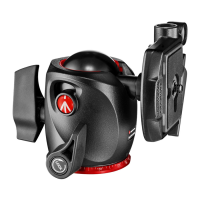
Manfrotto MHXPRO-BHQ2 ball head with load capacity and dimensions.

Assembling the Ball Head and Camera

Mounting the Ball Head on a Tripod

Attach the ball head to the tripod using the 3/8" thread and set screws.

Attaching the Camera to the Quick Release Plate

Screw camera onto plate, align, and ensure secure locking before mounting to head.

Mounting the Camera-Plate Assembly onto the Head

Insert the camera plate onto the ball head, ensuring the locking lever engages securely.

Operating the Ball Head

Independent Pan and Ball Movements

Control panoramic and ball movements using levers E and C for positioning and locking.

Friction Adjustment for Ball Movement

Adjust ball head friction using knob F for controlled positioning before final locking.

Removing the Camera from the Head

Procedure to safely detach the camera from the ball head using the safety lever.

Summary

Manfrotto MHXPRO-BHQ2 Ball Head Overview

Product Identification and Specifications

Manfrotto MHXPRO-BHQ2 ball head with load capacity and dimensions.

Assembling the Ball Head and Camera

Mounting the Ball Head on a Tripod

Attach the ball head to the tripod using the 3/8" thread and set screws.

Attaching the Camera to the Quick Release Plate

Screw camera onto plate, align, and ensure secure locking before mounting to head.

Mounting the Camera-Plate Assembly onto the Head

Insert the camera plate onto the ball head, ensuring the locking lever engages securely.

Operating the Ball Head

Independent Pan and Ball Movements

Control panoramic and ball movements using levers E and C for positioning and locking.

Friction Adjustment for Ball Movement

Adjust ball head friction using knob F for controlled positioning before final locking.

Removing the Camera from the Head

Procedure to safely detach the camera from the ball head using the safety lever.

Overview

This document describes the Manfrotto MHXPRO-BHQ2, a professional ball head designed for medium-format cameras, offering precise control and secure mounting for photographic equipment. The ball head features independent movements for both panoramic rotation and ball positioning, providing photographers with versatile adjustments for various shooting scenarios.

Function Description

The MHXPRO-BHQ2 serves as a crucial interface between a camera and a tripod, enabling flexible camera positioning while maintaining stability. Its primary function is to allow for quick and precise adjustments to the camera's angle and orientation. The head incorporates a quick-release plate system, which facilitates rapid attachment and detachment of the camera. This system is designed with safety mechanisms to prevent accidental camera release, ensuring the equipment remains securely mounted during use.

The ball head's design includes a main ball movement that allows for tilting and panning the camera in almost any direction. This movement is controlled by a locking lever, which, when released, frees the ball for adjustment and, when tightened, securely fixes the camera in the desired position. In addition to the ball movement, the head features an independent panoramic rotation. This allows the camera to be rotated horizontally without affecting the ball's tilt, which is particularly useful for creating panoramic images or making precise horizontal adjustments.

A key feature of this ball head is its separate friction adjustment for the ball movement. This adjustment mechanism allows users to fine-tune the resistance of the ball's movement, making it easier to control the camera's positioning before fully locking it off. By adjusting the friction, photographers can achieve a smoother, more controlled movement, preventing the camera from suddenly dropping or shifting when the main locking lever is released. This feature enhances user control and safety, especially when handling heavier camera setups.

The quick-release plate, designated as "G," is an integral part of the system. It attaches directly to the camera's threaded hole and then slides into the head's receiver. The plate is secured by a locking lever, "H," which engages with the plate to hold it firmly in place. A secondary safety lever, "I," works in conjunction with the main locking lever to provide an additional layer of security, preventing the main lever from opening accidentally. This two-stage locking mechanism is essential for safeguarding valuable camera equipment.

Usage Features

Setting up the MHXPRO-BHQ2 involves assembling it onto a tripod. The head is equipped with a 3/8" female thread ("A") for attachment to most standard tripods. For Manfrotto tripods, there are additional set screws ("B") on the top plate that can be tightened against the base of the head. These screws enhance the locking mechanism, ensuring a more effective and secure connection between the head and the tripod, thereby increasing overall stability.

Attaching the camera to the quick-release plate ("G") is a straightforward process. The camera screw ("M") on the plate is threaded into the camera's base. It is crucial to ensure that this screw is tightened without applying excessive force, and the camera should be aligned with the "LENS" marking on the plate for optimal balance and positioning. Before mounting the camera onto the head, users must verify that the camera is securely fixed to the release plate.

Mounting the camera assembly onto the head involves inserting the quick-release plate ("G") into the head's receiver. This action should be accompanied by an audible click as the main locking lever ("H") engages and closes, indicating that the plate is properly seated. After the click, it is recommended to push the lever "H" again and physically check that the camera is securely fitted to the head, ensuring there is no play or looseness. This step is vital for confirming the camera's stability before use.

Removing the camera from the head requires a specific sequence of actions to disengage the safety mechanisms. First, the camera should be held securely with one hand. Then, the main locking lever ("H") is rotated, and simultaneously, the safety lever ("I") is pushed down. This action allows the main lever to fully open, releasing the quick-release plate and enabling the camera to be lifted off the head. This controlled release mechanism prevents accidental drops and ensures safe handling of the equipment.

The head offers independent control over its panoramic and ball movements. The panoramic movement is locked and unlocked using lever "E." To release the panoramic movement, lever "E" is rotated anticlockwise. Once the desired horizontal position is achieved, turning lever "E" fully clockwise locks the movement. Similarly, the ball movement is controlled by lever "C." To release the ball for positioning, lever "C" is rotated anticlockwise. After adjusting the camera's angle, turning lever "C" fully clockwise locks the ball in place. It is important to always hold the camera with one hand while releasing the ball to prevent sudden movements or drops.

The friction adjustment knob "F" provides an additional layer of control for the ball movement. To adjust friction, the main ball locking lever "C" should be unlocked (rotated anticlockwise). Then, while holding the camera with one hand, knob "F" can be rotated. Turning knob "F" clockwise increases friction, making the ball movement stiffer and more controlled. Turning it anticlockwise reduces friction, allowing for smoother, freer movement. This feature is particularly useful for balancing heavier lenses or achieving precise, slow camera movements. However, it is crucial to remember that friction adjustment does not fully lock the camera; the ball must always be locked by fully turning lever "C" clockwise for secure positioning.

Maintenance Features

While the manual does not explicitly detail maintenance features, the design of the MHXPRO-BHQ2 implies certain aspects that contribute to its longevity and reliable performance. The robust construction, typical of Manfrotto products, suggests durability under regular use. The use of high-quality materials for the locking levers, quick-release plate, and ball mechanism indicates a design intended to withstand the stresses of professional photography.

The quick-release plate system, with its precise fit and secure locking mechanisms, is designed to minimize wear and tear on both the plate and the head's receiver. Proper engagement and disengagement of the plate, as described in the usage instructions, help preserve the integrity of these components. Avoiding excessive force when attaching the camera to the plate or when operating the locking levers contributes to the longevity of the threads and mechanical parts.

The friction adjustment mechanism, while enhancing usability, also plays a role in maintenance by allowing users to prevent sudden, uncontrolled movements that could potentially stress the internal components of the ball head. Regular, gentle operation of all levers and knobs, as opposed to forceful manipulation, will help maintain their smooth function and prevent premature wear.

Although not explicitly stated, it is generally good practice for photographic equipment to be kept clean and free from dust, sand, and moisture. These elements can ingress into the moving parts of the ball head, potentially causing friction, stiffness, or damage over time. Wiping down the head with a soft, dry cloth after use, especially in challenging environments, can help preserve its operational integrity. Storing the ball head in a protective bag or case when not in use can also shield it from environmental contaminants and physical impacts.

The design of the MHXPRO-BHQ2, with its clear operational steps and safety features, implicitly guides users towards practices that extend the life of the product. By following the instructions for secure mounting, proper locking, and careful release, users can ensure the ball head continues to perform reliably for many years, providing a stable and flexible platform for their photographic endeavors.

Manfrotto MHXPRO-BHQ2 Specifications

General IconGeneral
AttachmentUniversal \
Product colorBlack
Lateral tilt angle-90 - 40 °
Panoramic rotation360 °
Maximum weight capacity10 kg
Weight and Dimensions IconWeight and Dimensions
Height115 mm
Weight500 g

Related product manuals