camel
4
ME0074 issue 2
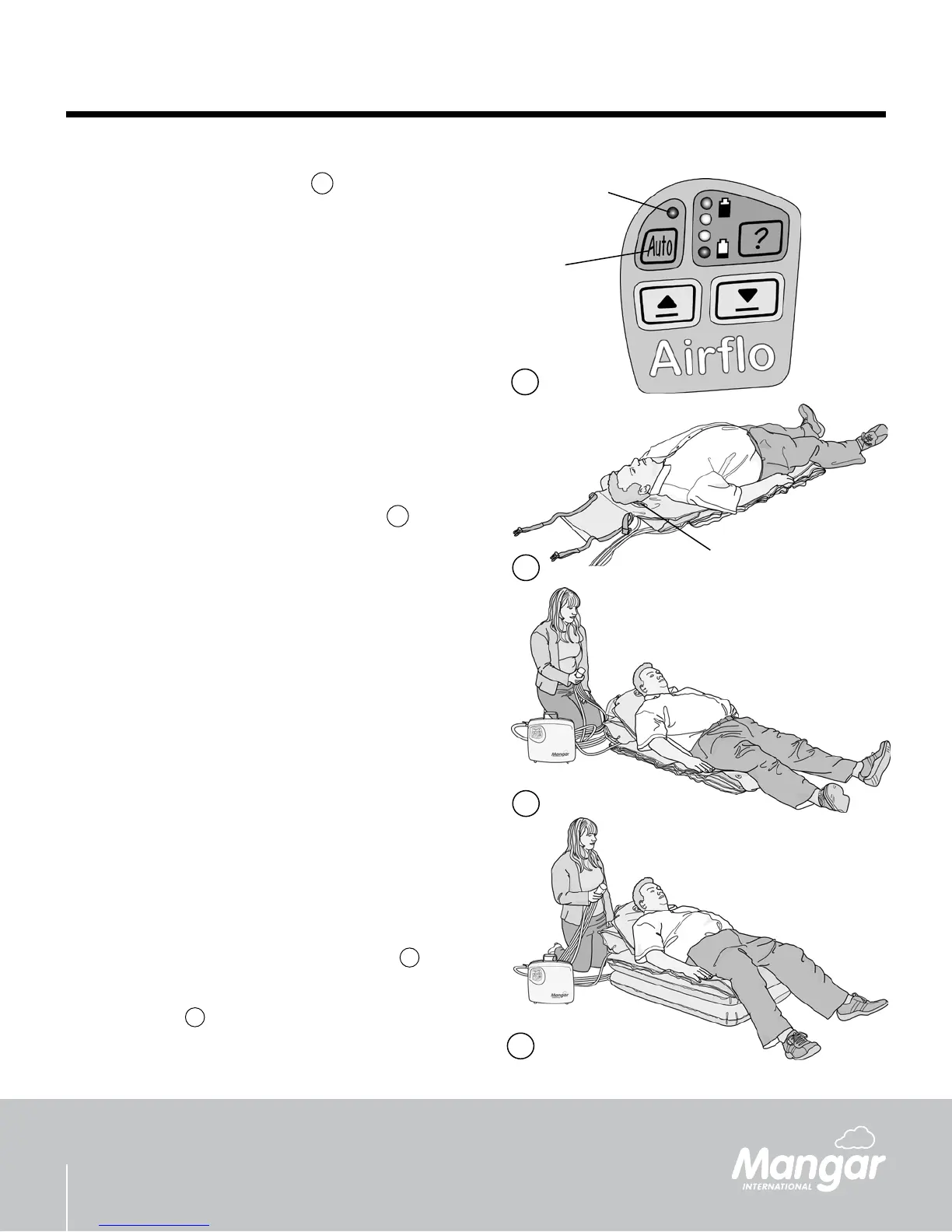
Positioning the patient on the CAMEL - g.
5
Position the CAMEL at the side of the patient so •
that the patient’s head is level with the CAMEL
badge (A).
Transfer the patient onto the CAMEL. The head •
should lie on the CAMEL badge (A) and the body
should lie centrally.
Using the CAMEL
The following instructions apply equally when the
CAMEL is being operated by a person raising
themselves without assistance, or by an assistant
raising a patient.
WARNING: If the slide sheet has been used to
transfer the patient onto the CAMEL it must be
removed from under the patient before commencing
a lift.
Press the number 1 button on the CAMEL Hand •
Control to partially inate the backrest section until
the patient is in a comfortable position - g.
6
Press the number 2 button to inate the bottom •
section - g.
7
until it becomes rigid.
A
5
Airo ‘Auto’ Control Button - g.
The ‘Auto’ function must be selected in order to operate
the CAMEL Hand Control. When selected, the Airo
will work automatically when the CAMEL Hand Control
buttons are pressed.
To switch the ‘Auto’ function • on, press and hold
the button (A) for a few seconds until the LED (B)
lights up.
To switch the ‘Auto’ function • off, Press any of the
Airo buttons.
WARNING: Pressing any of the Airo buttons will
cancel the ‘Auto’ function and the hand control will not
work.
4
B
A
4
6
7


 To Next Page