USER’S MANUAL
18
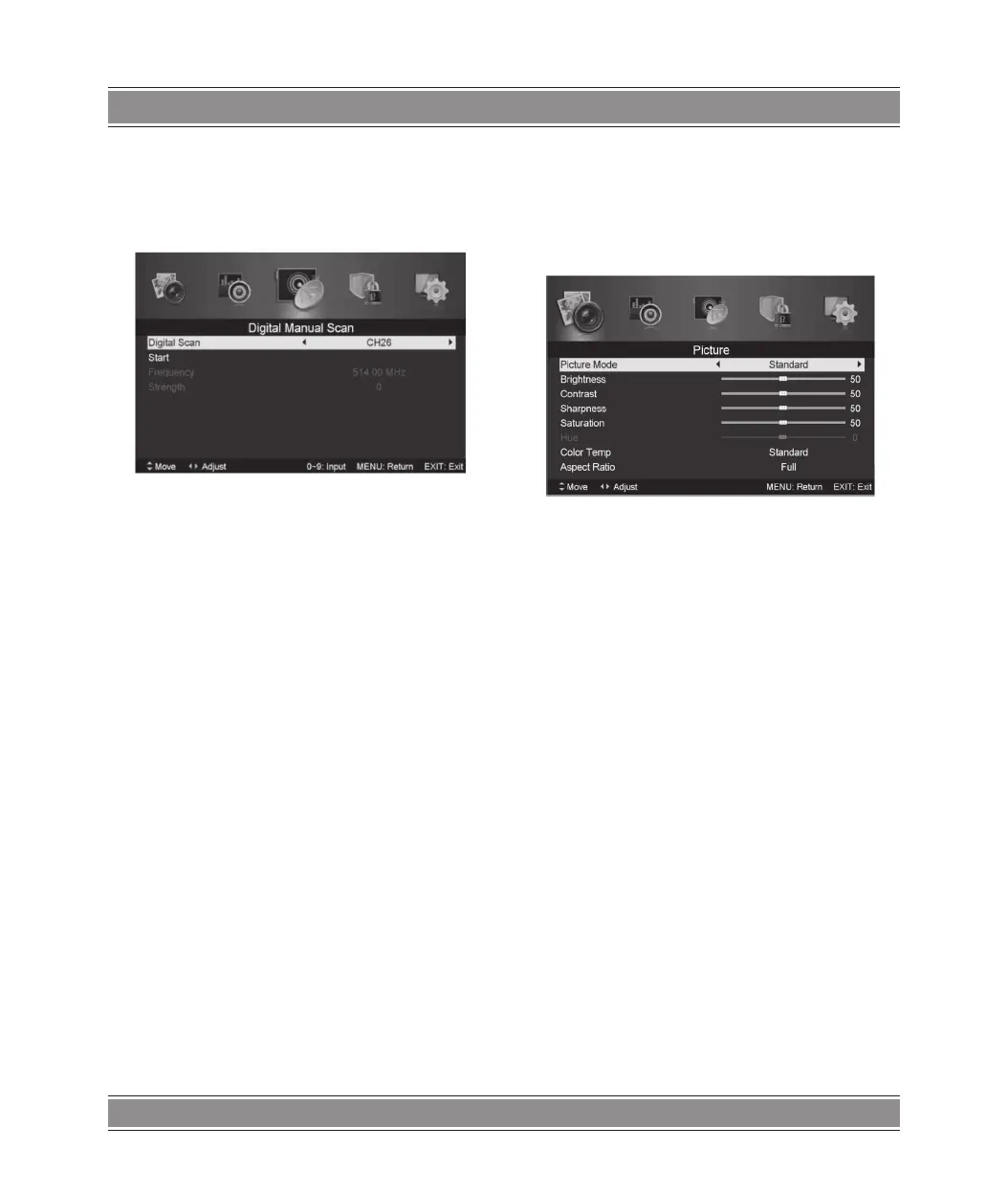
3.Digital Manual Tuning
Press / button to select “Diigital Manual Scan” and press
the button to start.
Press “MENU” button to return the previous menu.
Press “EXIT” button to exit the menu.
4.Channel Edit
Press / button to select “Channel Edit” and press the
“ENTER” button to enter.
a. DELETE
Press / button to select the program and press “RED”
button once to delete the program.
b. RENAME
Press / , button to select the program and press “GREEN”
button to rename the program. Press / , button to select the
item which you want to change and press the / ,button to
select the dierent item . Press “ENTER” button to confirm.
NOTE:
RENAME only use in ATV.
b. MOVE
Press / ,button to select the channel and press the “YEL-
LOW” button to move . Then press the / ,button to select
the channel with which you want to move. Press “YELLOW”
button again to confirm.
c. SKIP
Press / ,button to select the channel which you want to
skip and press the “BLUE” button to skip . Press “BLUE” button
again to cancel the setting.
5. Signal information (only
use in DTV)
Press / ,button to select “Signal information” and press
the “ENTER” button . Press “MENU” button to return the previous
menu. Press “EXIT” button to exit the menu.
Picture
You can select the type of picture, which best corresponds
to your viewing.
Press the “MENU” button to enter the OSD menu. Then press
/ , button to select the “PICTURE” menu. Press / button
to select “Picture Mode” and press the / ,button to select.
1. Pressk / button to select “Brightness” and press the
/ button to enter brightness adjustment menu to adjust
brightness.
2. Press / , button to select “Contrast” and press the /
button to enter contrast adjustment menu to adjust contrast.
3. Press / button to select “Sharpness” and press the
/ button to enter sharpness adjustment menu to adjust
sharpness.
4. Press / button to select “Saturation” and press the
/ button to enter Saturation adjustment menu to adjust
saturation.
5. Press / button to select “Hue’’ and press the /
button to enter hue adjustment menu to adjust hue.
6. Press / button to select “Sharpness” and press the
/ button to enter sharpness adjustment menu to adjust
sharpness.
7. Press / button to select “Color Temp” and press the
/ button to select mode Standard/Cool/Warm..
8. Press / button to select “Aspect Ratio” and press the
/ button to select.
Press / button to select “Advanced Settings” and press
the button to enter Advanced Settings adjustment menu
to adjust.
Sound
You can select the type of sound, which best corresponds
to your listening.
Press the “MENU” button to enter the OSD menu. Then press
/ button to select the “SOUND” menu.



 To Next Page