7
PRZYCISKI FUNKCYJNE
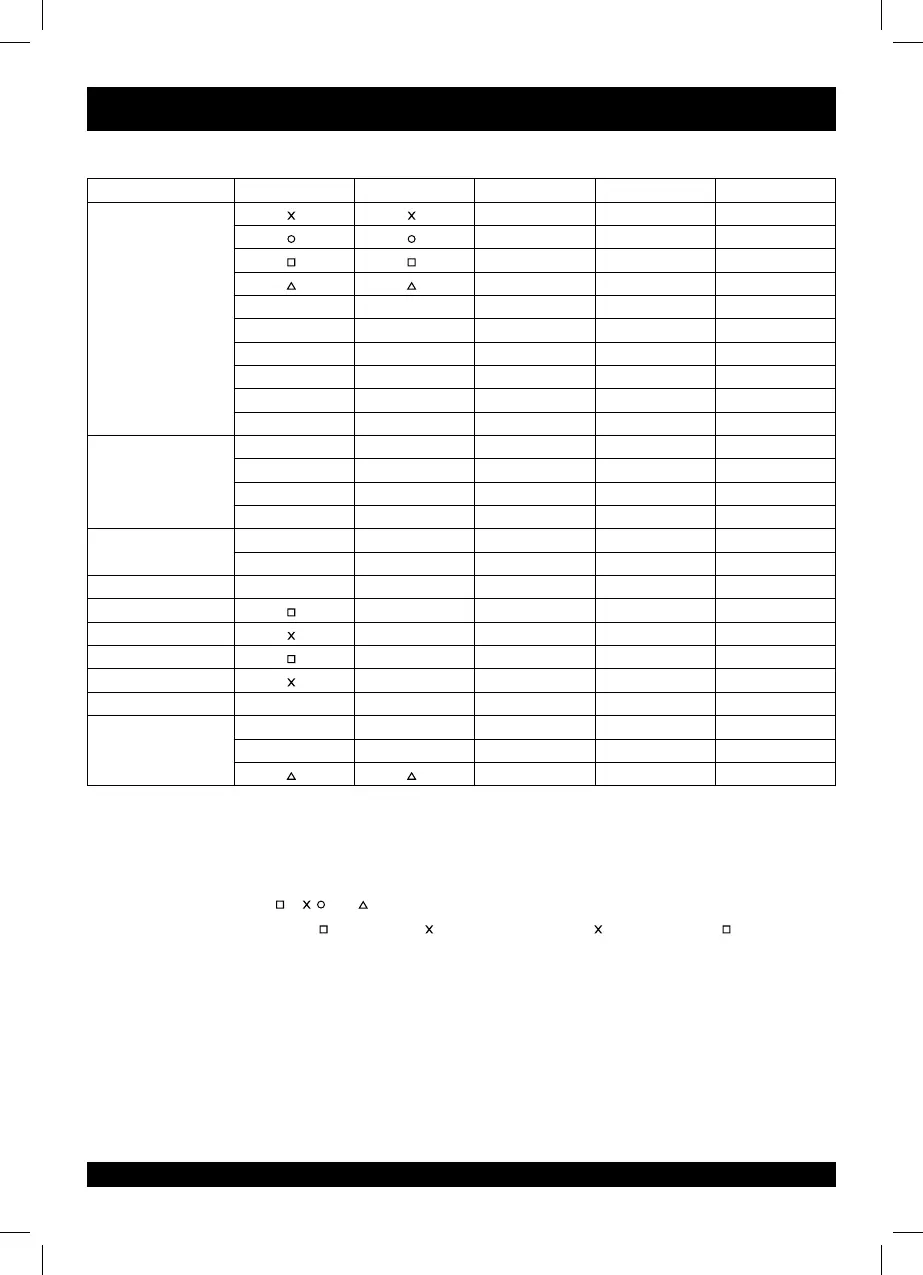
MODE PS3 PS4 XBOX ONE PC(X-INPUT) PC(D-INPUT)
ACTION KEY
A A 2
B B 3
X X 1
Y Y 4
R1 R1 RB RB 6
L1 L1 LB LB 5
R2 R2 RT RT 8
L2 L2 LT LT 7
R3 R3 SR SR 12
L3 L3 SL SL 11
DPAD
UP UP UP UP UP
DOWN DOWN DOWN DOWN DOWN
LEFT LEFT LEFT LEFT LEF T
RIGHT RIGHT RIGHT RIGHT RIGHT
FUNCTION KEY
START OPTIONS Menu Menu 10
SELECT SHARE View View 9
DIRECTION LX LX
←/→ ←/→ ←/→
LWING L2 LT LT 1
RWING R2 RT RT 2
LPEDAL L2 LT LT 1
RPEDAL R2 RT RT 2
MODE BUTTON HOME HOME X-Guide X-Guide 13
GEAR SHIFT
L2 L1 LB LB 7
R2 R1 RB RB 8
Y Y 4
FUNCTION INTRODUCTION
INTRODUCTION
1. Program source button: /1/ , /3/B, /4/Y, X/2/A, L1/5/LB, L2/7/LT, R1/6/RB, R2/8/RT.
2. Programmable button: L-wing ( /1/LT), R-wing ( /2/RT), Foot Accelerator ( /2/RT), Foot Brake( /1/LT),
L3/11/SL, R3/12/SR, Gear-shift (L2/7/LB, R2/8/RB).
PROGRAM SETUP
1. Press SHARE/9/VIEW + OPTIONS/10/MENU, hold for 3 seconds until the green LED is on.
2. Press the programmable button, and the green LED starts blinking.
3. Press program source button. The green LED is off. Program is set.



 To Next Page