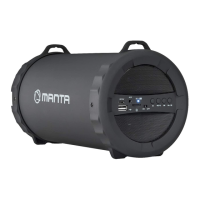
Need help?
Do you have a question about the Manta SPK5019 and is the answer not in the manual?
Ensures the power supply wire is not trampled or pressed by heavy objects.
Requires placement in a ventilated area with at least 10cm distance from walls.
Warns against dismantling the casing to prevent electric shock risk.
Instructs to cut power and unplug if unusual smell or smoke is detected.
States the set operates on AC100-240V/50-60Hz power supply.
Prohibits placing liquid-filled items on the unit to avoid damage.
Activates or deactivates the standby mode of the speaker.
Adjusts the main volume level of the speaker using +/- buttons.
Allows selection and adjustment within menu options using +/- buttons.
Temporarily silences the audio output of the speaker.
Controls previous and next track selection, also volume down/up.
Starts, stops, or resumes music playback.
Switches the audio source input for the speaker.
Enables or disables repeating the current track or playlist.
Shows information related to the speaker's status.
Button to switch between POWER, USB, LINE IN, BLUETOOTH, FM inputs.
Port for connecting a microphone signal.
Port for connecting a guitar signal.
Button used for navigating and selecting menu options.
Dial for adjusting the master volume level.
USB port for card input and 5V 1A charging.
Port for connecting an external audio line input.
LEDs indicating charging status (Red for charging, Green for full).
Interface for connecting the DC 13.5V power supply.
Buttons for selecting next and previous songs.
Instructions on how to power on the speaker using the standby button.
How to choose the audio source via panel or remote control.
Procedure to mute and unmute the speaker's sound.
Using the remote's VOL +/- buttons for volume adjustment.
Turning the unit's dial to decrease or increase volume.
Navigating menus and selecting options like EQ, volume, and light modes.
Enabling or disabling the repeat function for current track.
Selecting specific songs from a playlist using PREV/NEXT.
Details on using the USB port to charge mobile phones (5V 1A).
Instructions for entering radio mode and performing automatic scan.
Steps to connect the device via Bluetooth and select 'SPK5019'.
Lists functions accessible via the 'Discolor DJ' app.
Guides on connecting to the speaker via the app's Bluetooth interface.
How to select songs, play, pause, and control playback via the app.
Adjusting speaker light colors, brightness, and flash modes through the app.
Instructions for playing music from a USB card using the app.
Using the app for volume, microphone, guitar settings, and EQ presets.
Managing audio input via Line-In and muting music.
Operating the FM radio mode, including automatic and manual scan.
Information on responsible disposal and recycling within the EU.
Notes on potential changes in design, parameters, and manual accuracy.
 General
| Purpose | Portable |
|---|---|
| Karaoke modes | - |
| Product color | Black |
| Built-in camera | No |
| Built-in disco light | Yes |
| Volume control | Rotary |
| RMS rated power | 30 W |
| Number of built-in speakers | 2 |
| Microphone connectivity | Wired |
| Number of microphones supported (max) | 1 |
| USB version | 2.0 |
| Display type | LED |
| Battery type | Integrated |
| Power source type | Battery |
| AC adapter frequency | 50/60 Hz |
| AC adapter input voltage | 220 - 240 V |
| Control type | Buttons, Rotary |
 Weight and Dimensions
| Depth | 235 mm |
|---|---|
| Width | 520 mm |
| Height | 215 mm |
| Weight | 5000 g |

 To Next Page