o
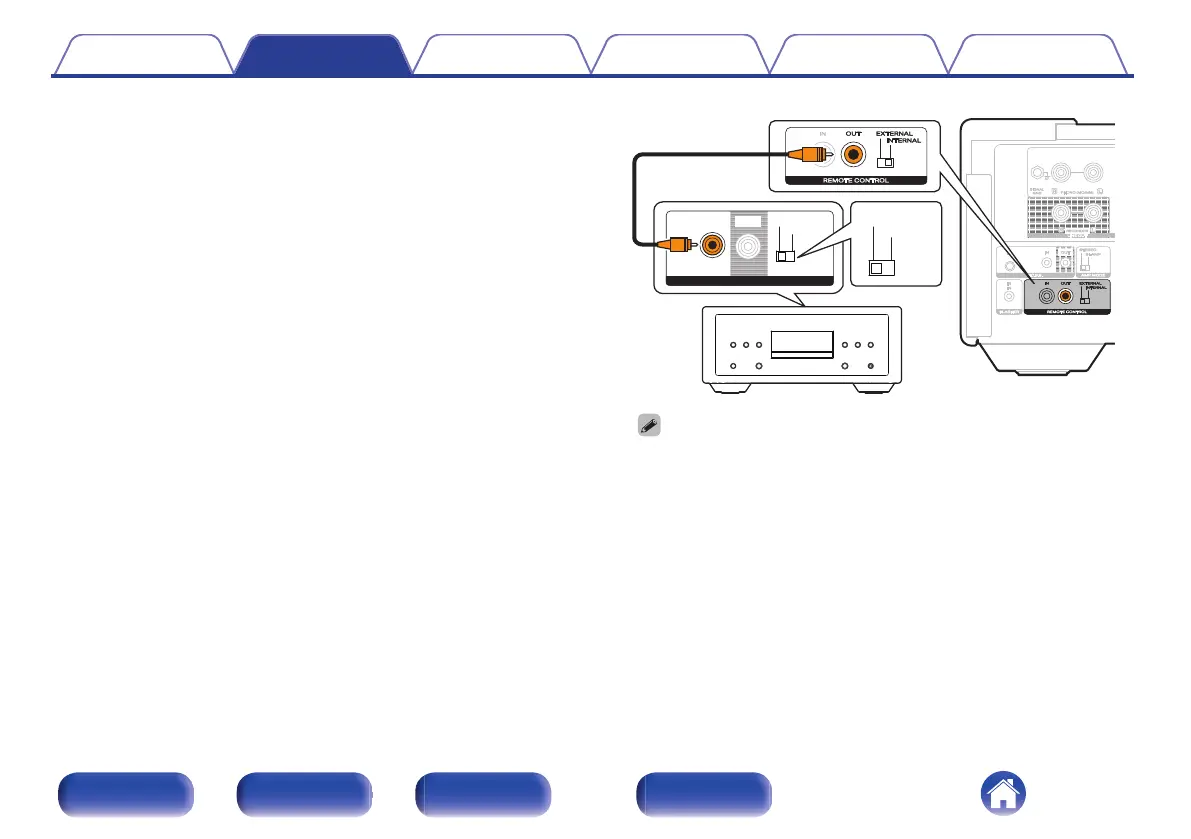
Remotely connecting Marantz LINK 10n and
SACD 10
If you connect the unit to the REMOTE CONTROL IN/OUT connectors
using the remote connection cable provided with the Marantz audio
unit, you can turn on the power or the standby mode of the LINK 10n
and SACD 10 in conjunction with the operation of the unit.
Set the EXTERNAL/INTERNAL switch on the rear panel of this unit
and the connected device as follows.
0
Turn this unit’s EXTERNAL/INTERNAL switch to “INTERNAL”.
0
Turn the EXTERNAL/INTERNAL switch of the connected device to
“EXTERNAL”.
ININ EXTERNALEXTERNAL
INTERNALINTERNAL
OUTOUT
REMOTE CONTROLREMOTE CONTROL
EXTERNALEXTERNAL
INTERNALINTERNAL
0
To operate the unit, point the remote control at the remote sensor of this unit.
0
To use this unit by itself without connecting a Marantz audio device, turn the
switch to “INTERNAL”.
Contents Connections Playback Settings Tips Appendix
37
Front/Top
panel
Rear panel
Remote control
unit
Index



 To Next Page