5
NAMES AND
FUNCTIONS
BASIC
CONNECTIONS
BASIC
OPERATIONS
ADVANCED
CONNECTIONS
ADVANCED
OPERATIONS
TROUBLESHOOTING
OTHERS
NAMES AND
FUNCTIONS
ENGLISH
REMOTE CONTROLLER
z
c
v
n
.⁄1
⁄6
⁄9
⁄7
⁄8
⁄2
⁄3
⁄4
⁄5
⁄0
m
,
b
x
NAMES AND FUNCTIONS
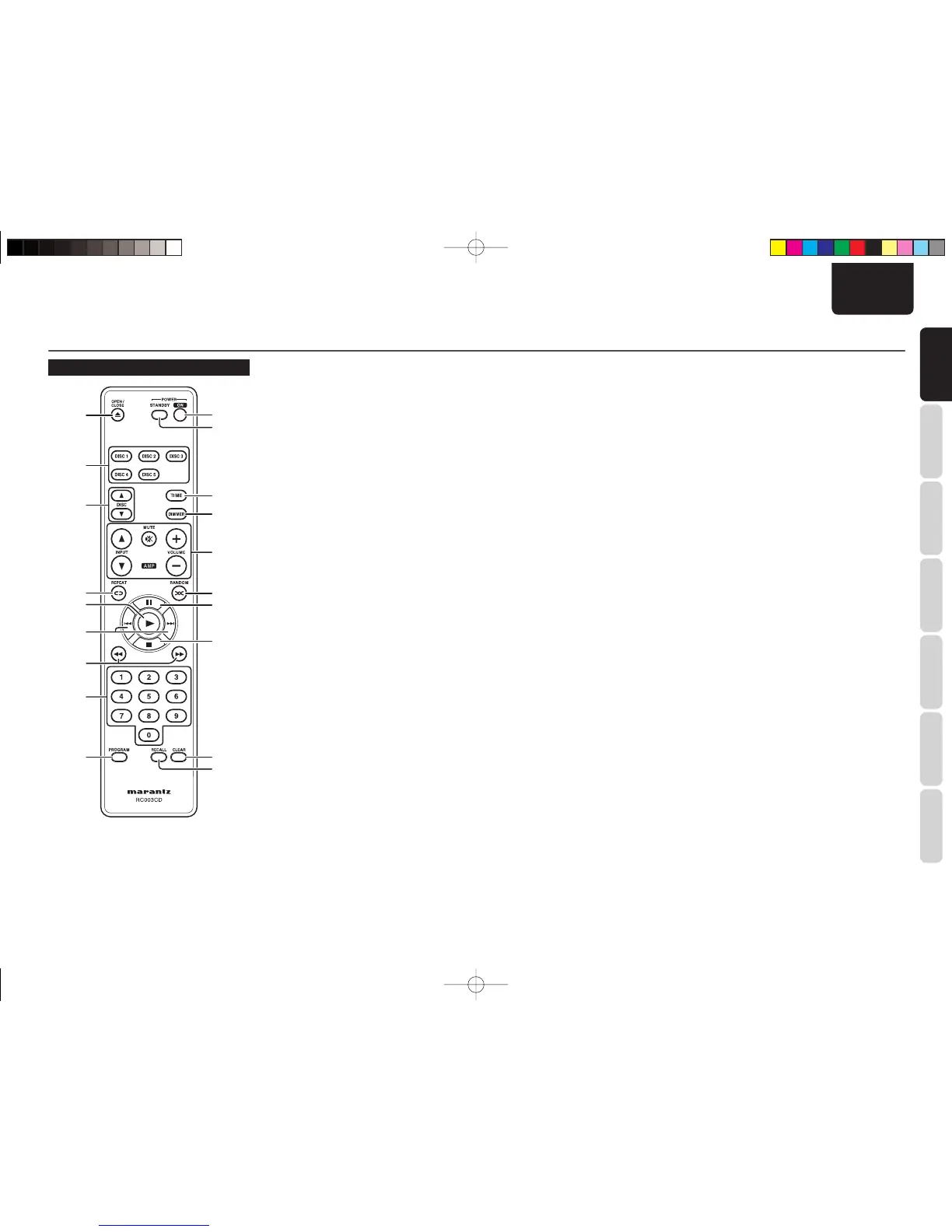
z ON button
When this button is pressed while the unit is in
standby status, the power of the unit is turned on.
(See page 7)
x STANDBY button
When this button is pressed while the power is on,
the unit goes into the standby status.
c TIME button
This button is used to switch the time display.
(See page 9)
v DIMMER button
This button is used to adjust the brightness of the
display window. (See page 11)
b +, – (VOLUME) button
5, ∞ (INPUT) button
MUTE button
These are used to operate the corresponding
functions of a Marantz integrated amplifier. For
each function, refer to User Guide supplied with the
Integrated Amplifi er.
n RANDOM button
Playback tracks randomly. (See page 10)
m 8 button
See page 7.
, 7 button
See page 7.
. CLEAR button
This is used to cancel the programmed tracks.
(See page 11)
⁄0 RECALL button
Use this button to check the programmed tracks
while programming or stopped programming.
(See page 11)
⁄1 PROGRAM button
This button is for program play. (See page 10)
⁄2 Numeric buttons
See page 8.
⁄3 1, ¡ buttons
See page 8.
⁄4 4, ¢ buttons
See page 8.
⁄5 3 button
See page 7.
⁄6 REPEAT button
Playback a track or disc repeatedly. (See page 9)
⁄7 DISC 3, 4 button
When multiple discs are placed on the tray, the tray
can be rotated and a disc to be played can be chosen
by pressing one of these buttons. (See page 7)
⁄8 DISC1-DISC5 button
Choose a disc to play. (See page 8, 10)
⁄9 0 button
See page 7.
CC4003U01Eng.indd5CC4003U01Eng.indd5 09.8.244:08:49PM09.8.244:08:49PM


 To Next Page