13
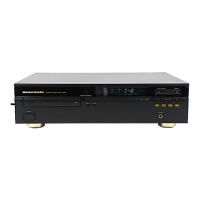
r Select the “CD 50n” format.
• It is normally recommended to set the format to “2 ch 32-bit
Integer 384.0 kHz”.
CD 50n
CD 50n
r
t Quit Audio MIDI Setup.
System requirements: macOS 12 or 13
q Move the cursor to “Go” on the computer screen, and then
click “Utilities”.
• The utility list is displayed.
w Double-click “Audio MIDI Setup”.
• The “Audio Devices” window is displayed.
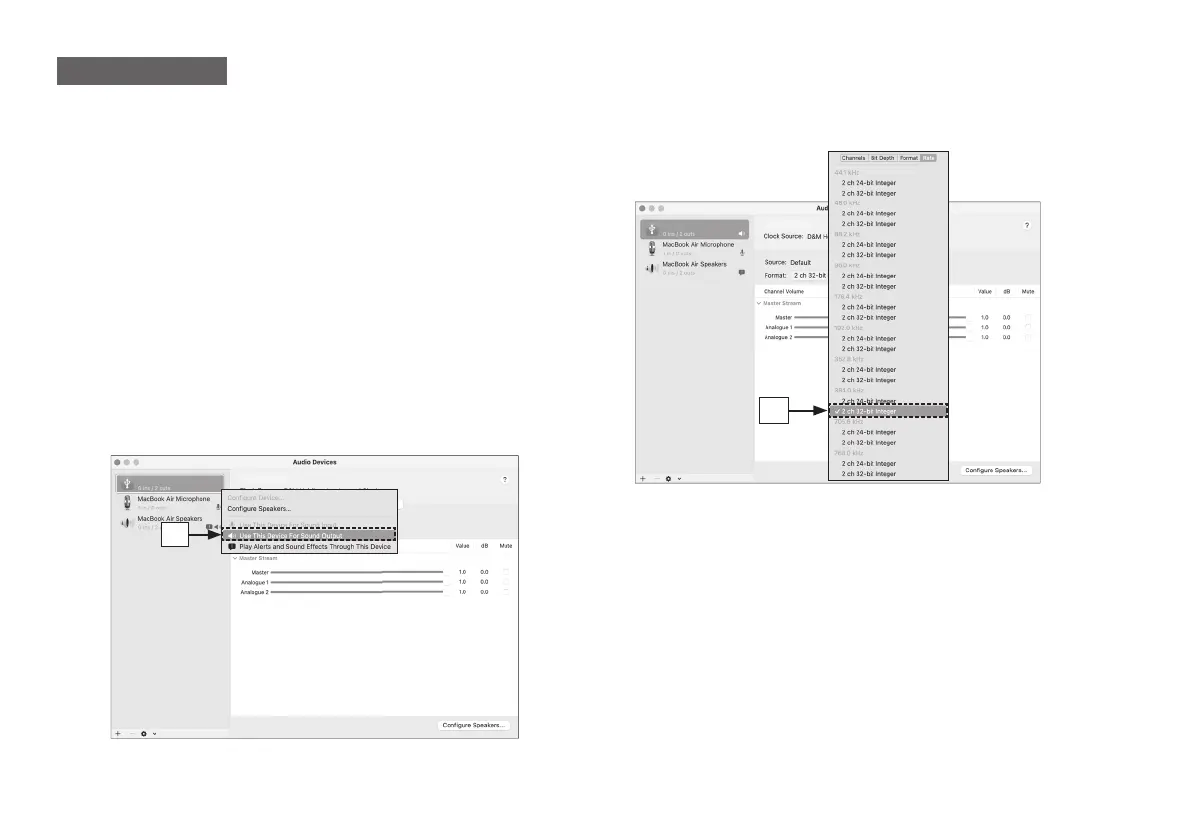
e Secondary click on “CD 50n”, and then check that “Use This
Device For Sound Output” is checked.
• If a di erent device is checked, select and secondary click on
“CD 50n”, and then select “Use This Device For Sound Output”.
macOS
CD 50n
CD 50n
e
1.CD50nU_QSG_ENG_10A_231122.indd 131.CD50nU_QSG_ENG_10A_231122.indd 13 2023/11/30 10:12:322023/11/30 10:12:32



 To Next Page