3
Setup
NOTE
The antennas are required for both Bluetooth and Wi-Fi functions.
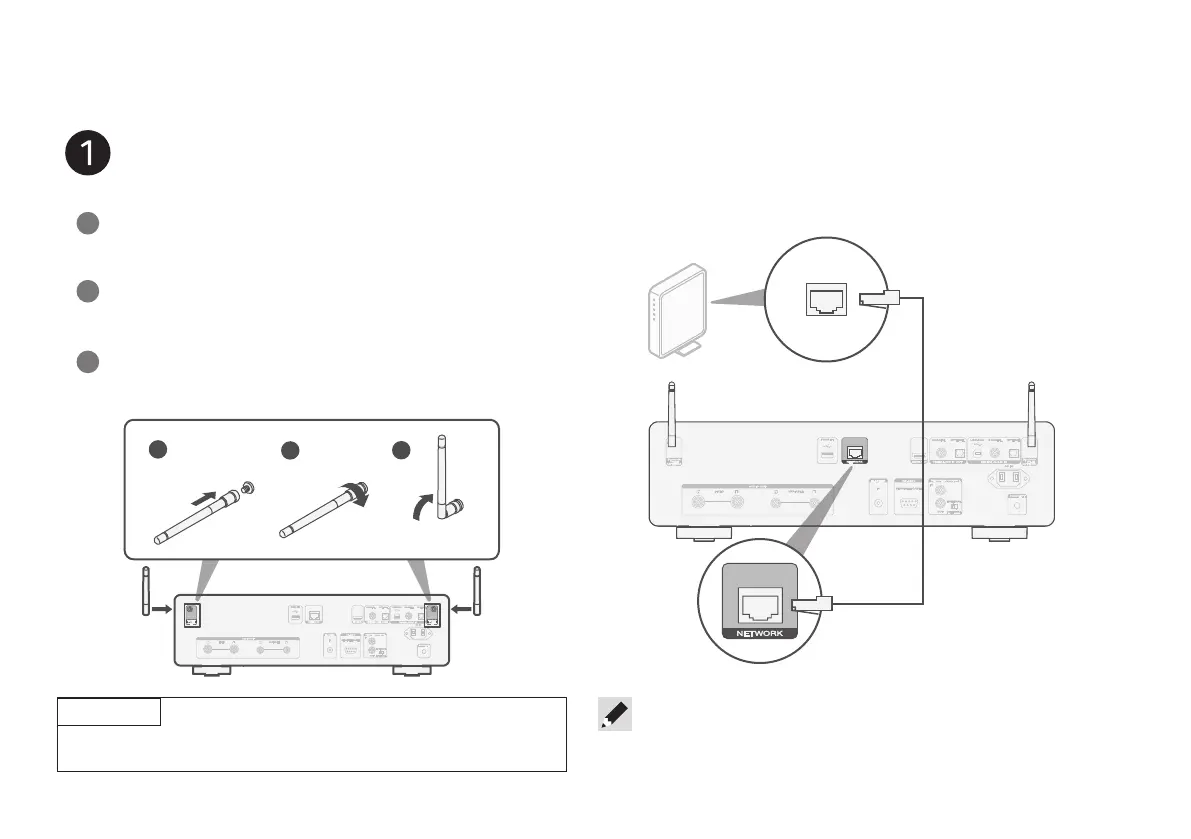
Connect the antennas
Place the antenna evenly over the antenna terminal
located at the upper left or right corner of the rear panel.
1
Turn the antenna clockwise until it is fully connected.
Do not over tighten.
2
Rotate the antenna upwards for the best possible
reception.
3
1
2
3
Optional
If you are connecting CD 50n to a wired network, connect an
Ethernet cable (not included) between the player and your router.
Do not connect the Ethernet cable if you are connecting the player
to a wireless network.
• In step 6 we will guide you how to connect to a wireless network.
1.CD50nU_QSG_ENG_10A_231122.indd 31.CD50nU_QSG_ENG_10A_231122.indd 3 2023/11/30 10:12:302023/11/30 10:12:30



 To Next Page