7
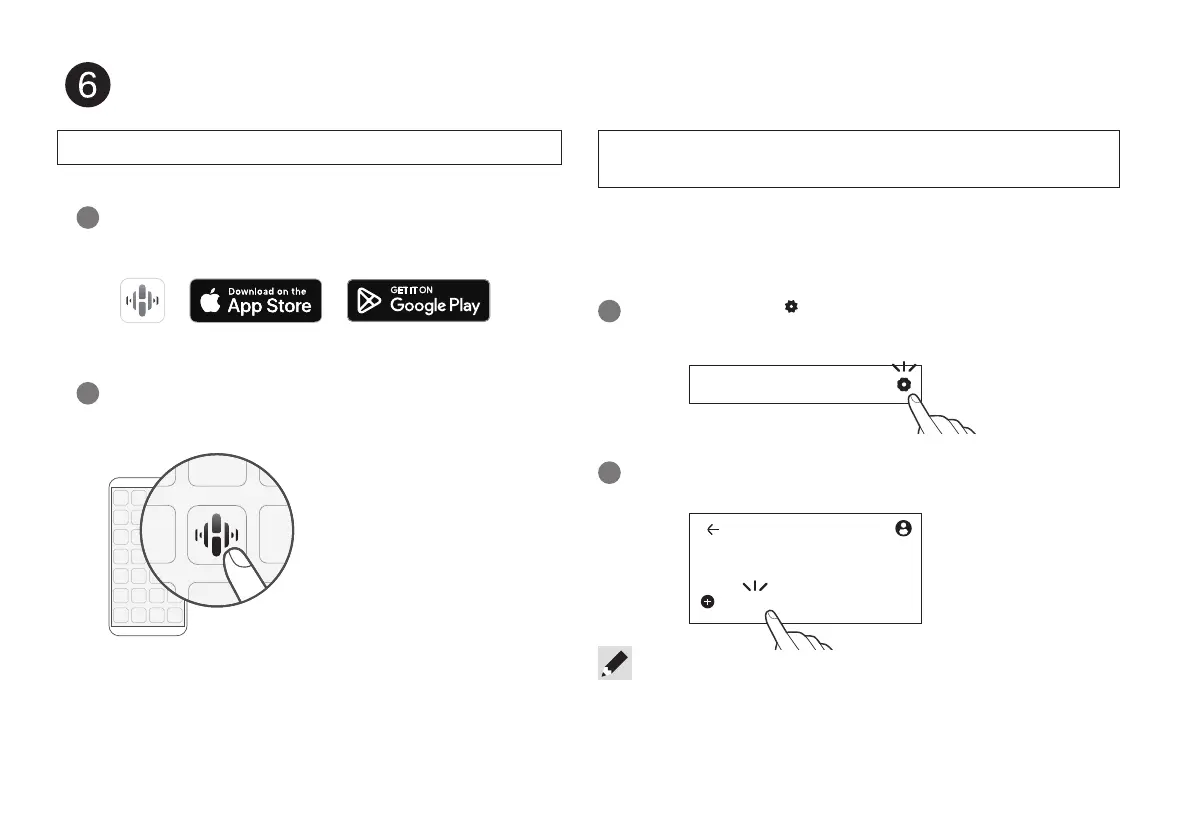
Use the HEOS app to complete CD 50n setup
Go to the Apple App Store, Google Play or Amazon App
Store and search for “HEOS” to download and install.
1
Launch the HEOS app and follow the instructions
in the app.
2
If you already have the HEOS app and have setup at least one HEOS
built-in device, please follow the steps below to add the CD 50n to
your wireless network.
Select the Settings
icon in the upper-right corner of the
main “Home” menu to display the Settings menu.
1
Select “Add Device” from the HEOS app’s Settings menu and
follow the instructions:
2
• You will need to use the CONNECT button on the rear panel of this unit when
connecting this unit to a wireless LAN network. Place this unit in a position where
the CONNECT button is within reach until the network con guration is complete. If
you cannot reach the CONNECT button, you can also use the HEOS button on the
remote control. Instead of the CONNECT button, press and hold the HEOS button
for at least 2 seconds.
First time setting up HEOS Built-in device
I have setup at least one HEOS built-in device on
my network
Home
Add Device
Home
Settings
1.CD50nU_QSG_ENG_10A_231122.indd 71.CD50nU_QSG_ENG_10A_231122.indd 7 2023/11/30 10:12:312023/11/30 10:12:31



 To Next Page