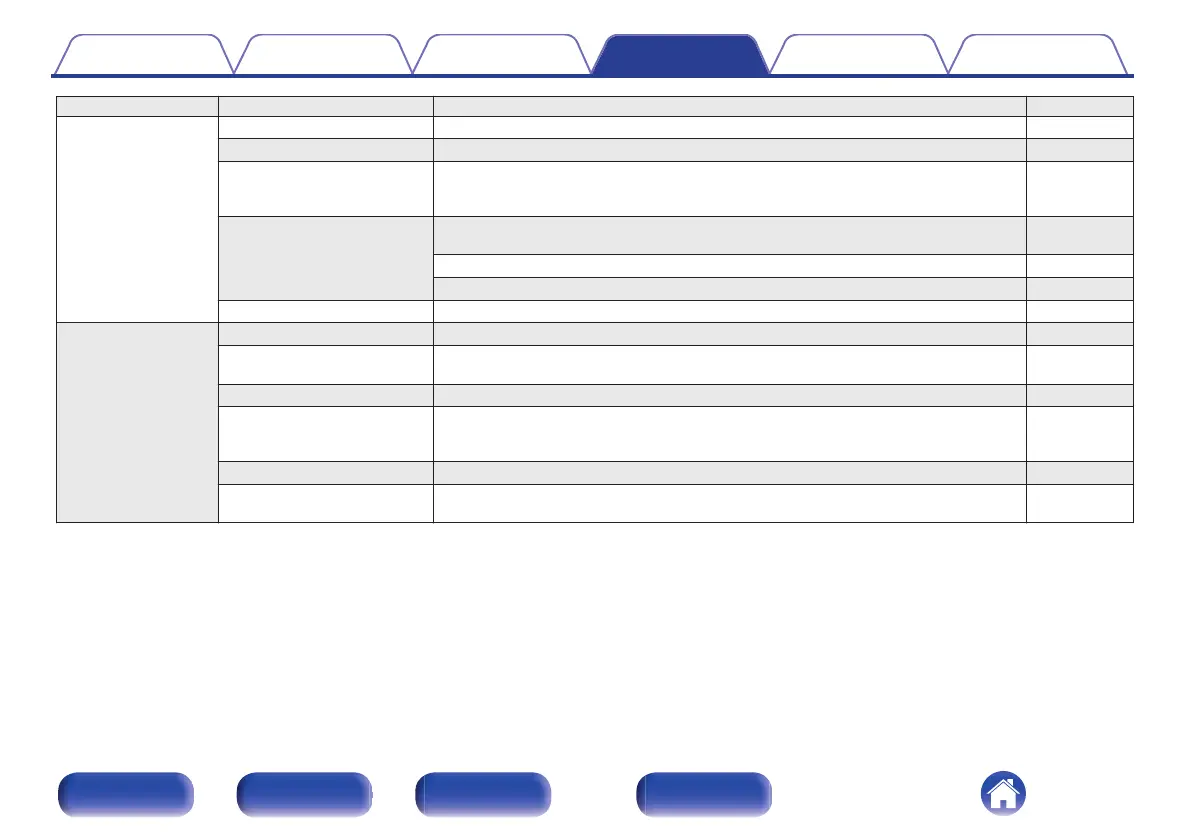
Setting items Detailed items Description/Detailed items Page
General Language Sets the language for display the menu. 103
Auto-Standby Sets the unit power to standby when the unit is not in use. 103
Power Sync Sets the “Power Sync” function, which links the powering on of Marantz amplifiers
connected to this unit to the powering on of this unit, turning them on when power
on operations are performed on this unit.
104
Information Displays notifications. Also, sets whether or not to display the notification when the
power is turned on.
104
Notification Alerts 104
Check for Notifications 104
Reset Various settings are reset to the factory default values. 104
Network Network Information Displays various information about the network. 105
Network & USB-A The network and USB flash drive playback (USB-A) functions can be stopped to
prevent noise that affects the sound quality.
105
Wi-Fi The Wi-Fi function can be stopped to prevent noise that affects the sound quality. 105
Bluetooth Stopping Bluetooth function reduces a source of noise that affects sound quality,
enabling higher sound quality playback. It also sets the Bluetooth transmitter
settings.
106
Network Control Performs the on/off settings for the network function when in standby mode. 107
AirPlay Setup Set this unit to WAC mode. Perform this setup when connecting to a network using
an iOS device.
107
Contents Connections Playback Settings Tips Appendix
92
Front panel Rear panel
Remote control
unit
Index



 To Next Page