12
Playing CDs
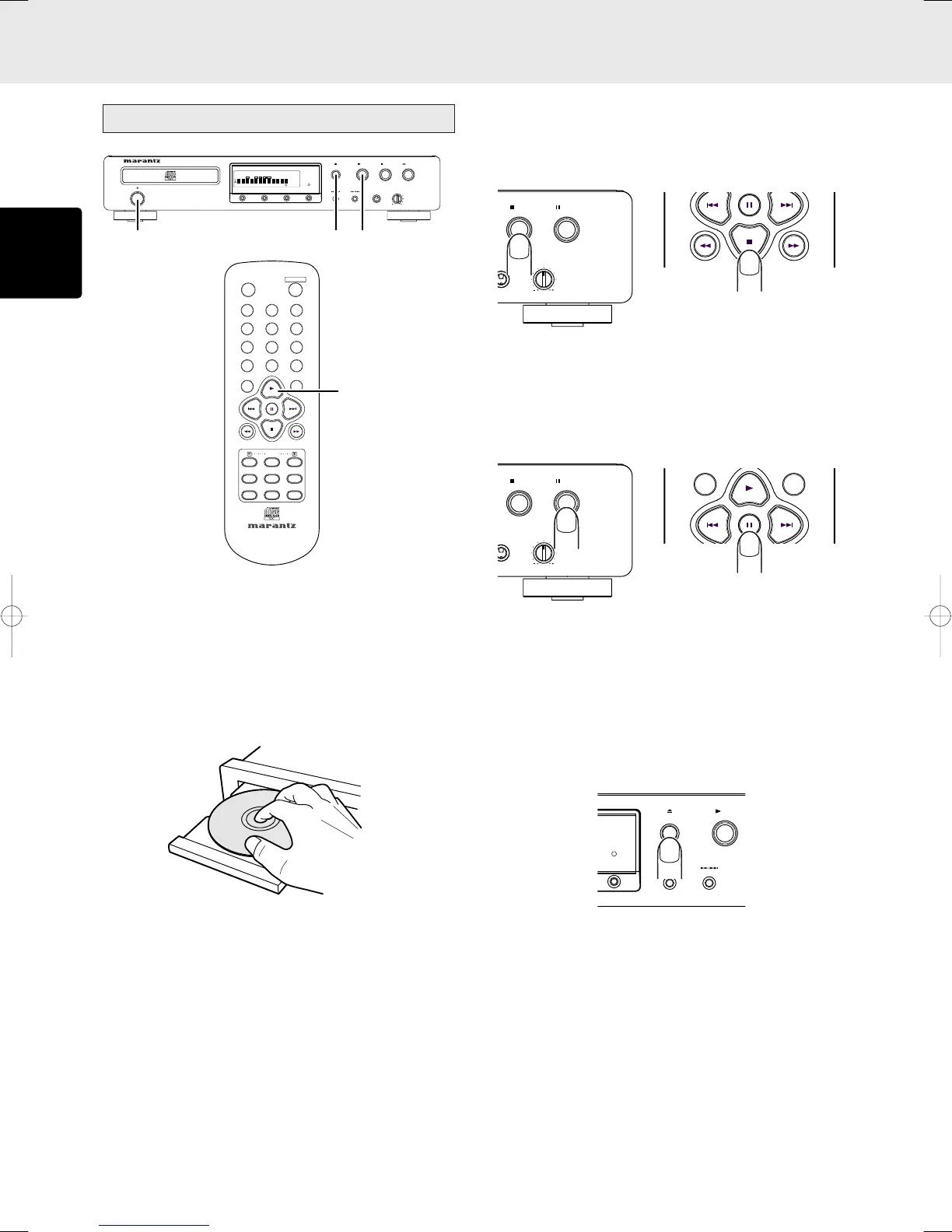
1. Turn on the power of the amplifier to which the player is
connected, and use the input selector on the amplifier to
select “CD” (the player’s input source which has been
connected).
2. Press the POWER button on the player to turn on the power.
3. Press the OPEN/CLOSE 0 button on the player. Place
the CD to be played in the extended disc tray while
ensuring that the label with the printed text is facing up.
In the case of a single (8 cm) CD, align it with the
indentation in the center of the tray.
4. Press the OPEN/CLOSE 0 button on the player to retract
the disc tray. Pushing the front of the disc tray lightly also
causes the tray to be retracted. Once the disc tray has
been retracted, “TOC Reading” appears on the display,
after which the total number of CD tracks and total
remaining time are displayed. In the case of a disc that
supports CD-TEXT, the album title is displayed, and then
the total number of CD tracks and total remaining time are
displayed.
5. Press the 3 button on the player or remote control unit to
start play. Adjust the volume level at the amplifier.
6. BASIC OPERATIONS
• Stopping play
Press the 7 button on the player or remote control unit during
play.
• Pausing play
During play, press the 8 button on the player or remote control
unit to temporarily suspend play.
To resume play from the place where it was temporarily
suspended, press the 3 button or 8 button on the player or
the 3 button or 8 button on the remote control unit.
• Removing the CD
After play has finished, press the OPEN/CLOSE 0 button on
the player to extend the disc tray, and remove the CD.
After the CD has been removed, press the OPEN/CLOSE 0
button again to retract the disc tray. The disc tray should
always be retracted when the player is not in use.
1
DISPLAY
POWER
RESET
SCROLL/
TIME
RECALL
TEXT
AMS A-B
REPEAT
PITCH
23
65
4
7
89
PROGRAM
0
CANCEL
RANDOM
QUICK REPLAY
REMOTE CONTROLLER
RC5400CD
CD PLAYER CD5400
POWER
ON/STANDBY
STANDBY
STOPPLAY
PAUSE
PHONES LEVEL
OPEN/CLOSE
TIME EDIT PEAK DISPLAY OFF
DISC
TTL
TRK
PEAK
TTL
TIME
RNDM
RROG
A
–
B RPT 1
PITCH
EDIT
TEXT
12 34 56 78 910 1112 13141516 1718 1920
2 3, 4 5
5
STOP
PAUSE
ONES LEVEL
STOP
PAUSE
ONES LEVEL
PLAY
OPEN/CLOSE
DISPLAY OFF
CD5400U(ENG1) 03.4.10, 3:49 PMPage 12 AdobePageMaker6.5J/PPC



 To Next Page