20
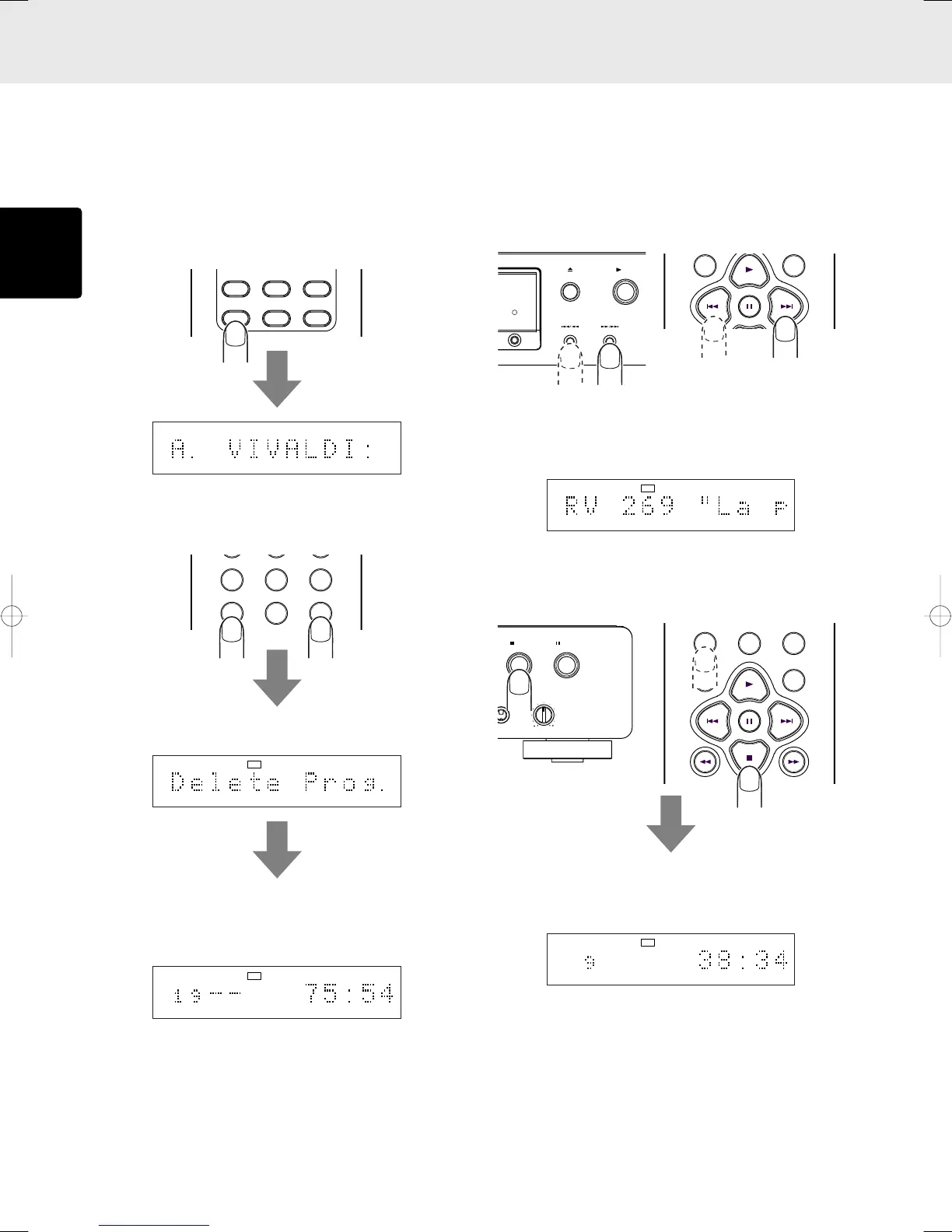
• Delete program play in the text display
mode
In the case of a CD-TEXT disc, the tracks that are not desired
can be selected by title for delete program play.
If the main display is set to the time display mode, press the
TEXT button on the remote control unit to establish the text
display mode.
1. During stop, press the PROGRAM button on the remote
control unit, and then press the CANCEL button.
“Delete Prog.” appears for an instant on the main display.
The total number of CD tracks and the album title appear
on the main display, the PROG indicator flashes, and the
delete program mode is established.
ADVANCED OPERATIONS
2. Press the 4 and ¢ buttons on the remote control unit
or 4/1 and ¡/¢ buttons on the player to select
the track which you do not want to hear. (The tracks can
also be selected using the numeric buttons on the remote
control unit but in this case the titles will not be displayed.)
The title of each selected track is scrolled, and once it
has been scrolled, it is deleted automatically. If you do
not want to delete the track, select another track before
the scrolling is completed.
3. Repeat step 2, and upon completion of the programming,
press the 7 button on the player or remote control unit or
press the PROGRAM button on the remote control unit.
The PROG indicator in the display stops flashing and lights
up instead, and the delete program is entered. Up to 30
tracks can be deleted from the program.
4. Press the 3 button on the player or remote control unit.
The CD is now played but with the deleted tracks skipped.
Note:
Delete programming in the text display mode cannot be
performed for tracks which have no text information for
their titles.
SCROLL/
TIME
RECALL
TEXT
AMS A-B
REPEAT
TEXT
12 34 56 78 910 1112 1314 1516 1718 19
TEXT
12 34 56 78 910 1112 1314 1516 1718 19
RROG
5
5
5
5
5
5
5
5
TEXT
12 34 56 78 910 1112 1314 1516 1718 19
TTL
TTL
TIME
RROG
5
5
5
5
5
5
5
5
PLAY
OPEN/CLOSE
DISPLAY OFF
TEXT
2 3 4 5 6 7 8 9 10 11 12 13 14 15 16 17 18 19
RROG
5
5
5
5
5
5
5
5
PROGRAM
0
CANCEL
RANDOM
QUICK REPLAY
TEXT
1357911131517
TTL
TTL
TIME
RROG
CD5400U(ENG2) 03.4.10, 3:51 PMPage 20 AdobePageMaker6.5J/PPC



 To Next Page