ENGLISH
2 – Front and rear panel—RC632CDR (remote control unit)
10
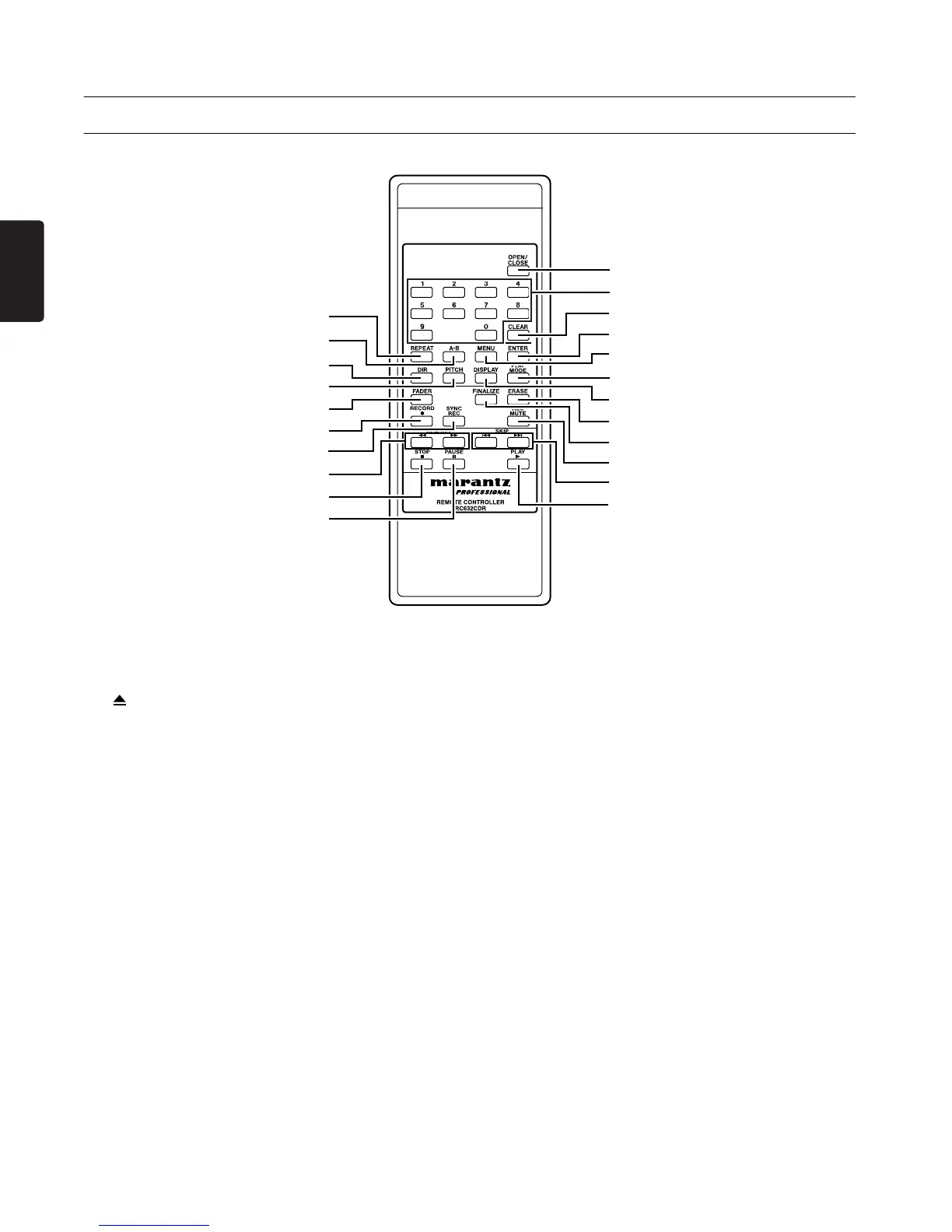
RC632CDR (remote control unit)
1 OPEN/CLOSE button
Performs the same function as the front panel
Open/Close button (
3).
2 0–9 buttons
Use these buttons to enter track numbers or to
make program playback settings.
3 CLEAR button
Cancels the number entered by the 0–9 buttons.
When programming, this button deletes the most
recently entered program.
4 REPEAT button
Performs the same function as the front panel
REPEAT button (
4).
5 A-B button
Use this button for A-B Repeat Playback opera-
tions
(
→
p.20).
6 MENU button
Performs the same function as the front panel
MENU button (
9).
7 ENTER button
Performs the same function as when the front
panel MULTI JOG dial (
A) is pressed.
8 DIR button
Switches MP3 file directory playback (→ p.23)
on/off.
9 PITCH button
Performs the same function as the front panel
PITCH button (
5).
0 DISPLAY button
Performs the same function as the front panel
DISPLAY button (
0).
A PLAY MODE button
Switches the Playback modes (→ p.17).
B FADER button
Performs the same function as the front panel
FADER/> button (
L).
C FINALIZE button
Performs the same function as the front panel
FINALIZE/INS button (
E).
4
5
8
B
E
H
J
9
1
3
7
6
A
0
2
D
C
F
G
I
L
K



 To Next Page