A
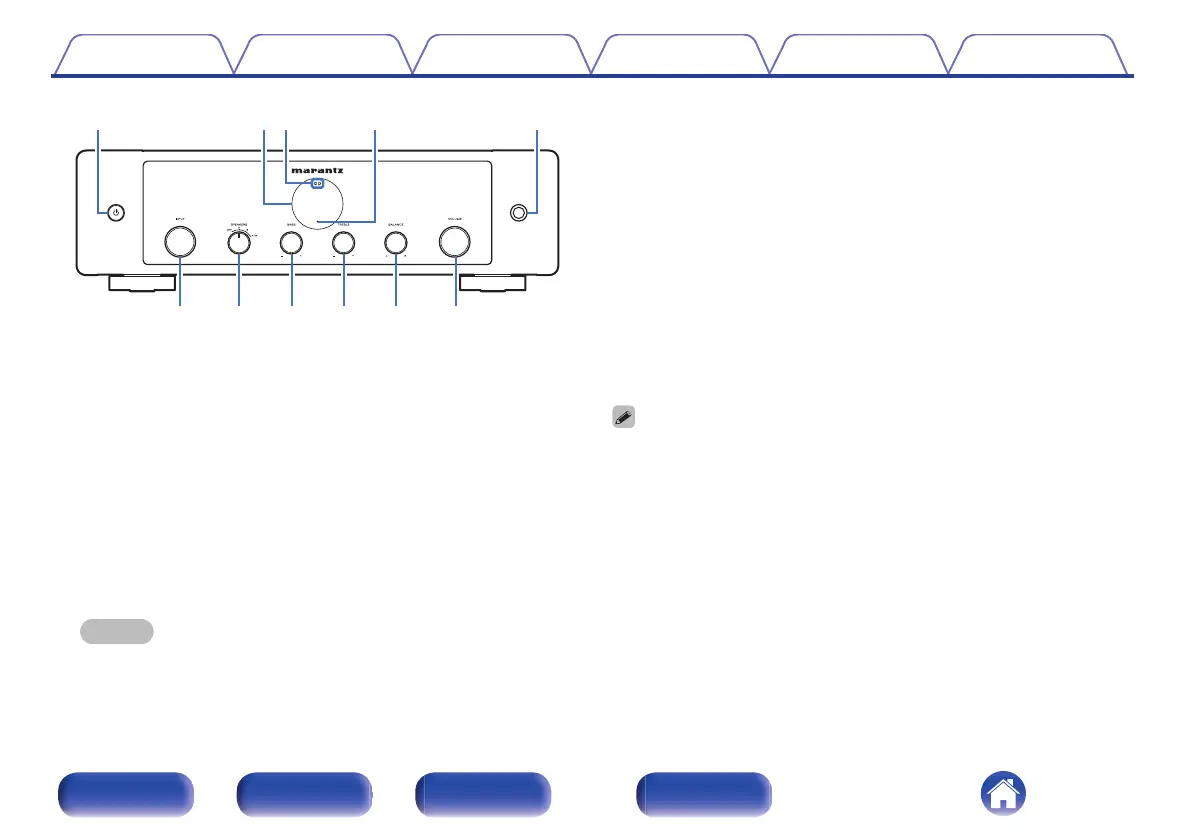
Power X button
This turns the power on/off (standby). (v p. 26)
B
Display
This displays various pieces of information.
C
Remote control sensor
This receives signals from the remote control unit. (v p. 5)
D
Protection circuit indicator
This blinks when the protection circuit has operated. (v p. 38)
E
Headphones jack
Used to connect headphones.
Turn the SPEAKERS selector knob on the main unit to turn off speaker
output when using headphones. (v p. 27)
NOTE
0
To prevent hearing loss, do not raise the volume level excessively when using
headphones.
F
INPUT selector knob
This selects the input source. (v p. 27)
G
SPEAKERS selector knob
This selects the speaker for audio output. (v p. 27)
H
BASS control knob
This setting adjusts the volume level for the bass. (v p. 28)
I
TREBLE control knob
This setting adjusts the volume level for the treble. (v p. 28)
J
BALANCE control knob
This adjusts the balance of the volume output from the left and right
speakers. (v p. 28)
K
VOLUME knob
This adjust the volume level. (v p. 27)
0
8, 9 and 0 can be adjusted when source direct mode is off. (v p. 28)
Contents Connections Playback Settings Tips Appendix
7
Front panel Rear panel
Remote control
unit
Index



 To Next Page