9
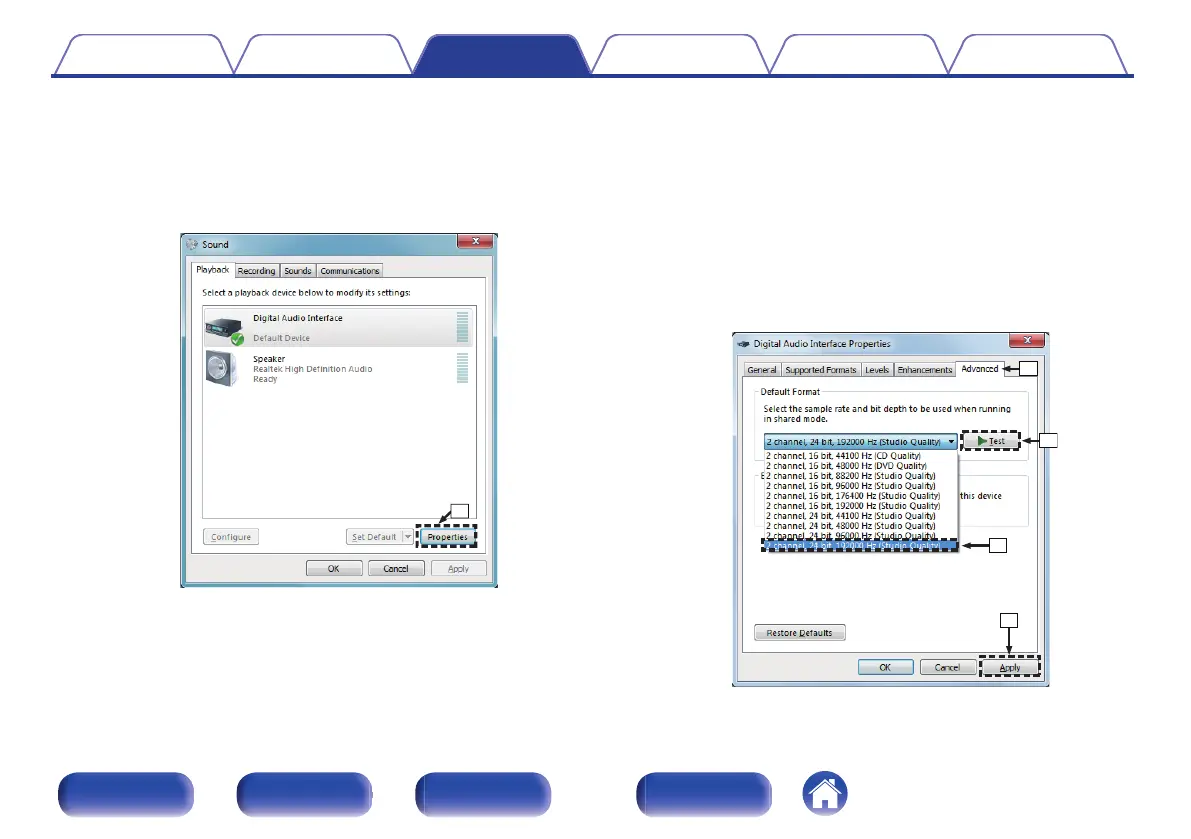
Checking audio output.
Outputs a TEST signal from the PC and checks the audio output
from the USB-DAC function.
A
Select “ND8006” and click “Properties”.
0
The ND8006 Properties window is displayed.
.
B
Click the “Advanced” tab.
C
Select the sampling rate and bit rate to be applied to the D/A
converter.
0
It is recommended that “2 channel, 24 bit, 192000 Hz (Studio
Quality)” is selected (Windows 7).
0
It is recommended that “2 channel, 32 bit, 192000 Hz (Studio
Quality)” is selected (Windows 8/Windows 8.1/Windows 10).
D
Click “Apply”.
E
Click “Test”.
0
Check that audio from this unit is output from the PC.
.
Contents
Connections Playback Settings Tips Appendix
67
Front panel Rear panel
Remote control
unit
Index


 To Next Page