o
Audio device settings (Mac OS only)
A
With the unit power off, connect the unit and Mac using a USB cable
(sold separately).
0
For the connection procedure, refer to the “Connecting a PC or Mac”
section. (v p. 24)
B
Press POWER X.
C
Press USB-DAC to switch the input source to “USB-DAC”.
D
Move the cursor to “Go” on the computer screen, and then click
“Utilities”.
0
The utility list is displayed.
E
Double-click “Audio MIDI Setup”.
0
The “Audio Devices” window is displayed.
F
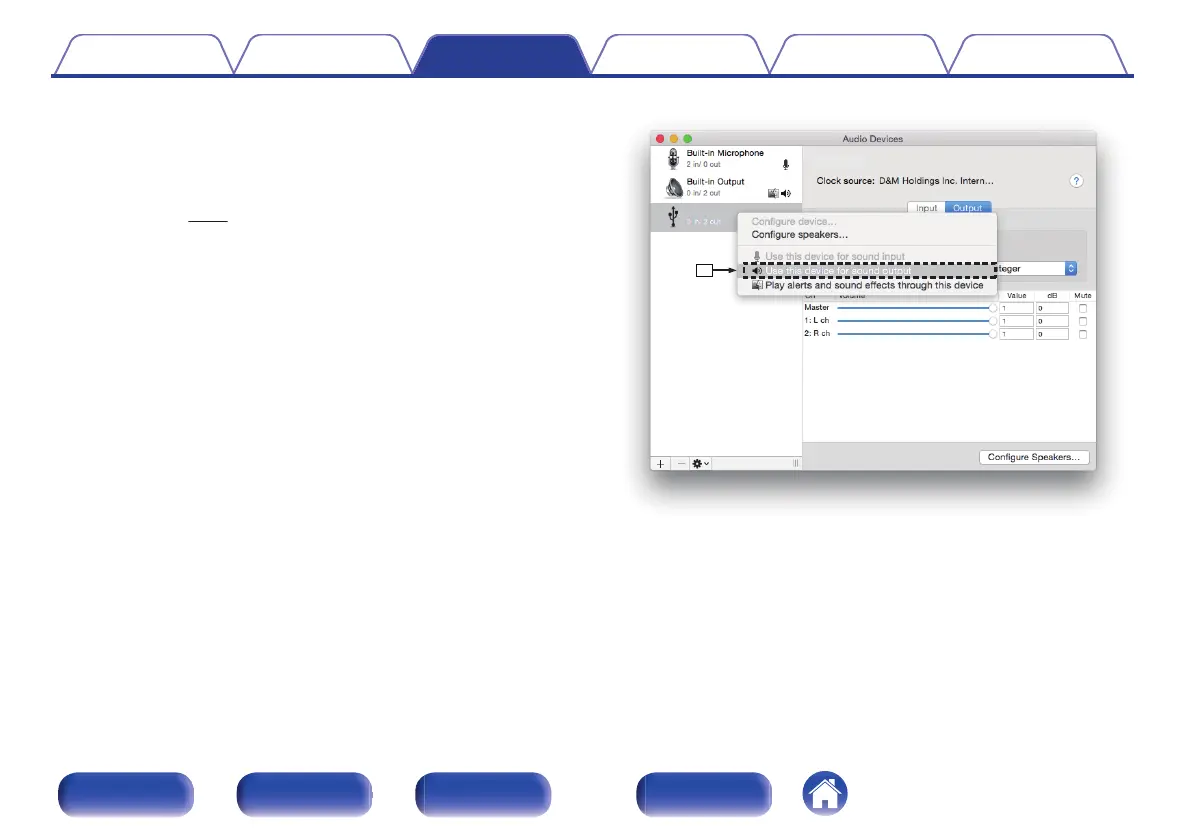
Check that “Use this device for sound output” is checked in “ND8006”.
0
If a different device is checked, select and “Secondary click” on
“ND8006”, and then select “Use this device for sound output”.
.
Contents
Connections Playback Settings Tips Appendix
69
Front panel Rear panel
Remote control
unit
Index


 To Next Page