7
5. DSP(QD01) FIRMWARE UPDATE PROCE-
DURE
Necessary Equipment
•
Windows PC((Windows20 or WindowsXP)
•
USB cable (USB 4Pin - mini USB 5pin)
•
CompactFlash (with format)
•
Update Disc (*PMD670CDR)
Connection
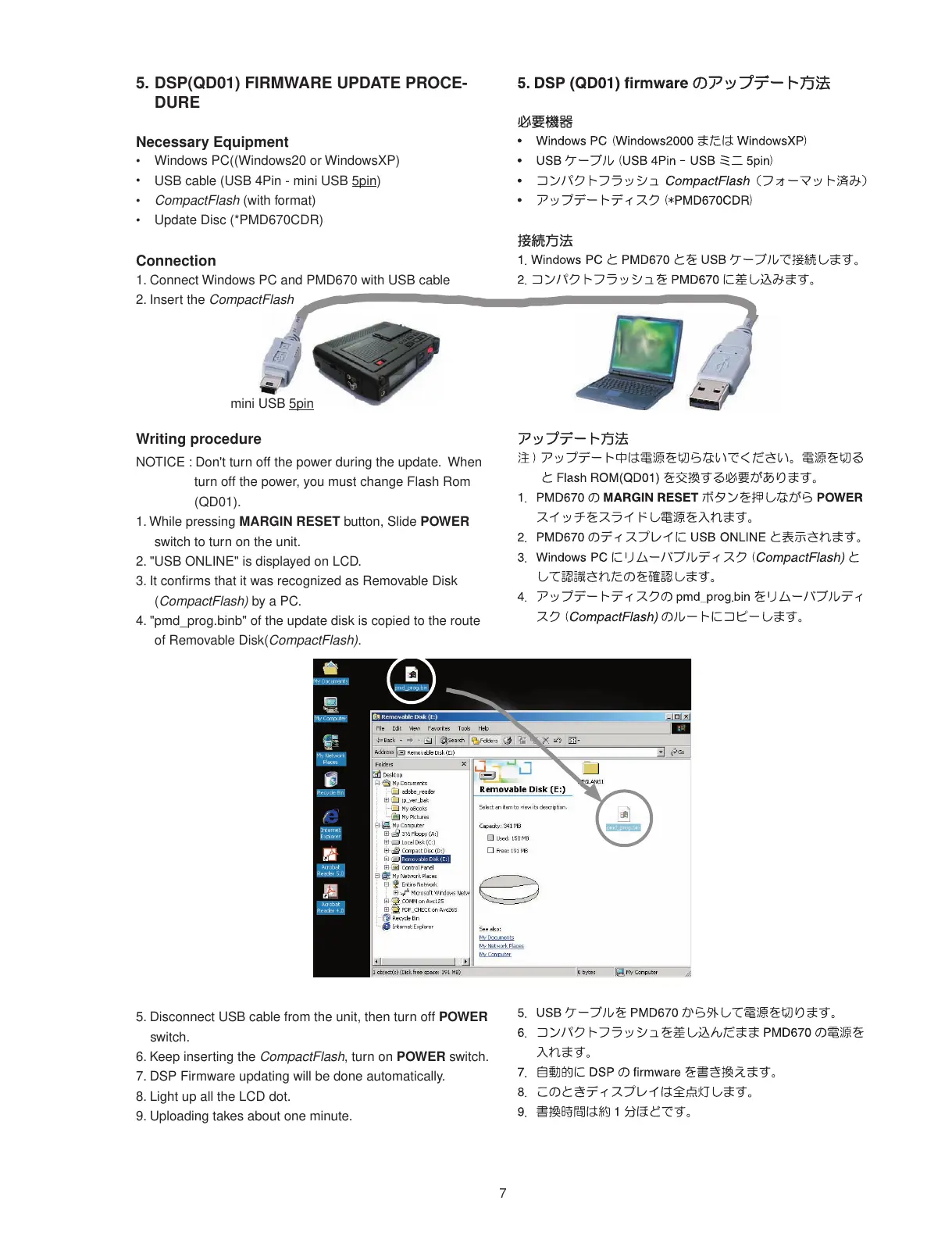
1. Connect Windows PC and PMD670 with USB cable
2. Insert the CompactFlash
Writing procedure
NOTICE : Don't turn off the power during the update. When
turn off the power, you must change Flash Rom
(QD01).
1. While pressing MARGIN RESET button, Slide POWER
switch to turn on the unit.
2. "USB ONLINE" is displayed on LCD.
3. It confi rms that it was recognized as Removable Disk
(CompactFlash) by a PC.
4. "pmd_prog.binb" of the update disk is copied to the route
of Removable Disk(CompactFlash).
5. Disconnect USB cable from the unit, then turn off POWER
switch.
6. Keep inserting the CompactFlash, turn on POWER switch.
7. DSP Firmware updating will be done automatically.
8. Light up all the LCD dot.
9. Uploading takes about one minute.
mini USB 5pin














 To Next Page