EasyManua.ls Logo

Marantz RC5400 - RC5400 Reference: Programming Macros

Marantz RC5400
68 pages
Print Icon
To Next Page IconTo Next Page
To Previous Page IconTo Previous Page
Loading...
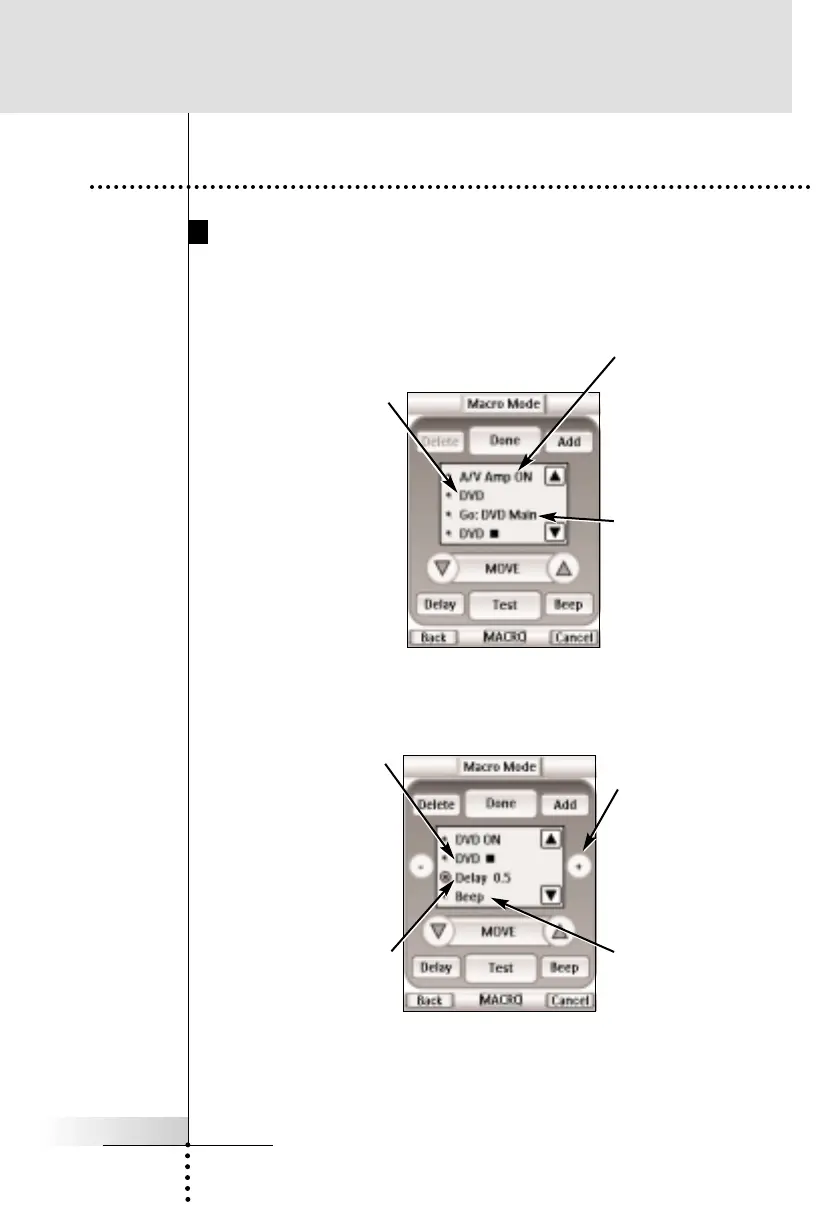
Macro Page Notation
Before you begin to program a Macro, study the notation used in
the MACRO mode. Each type of action has its own notation.
User Guide
40
Reference
6. Programming Macros
DVD
- When only a device
name is listed, the macro
step will be a Device
Action (the action that
occurs when the Device
is selected, which is
typically the
receiver/preamp s source
selection or input
command).
GO: DVD Main
- A Go command
indicates a panel jump.
In this case, TV means
a jump to the TV device
and Main is the name
for the particular panel
(sometimes panels just
have numbers, not
names).
AMP - ON - When a
device name and a
button name are listed,
that particular button s
IR command will be
issued.
DVD-n
- A device name and the
Stop symbol means that
this particular button s IR
command will be issued.
The symbol list can be
found on page 54.
Delay
- A delay counts as one
of the 250 macro steps.
Delays can be adjusted
in 0.1 second intervals
to be any value between
0.1 second to 10.0
seconds.
Adjusting Delays
- When a delay is
Selected, you can
adjust the delay with
the + and - buttons.
Beep - A beep counts
as one of the 250 macro
steps. Useful to notify
when the macro
execution is finished

Other manuals for Marantz RC5400

Related product manuals