EasyManua.ls Logo

Marantz SD1010 - Page 15

Marantz SD1010
44 pages
Print Icon
To Next Page IconTo Next Page
To Previous Page IconTo Previous Page
Loading...
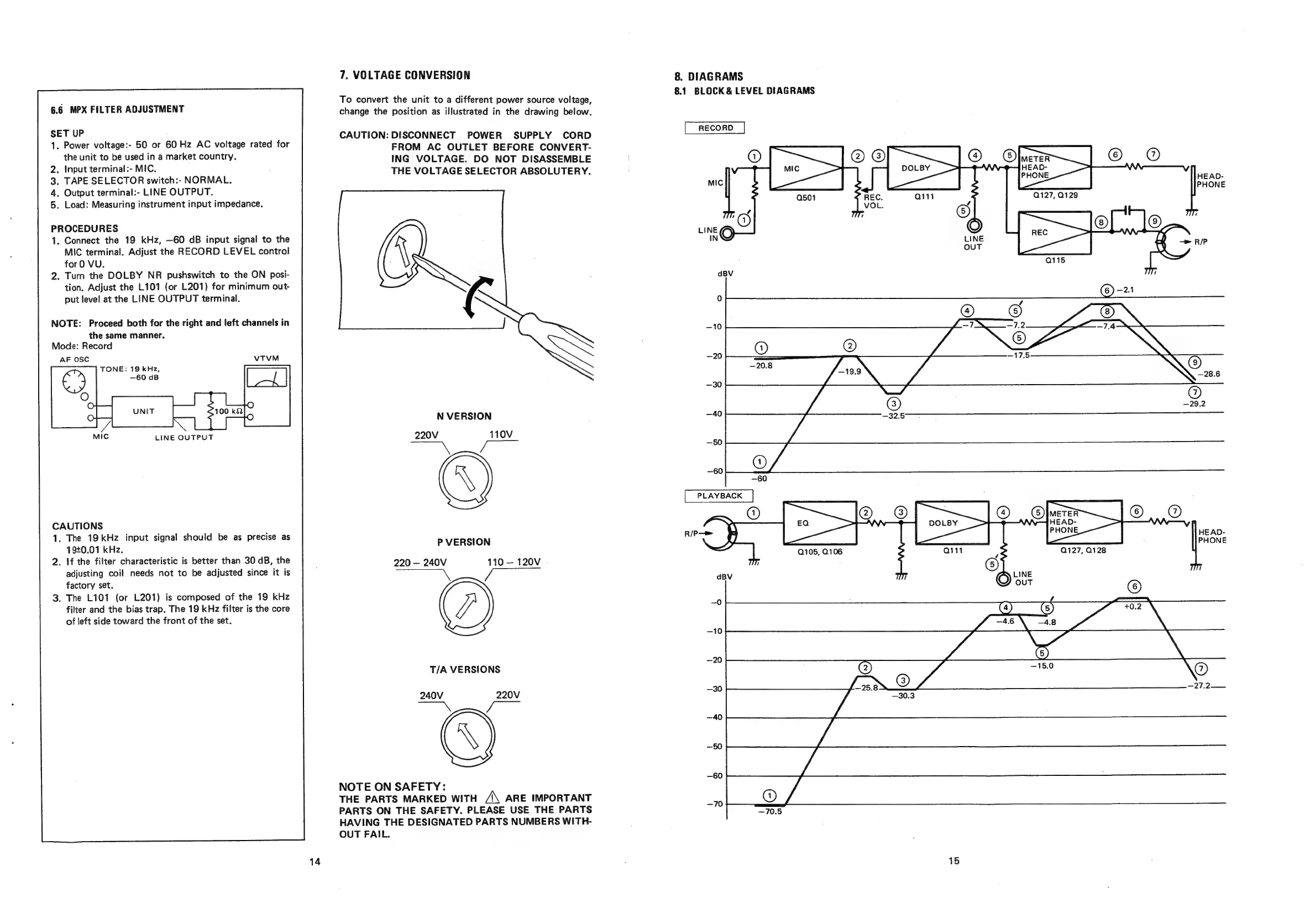
6.6
MPX
FILTER
ADJUSTMENT
SET
UP
1.
Power
voltage:-
50
or
60
Hz
AC
voltage
rated
for
the
unit
to
be
used
in
a
market
country.
2.
Input terminal:-
MIC.
3.
TAPE
SELECTOR
switch:-
NORMAL.
4.
5.
Load:
Measuring
instrument
input
impedance.
Output
terminal:-
LINE
OUTPUT.
PROCEDURES
1.
Connect
the
19
kHz,
—60
dB
input
signal
to
the
MIC
terminal.
Adjust
the
RECORD
LEVEL
control
for
0
VU.
.
Turn
the
DOLBY
NR
pushswitch
to
the
ON
posi-
tion.
Adjust
the
L101
(or
L201)
for
minimum
out-
put
level
at
the
LINE
OUTPUT
terminal.
NOTE:
Proceed
both
for
the
right
and
left
channels
in
the
same
manner.
Mode:
Record
AF
OSC
TONE:
19
kHz,
LINE
OUTPUT
CAUTIONS
.
The
19kHz
input
signal
should
be
as
precise
as
1940.01
kHz.
.
If
the
filter
characteristic
is
better
than
30
dB,
the
adjusting
coil
needs
not
to
be
adjusted
since
it
is
factory
set.
.
The
L101
(or
L201)
is
composed
of
the
19
kHz
filter
and
the
bias
trap.
The
19
kHz
filter
is
the
core
of
left
side
toward
the
front
of
the
set.
7,
VOLTAGE
CONVERSION
To
convert
the
unit
to
a
different
power
source
voltage,
change
the
position
as
illustrated
in
the
drawing
below.
CAUTION:
DISCONNECT
POWER
SUPPLY
CORD
FROM
AC
OUTLET
BEFORE
CONVERT-
ING
VOLTAGE.
DO
NOT
DISASSEMBLE
THE
VOLTAGE
SELECTOR
ABSOLUTERY.
N
VERSION
220V
110V
;
P
VERSION
220
240V
110
120V
.
T/A
VERSIONS
240V
220V
©
NOTE
ON
SAFETY:
THE
PARTS
MARKED
WITH
A\
ARE
IMPORTANT
PARTS
ON
THE
SAFETY.
PLEASE
USE
THE
PARTS
HAVING
THE
DESIGNATED
PARTS
NUMBERS
WITH-
OUT
FAIL.
8.
DIAGRAMS
8.1
BLOCK
&
LEVEL
DIAGRAMS
@
—29.2
HEAD-
PHONE
15

Related product manuals