EasyManua.ls Logo

Marantz SD535 - Operation

Marantz SD535
12 pages
Print Icon
To Next Page IconTo Next Page
To Previous Page IconTo Previous Page
Loading...
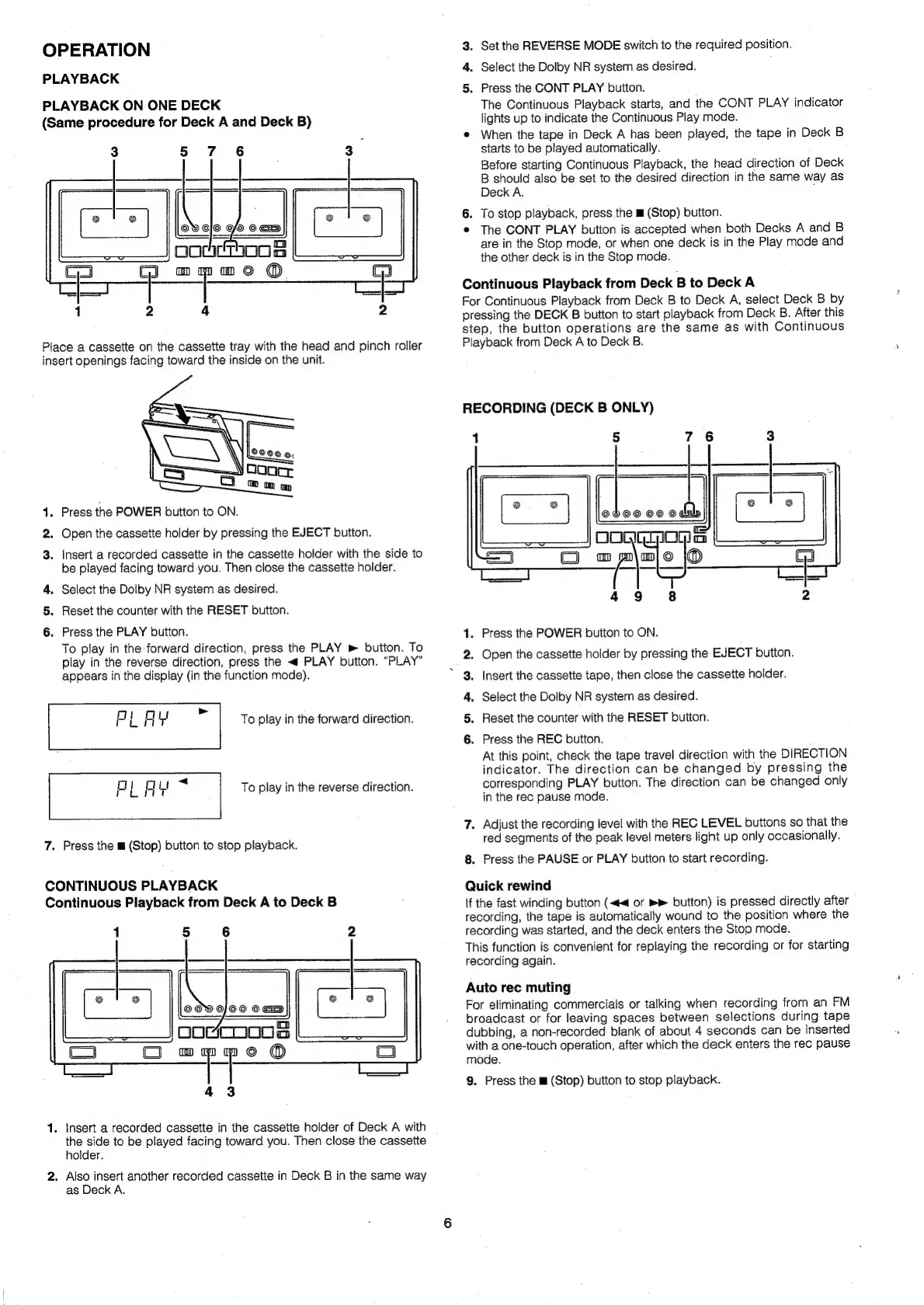
OPERATION
PLAYBACK
PLAYBACK
ON
ONE
DECK
(Same
procedure
for
Deck
A
and
Deck
B)
3
5
7
6
|
3
opochkeThoos
C3
Gl
mmmo
®
=e
en
a
1
2
4 2
Place
a
cassette
on
the
cassette
tray
with
the
head
and
pinch
roller
insert
openings
facing
toward
the
inside
on
the
unit.
4.
Press
the
POWER
button
to
ON.
2.
Open
the
cassette
holder
by
pressing
the
EJECT
button.
3.
Insert
a
recorded
cassette
in
the
cassette
holder
with
the
side
to
be
played
facing
toward
you.
Then
close
the
cassette
holder.
4.
Select
the
Dolby
NR
system
as
desired.
5.
Reset
the
counter
with
the
RESET
button.
6.
Press
the
PLAY
button.
To
play
in
the
forward
direction,
press
the
PLAY
»
button.
To
play
in
the
reverse
direction,
press
the
<
PLAY
button.
“PLAY”
appears
in
the
display
(in
the
function
mode).
To
play
in
the
forward
direction.
To
play
in
the
reverse
direction.
7.
Press
the
m
(Stop)
button
to
stop
playback.
CONTINUOUS
PLAYBACK
Continuous
Playback
from
Deck
A
to
Deck
B
1
5
6
2
©OV
O/O©6
OG
pogcoooos
7
FP
©
@
43
1.
Insert
a
recorded
cassette
in
the
cassette
holder
of
Deck
A
with
the
side
to
be
played
facing
toward
you.
Then
close
the
cassette
holder.
2.
Also
insert
another
recorded
cassette
in
Deck
B
in
the
same
way
as
Deck
A.
eo
PS
SP
3.
Set
the
REVERSE
MODE
switch
to
the
required
position.
4.
Select
the
Dolby
NR
system
as
desired.
5.
Press
the
CONT
PLAY
button.
The
Continuous
Playback
starts,
and
the
CONT
PLAY
indicator
lights
up
to
indicate
the
Continuous
Play
mode.
®
When
the
tape
in
Deck
A
has
been
played,
the
tape
in
Deck
B
starts
to
be
played
automatically.
Before
starting
Continuous
Playback,
the
head
direction
of
Deck
3
earig
also
be
set
to
the
desired
direction
in
the
same
way
as
eck
A.
6.
To
stop
playback,
press
the
m
(Stop)
button.
®
The
CONT
PLAY
button
is
accepted
when
both
Decks
A
and
B
are
in
the
Stop
mode,
or
when
one
deck
is
in
the
Play
mode
and
the
other
deck
is
in
the
Stop
mode.
Continuous
Playback
from
Deck
B
to
Deck
A
For
Continuous
Playback
from
Deck
B
to
Deck
A,
select
Deck
B
by
pressing
the
DECK
B
button
to
start
playback
from
Deck
B.
After
this
step,
the
button
operations
are
the
same
as
with
Continuous
Playback
from
Deck
A
to
Deck
B.
RECORDING
(DECK
B
ONLY)
1
5
7
6
3
Press
the
POWER
button
to
ON.
Open
the
cassette
holder
by
pressing
the
EJECT
button.
Insert
the
cassette
tape,
then
close
the
cassette
holder.
Select
the
Dolby
NR
system
as
desired.
Reset
the
counter
with
the
RESET
button.
Press
the
REC
button.
;
At
this
point,
check
the
tape
travel
direction
with
the
DIRECTION
indicator.
The
direction
can
be
changed
by
pressing
the
corresponding
PLAY
button.
The
direction
can
be
changed
only
in
the
rec
pause
mode.
7.
Adjust
the
recording
level
with
the
REC
LEVEL
buttons
so
that
the
red
segments
of
the
peak
level
meters
light
up
only
occasionally.
8.
Press
the
PAUSE
or
PLAY
button
to
start
recording.
Quick
rewind
if
the
fast
winding
button
(<<
or
button)
is
pressed
directly
after
recording,
the
tape
is
automatically
wound
to
the
position
where
the
recording
was
started,
and
the
deck
enters
the
Stop
mode.
This
function
is
convenient
for
replaying
the
recording
or
for
starting
recording
again.
:
Auto
rec
muting
For
eliminating
commercials
or
talking
when
recording
from
an
FM
broadcast
or
for
leaving
spaces
between
selections
during
tape
dubbing,
a
non-recorded
blank
of
about
4
seconds
can
be
inserted
with
a
one-touch
operation,
after
which
the
deck
enters
the
rec
pause
mode.
9.
Press
the
m
(Stop)
button
to
stop
playback.