EasyManua.ls Logo

Marantz SD555 - Page 3

Marantz SD555
28 pages
Print Icon
To Next Page IconTo Next Page
To Previous Page IconTo Previous Page
Loading...
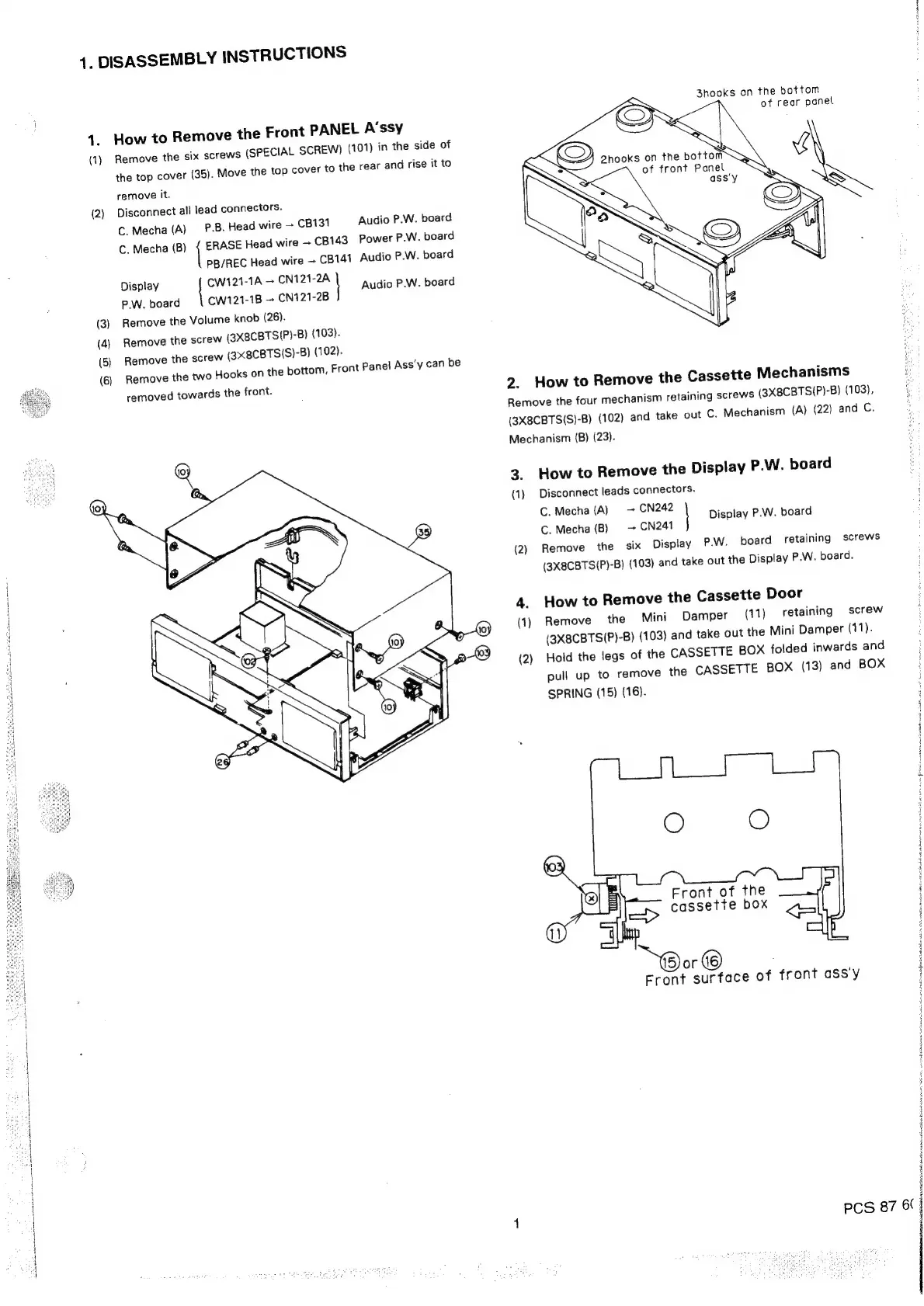
1.
DISASSEMBLY
INSTRUCTIONS
3nooks
on
the
bottom
of
rear
panel
1.
How
to
Remove
the
Front
PANEL
A’ssy
SPECIAL
SCREW)
(101)
in
the
side
of
he
rear
and
rise
it
to
(1)
Remove
the
six
screws
(
the
top
cover
(35).
Move
the
top
cover
tot
2hooks
on
the
bottom
i
of
front
Panel
remove
it.
ass'y
(2)
Disconnect
all
lead
connectors.
C.
Mecha
(A)
PB.
Head
wire
>
CB131
C.
Mecha
(B)
{
ERASE
Head
wire
CB143
Power
P.W.
board
PB/REC
Head
wire
~
CB141
Audio
P.W.
board
Audio
P.W.
board
Display
|
CW121-1A
~
CN121-2A
|
‘uidi
PAW
board
P.W.
board
CW121-1B
~
CN121-2B
(3)
Remove
the
Volume
knob
(26).
e
the
screw
(3X8CBTSIP)-B)
(103).
-B)
(102).
Front
Panel
Ass’y
can
be
(4)
Remov
(5)
Remove
the
screw
(3x8CBTSIS)
Hooks
on
the
bottom,
(6)
Remove
the
two
removed
towards
the
front.
2.
How
to
Remove
the
Cassette
Mechanisms
m
retaining
screws
(3X8CBTS(P)-B)
(103),
(22)
and
C.
Remove
the
four
mechanis
(3X8CBTS(S)-B)
(102)
and
take
out
C.
Mechanism
(A)
Mechanism
(B)
(23).
3.
How
to
Remove
the
Display
P.W.
board
(1)
Disconnect
leads
connectors.
C.
Mecha
(A)
=
CN242
;
Display
P.W.
board
C.
Mecha
(B)
~
CN241
(2)
Remove
the
six
Display
P.W.
board
retaining
screws
(3X8CBTS(P)-B)
(103)
and
take
out
the
Display
P.W.
board.
4.
How
to
Remove
the
Cassette
Door
(1)
Remove
the
Mini
Damper
(11)
retaining
screw
(3X8CBTSIP)-B)
(103)
and
take
out
the
Mini
Damper
(11).
(2)
Hold
the
legs
of
the
CASSETTE
BOX
folded
inwards
and
pull
up
to
remove
the
CASSETTE
BOX
(13)
and
BOX
SPRING
(15)
(16).
:
:
j
i
i
Front
of
the
cassette
box
®or
©
Front
surface
of
front
ass'y
|
4
Hl
i
4
;
4
H
PCS
87
6.
|
|
|
i
|
i

Related product manuals