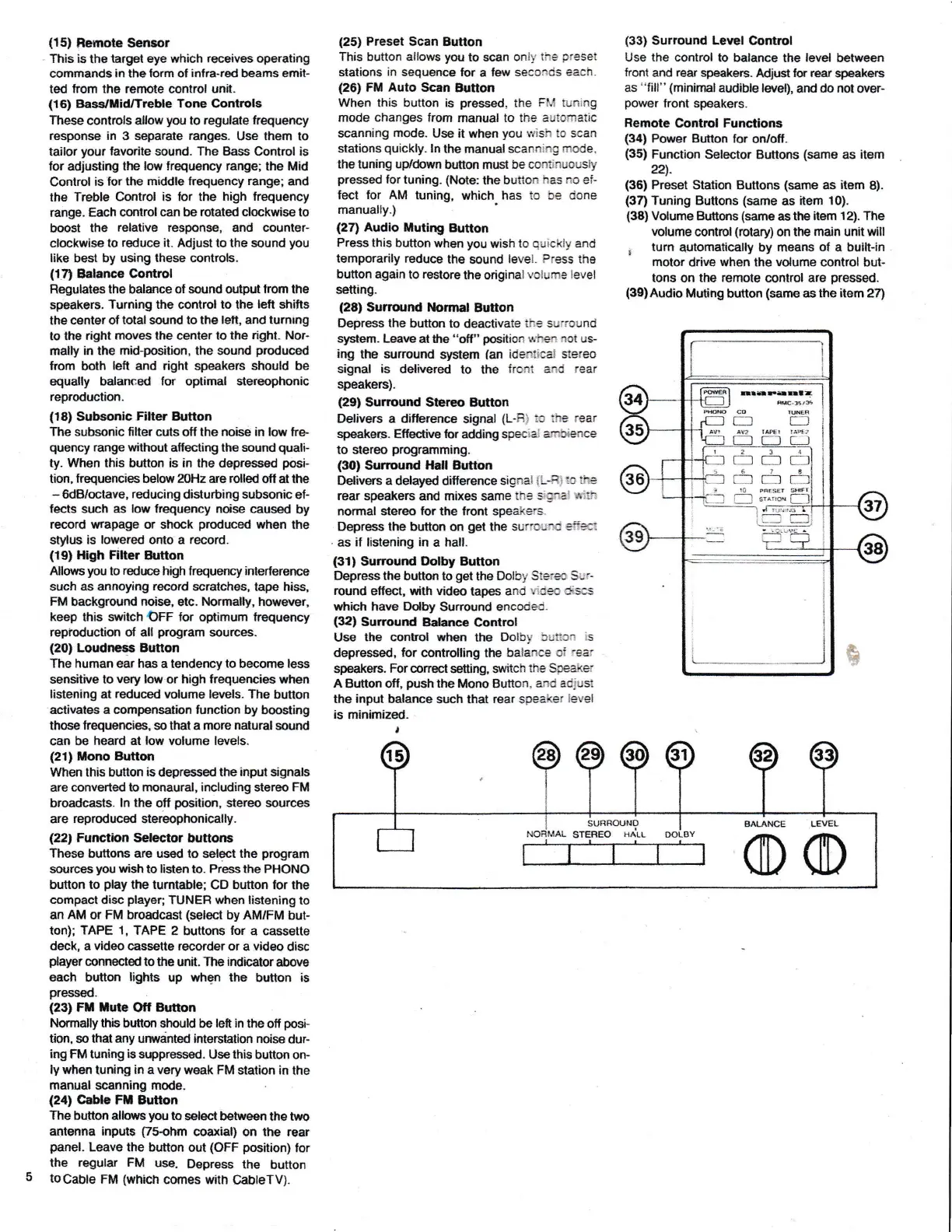
(15)
Bemote
Sensor
This is
ths
target eye
which receives
operating
commands
in
theform
of infra-red beams emit-
ted
from
ths rernote control unit.
{16)
Bass/tlid/Treble
Tone Controls
These
controls
allow
you
to
regulate frequency
response in
3
separate ranges.
Use them to
tailor
your
lavorite sound. The Bass
Control
is
for adjusting the
low trequency range;
the Mid
Control is
lor
the middle frequency
range;
and
lhe Treble Control
is ,or the
high frequency
range. Each
control
can
be
rotated clockwise
to
boost
the
relative response,
and
counter-
clmkwise to
reduce it.
Adjust to the sound
you
like
best by using
these
controls.
(171
Ealancc
Control
Regulates
the
balance
ol sound output
lrom
the
speakers.
Turning the
conirol
to
lhe
lert
shifts
the center ol
total sound to the
left, and turnlng
to the
right
moves the
center to
the right. Nor-
mally in the mid-position, lhe sourd
produced
lrom
both
left
and
right
speakers
should
be
equally balanced
for
optimal
stereophonic
regoduction.
{18}
Subsonic Filter Button
The subsonic filter
cuts ofl the
noise in low
fre-
quency
range without
affecting the sound
quali-
ty,
When
this button is in the depressed
posi-
tion,
frcquencies below
Z)Hz
are
rolled
ofi at the
-
6dB/octave,
reducing
disturbing
subsonic
ef-
fects
such
as low frequency noise
caused
by
record wrapage or
shock
produced
when
the
stylus
is lowered onto
a
record.
(1S)
High Fllter
Button
Allq,,rs
lou
to
t€drce
high lrequerrcy
interferenc€
sueh
as annoying
record
scratches,
tape hiss,
FM background noise,
etc.
tlormally, however,
keep
this
sryitch OFF lor optimum
trequency
repioductaon of all
program
sourices.
{20}
Loudness Butlon
The
human
ear
has
a tendency
to become
less
sensitive to
very low
or high frequencies wien
listening at
reduced
vc{ume levels, The
button
activates a Gompensation function by
boosting
those frequencies, so that a more
natural
sound
can be
heard at
low
volume
levels.
(21)
ilono Button
When
this
button
is
depressed
the
input
$ignals
are
converted to monaural, including
stereo
FM
broadcasts. ln
the
olf
position,
stereo
sources
are
reproduced
stereophonically.
(22,
Function
Selector buttons
These
buttons are us6d to
sclect
the
program
scn
rc€s
you
wish
to listen to. Press the PHONO
button
to
play
the
turntable; CD button for the
compact
disc
player;
TUNER
when
listening
io
an
AM
or
FM broadcast
(select
by AM/FM
but-
ton);
TAPE 1,
TAPE
2 buttons
for
a
cassetto
deck, a
video
cassette recorder
or a
video
disc
player
connecled to the
unit. The
indicator
above
each
button
lights
up whqn the button is
pressed.
(23)
Ftl lrute
oft
Button
Normalty this brfiton should be
left in
the
off
posF
tion,
so
that any urwdnted interstation
noise
dur-
ing
FM tuning
is
suppressed.
Use this button
on-
ly when
tuning
in a very
weak
FM station
in the
manual scanning mode.
(24)
Gable
Ff, Button
The
button allss
lrou
to
select behileen
the two
antsnna
inpd$
frs-ohm
coaxiaD on lhe rear
panel"
Leave the button
out
(OFF position)
for
the regular
FM
use.
Depress the
button
tocable
FM
(which
comes with
CableTV).
(25)
Preset Scan Button
This
button
allows
you
to scan onli-
t*e
preset
stations
in
sequence
br a
few
seccr}cis
each.
{26)
FM Auto
Scan
Button
When this button
is
pressed,
the
FM tuning
mode changes
from
manual
to lhe automatic
scanning
mode.
Use it
when
you
Hish to
scan
stations
quickly.
ln the
manual scaaning
mode.
the tuning uptdown
hfiton must
be continuously
pressed
tor
tuning-
(Note:
the
buiton
ias no
ei-
fect for AM tuning,
which
has to be cjone
manually.)
(27)
Audio iluting
Button
Press this
button when you
wish
to ouickly and
temporarily reduce
the
sound
level.
Press
the
buton
again to
restore
the original
volume level
setting.
(28)
Surround
ibrmal
Eutton
Depress the
button to
deactivate
i!.:s surround
system.
Leave at the
"off"
position
*'hsn
not
us-
ing
the sunound
s/stem
(an
ide;:iice! stereo
signal
is
delivered
to the
t.oiit a*d
rear
speakers).
(29)
Surrcund SteGo Button
Delivers
a difbrence
signal
(L-Ri
:o ihe
rear
speakers. El{ectiw for
adding
speciai
arntrience
to stereo
programming.
(30)
Surround ll.all Button
Delivers a
delayed dilierence
sig*al
{L-Hi
$ rhe
rear
speakers and mixes
same
th5 5;Sra1
sti:
nomal stereo for the front speake.s-
D@ress the button on
g€t
the
sur:'c,-ln!
ef.s::
as
if listening in
a hall.
t31)
Sunound Dolby Button
Depress the
button
to
get
the
Dolby Stera Sur-
round
effect, with
video
tapes
and
*ies ckscs
which
have
Dolby
Sunound encoded.
(32)
Surround
Balance
Control
Use
the control when
the Dolby
5ut'tcn
:s
depressed,
for
mntrolling the balance
qi
rear
speakers.
For
correct setting, s{t
itch
the
Speaker
A
Button off,
push
the Mono Button.
and ad.iust
the input balance
such that
rear
speaker
level
is
minimized,
t
(33)
Surround
Level
Control
Use the
control to balance
the
level
between
front
and
rear
speakers.
Mjust
lu rear
speakers
as
"fill" (minimal
audible
level),
and
do
not over-
power
tront speakers.
Remote
Control Functions
(34)
Power Button
for on/off-
(35)
Function
Selector Buttons
(same
as
item
nl.
(36)
Preset Stalion
Butlons
(same
as
itom
8).
{3fl
Tuning Buttons
(same
as
item 10).
(38)
Votume
Buttons
(same
as the
item 12). The
volume
cantrol
(rotary)
on the
main
unit
will
r
turn
automatically
by means
of
a bullt-in
motor drive when the volume control
but-
tons on the
remote
cof}trol
are
pres6ed.
(39)Audio
Mutihg
button
($arn6
asthe item
24
rnEF{nl!
R€''5,5
!.L:
ra rr
!0
H€sEr
!*t
r---.r
sr"ne
fl
I
i
:'r1'.o
LEVEL
o
c


 To Next Page
 Loading...