EasyManua.ls Logo

Marantz SR1010 - Page 10

Marantz SR1010
27 pages
Print Icon
To Next Page IconTo Next Page
To Previous Page IconTo Previous Page
Loading...
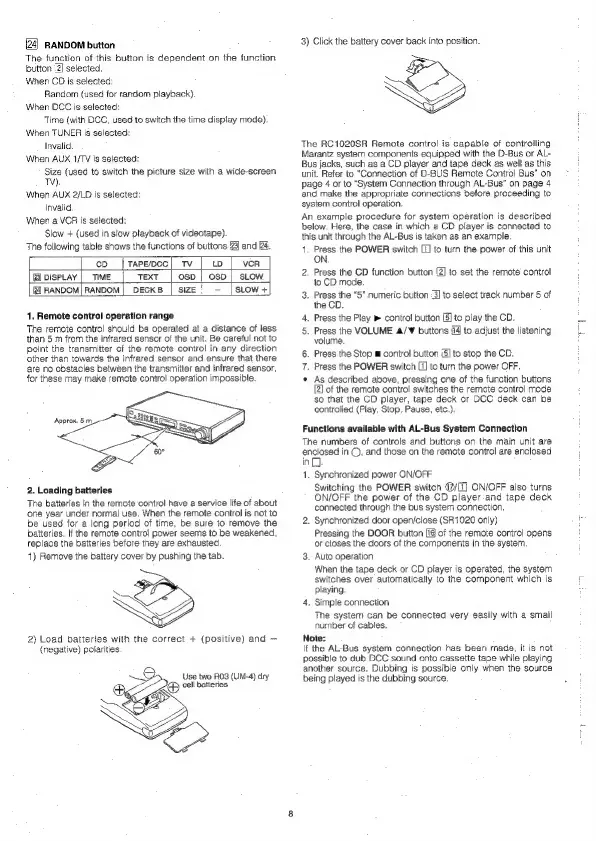
RANDOM
button
The
function
of
this
button
is
dependent
on
the
function
button
2]
selected.
When
CD
is
selected:
Random
(used
for
random
playback).
When
DCC
is
selected:
Time
(with
DCC,
used
to
switch
the
time
display
mode).
When
TUNER
is
selected:
Invalid.
When
AUX
1/TV
Is
selected:
Size
(used
to
switch
the
picture
size
with
a
wide-screen
TY).
When
AUX
2/LD
is
selected:
Invalid
When
a
VCR
is
selected:
Slow
+
(used
in
slow
playback
of
videotape).
The
following
table
shows
the
functions
of
buttons
23
and
24.
co
|tapepcc|
Tv
|
to
|
vor
@ovise.ay|
TIME
|
TEXT
|
osp|
oso
|
slow
Gil
RANDOM
sci
pecks
|
size’
-
|slow+
1.
Remote
control
operation
range
The
remote
control
should
be
operated
at
a
distance
of
less
than
5
m
from
the
infrared
sensor
of
the
unit.
Be
careful
not
to
point
the
transmitter
of
the
remote
control
in
any
direction
other
than
towards
the
infrared
sensor
and
ensure
that
there
are
no
obstacles
between
the
transmitter
and
infrared
sensor,
for
these
may
make
remote
control
operation
impossible.
2.
Loading
batteries
The
batteries
in
the
remote
control
have
a
service
life
of
about
one
year
under
normal
use.
When
the
remote
control
is
not
to
be
used
for
a
long
period
of
time,
be
sure
to
remove
the
batteries.
If
the
remote
contro!
power
seems
to
be
weakened,
replace
the
batteries
before
they
are
exhausted.
4)
Remove
the
battery
cover
by
pushing
the
tab.
“—.
2)
Load
batteries
with
the
correct
+
(positive)
and
(negative)
polarities
Use
two
R03
(UM-4)
dry
I)
cel
batteries
3)
Click
the
battery
cover
back
into
position.
ae
SZ
The
RC1020SR
Remote
control
is
capable
of
controlling
Marantz
system
components
equipped
with
the
D-Bus
or
AL-
Bus
jacks,
such
as
a
CD
player
and
tape
deck
as
well
as
this
unit.
Refer
to
“Connection
of
D-BUS
Remote
Control
Bus”
on
page
4
or
to
“System
Connection
through
AL-Bus”
on
page
4
and
make
the
appropriate
connections
before
proceeding
to
system
control
operation.
An
example
procedure
for
system
operation
is
described
below.
Here,
the
case
in
which
a
CD
player
is
connected
to
this
unit
through
the
AL-Bus
is
taken
as
an
example.
4,
Press
the
POWER
switch
[J
to
turn
the
power
of
this
unit
ON.
2.
Press
the
CD
function
button
[2]
to
set
the
remote’
control
to
CD
mode.
3.
Press
the
“5”
numeric
button
:3]
to
select
track
number
5
of
the
CD.
4.
Press
the
Play
»
contro!
button
[5]
to
play
the
CD.
5.
Press
the
VOLUME
4/¥
buttons
{4
to
adjust
the
listening
volume.
6.
Press
the
Stop
m
control
button
iS]
to
stop
the
CD,
7.
Press
the
POWER
switch
[1]
to
turn
the
power
OFF.
*
As
described
above,
pressing
one
of
the
function
buttons
[2]
of
the
remote
control
switches
the
remote
control
mode
so
that
the
CD
player,
tape
deck
or
DCC
deck
can
be
controlled
(Play,
Stop,
Pause,
etc.),
Functions
available
with
AL-Bus
System
Connection
The
numbers
of
controls
and
buttons
on
the
main
unit
are
enclosed
In
©,
and
those
on
the
remote
control
are
enclosed
in.
1.
Synchronized
power
ON/OFF
Switching
the
POWER
switch
@/[1]
ON/OFF
also
turns
ON/OFF
the
power
of
the
CD
player.and
tape
deck
connected
through
the
bus
system
connection.
2.
Synchronized
door
open/close
(SR1020
only)
Pressing
the
DOOR
button
[18
of
the
remote
control
opens
or
closes
the
doors
of
the
components
in
the
system
3.
Auto
operation
When
the
tape
deck
or
CD
player
is
operated,
the
system
switches
over
automatically
to
the
component
which
is
playing.
4.
Simple
connection
The
system
can
be
connected
very
easily
with
a
small
number
of
cables.
Note:
lf
the
AL-Bus
system
connection
has
been
made,
it
is
not
possible
to
dub
DCC
sound
onto
cassette
tape
while
playing
another
source.
Dubbing
is
possible
only
when
the
source
being
played
is
the
dubbing
source

Related product manuals