.
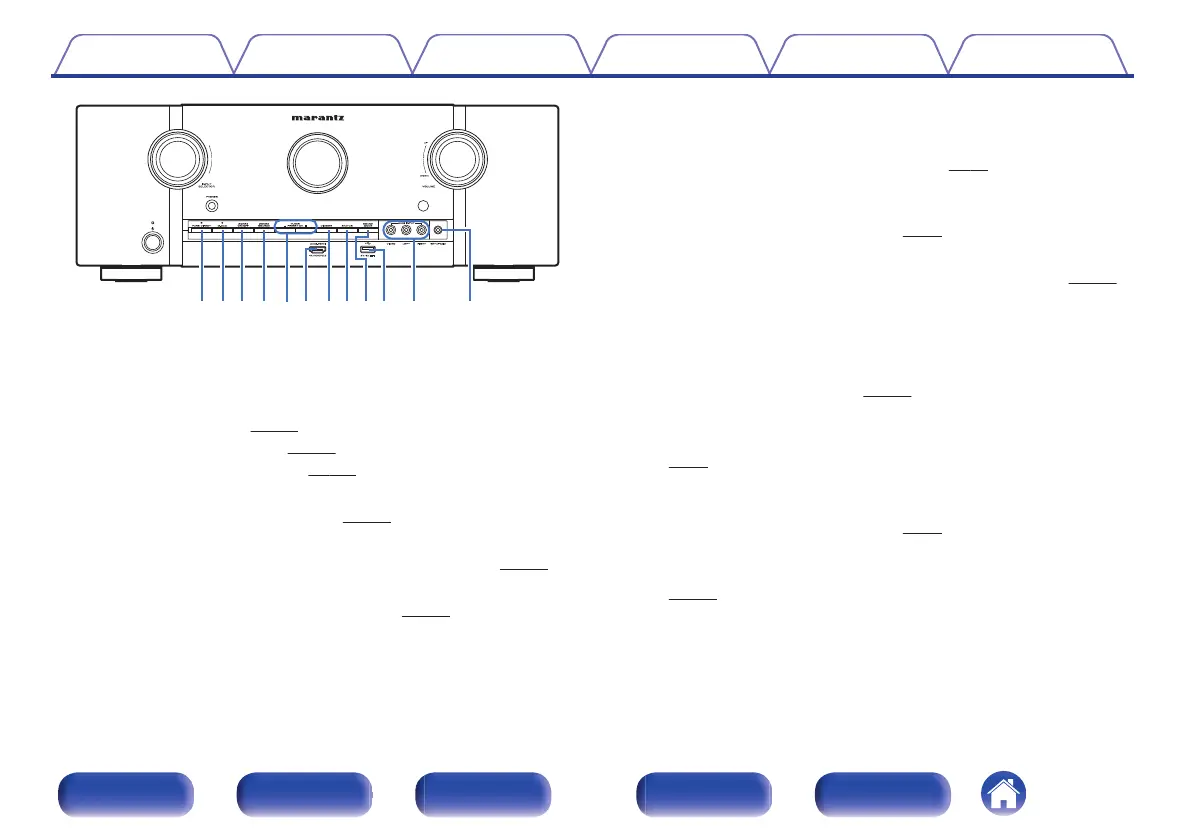
W1Q9Q8 W0Q2 Q3 Q4Q5Q0 Q1 Q6Q7
J
PURE DIRECT button
This switches the sound mode between Direct, Pure Direct and Auto
surround.
0
“Direct playback” (v
p. 117)
0
“Pure Direct playback” (v p. 117)
0
“Auto surround playback” (v
p. 118)
K
M-DAX button
This switches the M-DAX mode. (v p. 151)
L
ZONE2 ON/OFF button
This turns the power of ZONE2 (separate room) on/off. (v
p. 140)
M
ZONE2 SOURCE button
This selects the input source for ZONE2. (v p. 140)
N
Tuner preset channel buttons
(TUNER PRESET CH +, –)
These select preset broadcast stations. (v
p. 84)
O
AUX1-HDMI connector
This is used to connect HDMI output compatible devices such as video
camcorders and game consoles. (v p. 59)
P
DIMMER button
Each press of this switches the brightness of the display. (v p. 210)
Q
STATUS button
Each press of this switches the status information that is shown on the
display.
R
SOUND MODE button
Switching the sound mode. (v
p. 115)
S
USB port (T)
This is used to connect USB storages (such as USB memory devices).
(v p. 61)
T
AUX1 INPUT connectors
Used to connect analog output compatible devices such as video
camcorders and game consoles. (v
p. 59)
U
SETUP MIC jack
This is used to connect the supplied Sound calibration microphone.
(v
p. 179)
Contents
Connections Playback Settings Tips Appendix
18
Front panel Display Rear panel Remote Index



 To Next Page