EasyManua.ls Logo

Marantz ST610 - Page 5

Marantz ST610
30 pages
Print Icon
To Next Page IconTo Next Page
To Previous Page IconTo Previous Page
Loading...
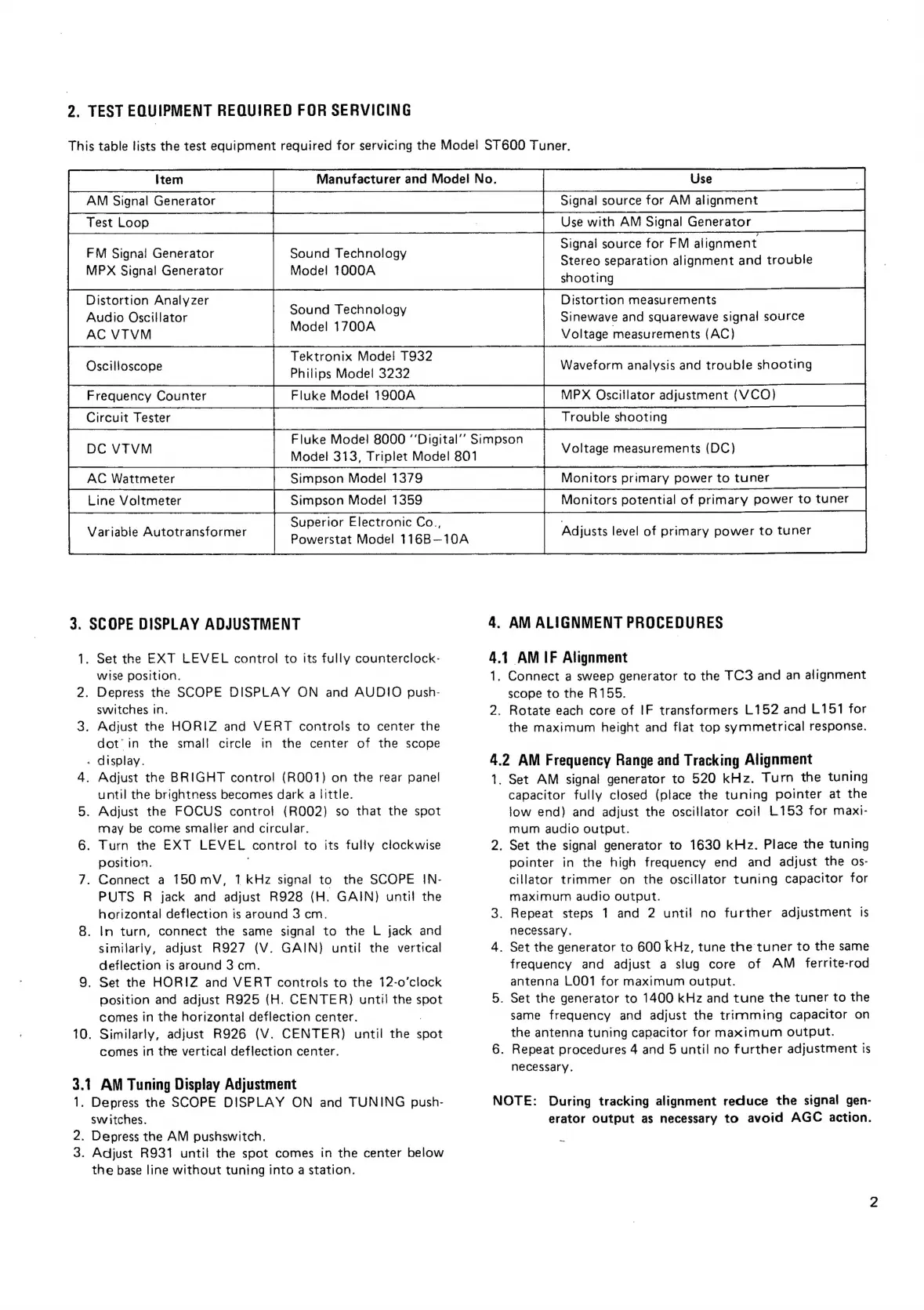
2.
TEST
EQUIPMENT
REQUIRED
FOR
SERVICING
This
table
lists
the
test
equipment
required
for
servicing
the
Model
ST600
Tuner.
AM
Signal
Generator
etn
ee
Signal
source
for
AM
alignment
[Testloop—SC—“‘idSSCSSCSCSCSCSCSSS
FM
Signal
Generator
Sound
Technology
MPX
Signal
Generator
Mode!
1000A
Use
with
AM
Signal
Generator
Signal
source
for
FM
alignment
Stereo
separation
alignment
and
trouble
shooting
Distortion
Analyzer
Distortion
measurements
Audio
Oscillator
ai
ae
Sinewave
and
squarewave
signal
source
AC
VTVM
One
Voltage
measurements
(AC)
Tektronix
Mode!
T932
,
Oscilloscope
Philips
Model
3232
Waveform
analysis
and
trouble
shooting
Fluke
Model
1900A
MPX
Oscillator
adjustment
(VCO)
Fluke
Model
8000
“‘Digital’’
Simpson
DC
VTVM
Model
313,
Triplet
Model
801
Voltage
measurements
(DC)
Simpson
Model
1359
Monitors
potential
of
primary
power
to
tuner
.
Superior
Electronic
Co.,
ee
Variable
Autotransformer
Powerstat
Model
116B—10A
Adjusts
level
of
primary
power
to
tuner
3.
SCOPE
DISPLAY
ADJUSTMENT
4.
AM
ALIGNMENT
PROCEDURES
1,
Set
the
EXT
LEVEL
control
to
its
fully
counterclock-
4.1
AM
IF
Alignment
wise
position.
1.
Connect
a
sweep
generator
to
the
TC3
and
an
alignment
2.
Depress
the
SCOPE
DISPLAY
ON
and
AUDIO
push-
scope
to
the
R155.
switches
in.
2.
Rotate
each
core
of
IF
transformers
L152
and
L151
for
3.
Adjust
the
HORIZ
and
VERT
controls
to
center
the
the
maximum
height
and
flat
top
symmetrical
response.
dot’
in
the
small
circle
in
the
center
of
the
scope
-
display.
4.2
AM
Frequency
Range
and
Tracking
Alignment
4.
Adjust
the
BRIGHT
control
(R001)
on
the
rear
panel
1.
Set
AM
signal
generator
to
520
kHz.
Turn
the
tuning
until
the
brightness
becomes
dark
a
little.
capacitor
fully
closed
(place
the
tuning
pointer
at
the
5.
Adjust
the
FOCUS
control
(R002)
so
that
the
spot
low
end)
and
adjust
the
oscillator
coil
1.153
for
maxi-
may
be
come
smaller
and
circular.
mum
audio
output.
|
6.
Turn
the
EXT
LEVEL
control
to
its
fully
clockwise
2.
Set
the
signal
generator
to
1630
kHz.
Place
the
tuning
position.
|
pointer
in
the
high
frequency
end
and
adjust
the
os-
7.
Connect
a
150
mV,
1
kHz
signal
to
the
SCOPE
IN-
cillator
trimmer
on
the
oscillator
tuning
capacitor
for
PUTS
R
jack
and
adjust
R928
(H.
GAIN)
until
the
maximum
audio
output.
horizontal
deflection
is
around
3
cm.
3.
Repeat
steps
1
and
2
until
no
further
adjustment
is
8.
In
turn,
connect
the
same
signal
to
the
L
jack
and
necessary.
similarly,
adjust
R927
(V.
GAIN)
until
the
vertical
4.
Set
the
generator
to
600
kHz,
tune
the
tuner
to
the
same
deflection
is
around
3
cm.
frequency
and
adjust
a
slug
core
of
AM
ferrite-rod
9.
Set
the
HOR!IZ
and
VERT
controls
to
the
12-o’clock
antenna
LOO1
for
maximum
output.
position
and
adjust
R925
(H.
CENTER)
until
the
spot
5.
Set
the
generator
to
1400
kHz
and
tune
the
tuner
to
the
comes
in
the
horizontal
deflection
center.
same
frequency
and
adjust
the
trimming
capacitor
on
10.
Similarly,
adjust
R926
(V.
CENTER)
until
the
spot
the
antenna
tuning
capacitor
for
maximum
output.
comes
in
the
vertical
deflection
center.
6.
Repeat
procedures
4
and
5
until
no
further
adjustment
is
necessary.
3.1
AM
Tuning
Display
Adjustment
1.
Depress
the
SCOPE
DISPLAY
ON
and
TUNING
push-
NOTE:
During
tracking
alignment
reduce
the
signal
gen-
switches.
erator
output
as
necessary
to
avoid
AGC
action.
2.
Depress
the
AM
pushswitch.
3.
Adjust
R931
until
the
spot
comes
in
the
center
below
the
base
line
without
tuning
into
a
station.

Related product manuals