EasyManua.ls Logo

Marantz SX-72 - Page 3

Marantz SX-72
38 pages
Print Icon
To Next Page IconTo Next Page
To Previous Page IconTo Previous Page
Loading...
@
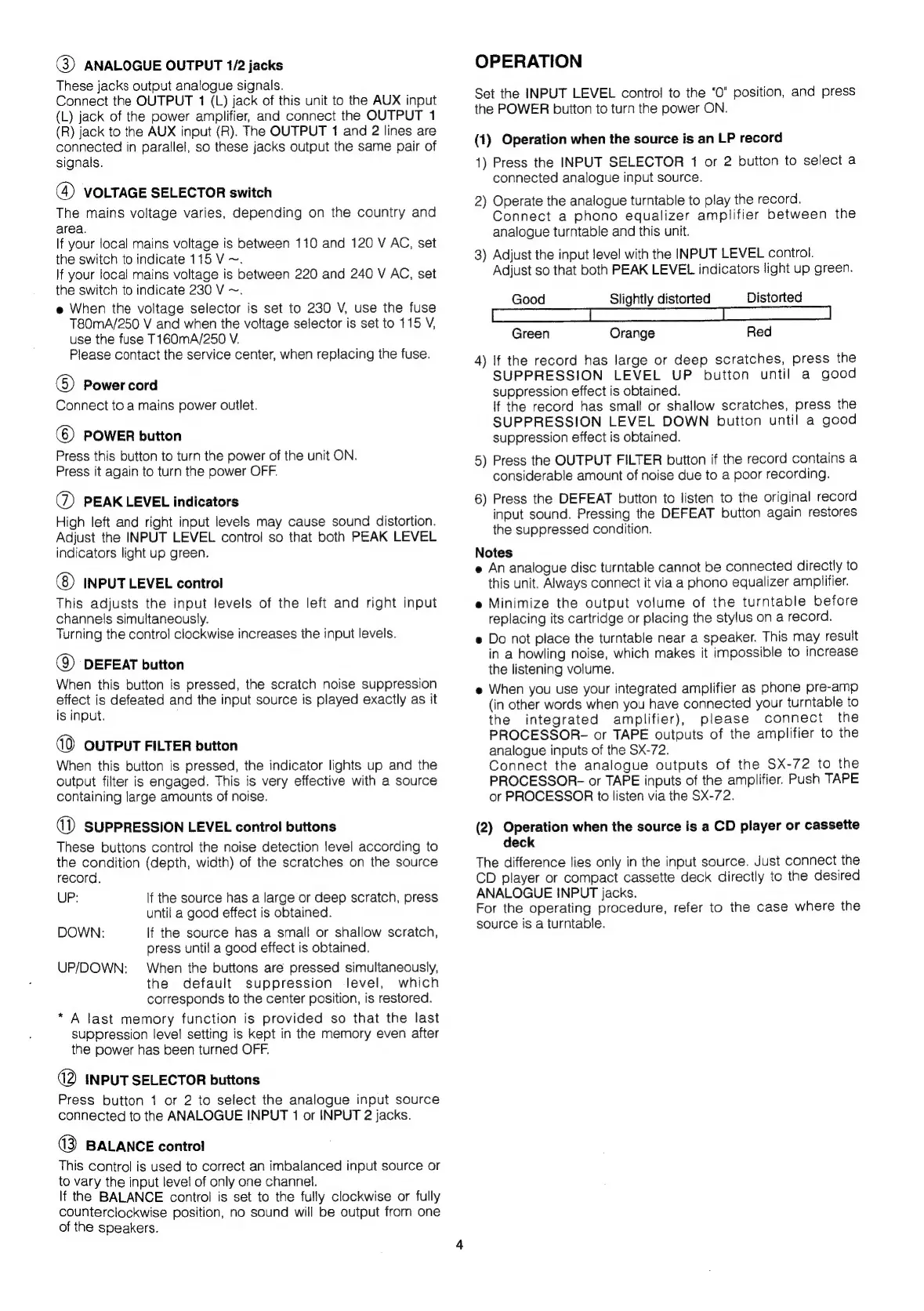
ANALOGUE
OUTPUT
1/2
jacks
These
jacks
output
analogue
signals.
Connect
the
OUTPUT
1
(L)
jack
of
this
unit
to
the
AUX
input
(L)
jack
of
the
power
amplifier,
and
connect
the
OUTPUT
1
(R)
jack
to
the
AUX
input
(R).
The
OUTPUT
1
and
2
lines
are
connected
in
parallel,
so
these
jacks
output
the
same
pair
of
signals.
(4)
VOLTAGE
SELECTOR
switch
The
mains
voltage
varies,
depending
on
the
country
and
area.
If
your
local
mains
voltage
is
between
110
and
120
V
AC,
set
the
switch
to
indicate
115
V
~.
If
your
local
mains
voltage
is
between
220
and
240
V
AC,
set
the
switch
to
indicate
230
V
~.
e
When
the
voltage
selector
is
set
to
230
V,
use
the
fuse
T80mA/250
V
and
when
the
voltage
selector
is
set
to
115
V,
use
the
fuse
T160mA/250
V.
Please
contact
the
service
center,
when
replacing
the
fuse.
6)
Power
cord
Connect
to
a
mains
power
outlet.
(©)
POWER
button
Press
this
button
to
turn
the
power
of
the
unit
ON.
Press
it
again
to
turn
the
power
OFF.
@)
PEAK
LEVEL
indicators
High
left
and
right
input
levels
may
cause
sound
distortion.
Adjust
the
INPUT
LEVEL
control
so
that
both
PEAK
LEVEL
indicators
light
up
green.
INPUT
LEVEL
control
This
adjusts
the
input
levels
of
the
left
and
right
input
channels
simultaneously.
Turning
the
control
clockwise
increases
the
input
levels.
()
DEFEAT
button
When
this
button
is
pressed,
the
scratch
noise
suppression
effect
is
defeated
and
the
input
source
is
played
exactly
as
it
is
input.
OUTPUT
FILTER
button
When
this
button
is
pressed,
the
indicator
lights
up
and
the
output
filter
is
engaged.
This
is
very
effective
with
a
source
containing
large
amounts
of
noise.
wD)
SUPPRESSION
LEVEL
control
buttons
These
buttons
control
the
noise
detection
level
according
to
the
condition
(depth,
width)
of
the
scratches
on the
source
record.
UP:
If
the
source
has
a
large
or
deep
scratch,
press
until
a
good
effect
is
obtained.
DOWN:
If
the
source
has
a
small
or
shallow
scratch,
press
until
a
good
effect
is
obtained.
UP/DOWN:
When
the
buttons
are
pressed
simultaneously,
the
default
suppression
level,
which
corresponds
to
the
center
position,
is
restored.
*
A
last
memory
function
is
provided
so
that
the
last
suppression
level
setting
is
kept
in
the
memory
even
after
the
power
has
been
turned
OFF.
(2
INPUT
SELECTOR
buttons
Press
button
1
or
2
to
select
the
analogue
input
source
connected
to
the
ANALOGUE
INPUT
1
or
INPUT
2
jacks.
(3
BALANCE
control
This
control
is
used
to
correct
an
imbalanced
input
source
or
to
vary
the
input
level
of
only
one
channel.
If
the
BALANCE
control
is
set
to
the
fully
clockwise
or
fully
counterclockwise
position,
no
sound
will
be
output
from
one
of
the
speakers.
OPERATION
Set
the
INPUT
LEVEL
control
to
the
"0"
position,
and
press
the
POWER
button
to
turn
the
power
ON.
(1)
Operation
when
the
source
is
an
LP
record
1)
Press
the
INPUT
SELECTOR
1
or
2
button
to
select
a
connected
analogue
input
source.
2)
Operate
the
analogue
turntable
to
play
the
record.
Connect
a
phono
equalizer
amplifier
between
the
analogue
turntable
and
this
unit.
3)
Adjust
the
input
level
with
the
INPUT
LEVEL
control.
Adjust
so
that
both
PEAK
LEVEL
indicators
light
up
green.
Good
Slightly
distorted
Distorted
Green
Orange
Red
4)
lf
the
record
has
large
or
deep
scratches,
press
the
SUPPRESSION
LEVEL
UP
button
until
a
good
suppression
effect
is
obtained.
if
the
record
has
small
or
shallow
scratches,
press
the
SUPPRESSION
LEVEL
DOWN
button
until
a
good
suppression
effect
is
obtained.
5)
Press
the
OUTPUT
FILTER
button
if
the
record
contains
a
considerable
amount
of
noise
due
to
a
poor
recording.
6)
Press
the
DEFEAT
button
to
listen
to
the
original
record
input
sound.
Pressing
the
DEFEAT
button
again
restores
the
suppressed
condition.
Notes
e
An
analogue
disc
turntable
cannot
be
connected
directly
to
this
unit.
Always
connect
it
via
a
phono
equalizer
amplifier.
e
Minimize
the
output
volume
of
the
turntable
before
replacing
its
cartridge
or
placing
the
stylus
on
a
record.
e
Do
not
place
the
turntable
near
a
speaker.
This
may
result
in
a
howling
noise,
which
makes
it
impossible
to
increase
the
listening
volume.
e
When
you
use
your
integrated
amplifier
as
phone
pre-amp
(in
other
words
when
you
have
connected
your
turntable
to
the
integrated
amplifier),
please
connect
the
PROCESSOR-
or
TAPE
outputs
of
the
amplifier
to
the
analogue
inputs
of
the
SX-72.
Connect
the
analogue
outputs
of
the
SX-72
to
the
PROCESSOR-
or
TAPE
inputs
of
the
amplifier.
Push
TAPE
or
PROCESSOR
to
listen
via
the
SX-72.
(2)
Operation
when
the
source
is
a
CD
player
or
cassette
deck
The
difference
lies
only
in
the
input
source.
Just
connect
the
CD
player
or
compact
cassette
deck
directly
to
the
desired
ANALOGUE
INPUT
jacks.
For
the
operating
procedure,
refer
to
the
case
where
the
source
is
a
turntable.

Related product manuals