EasyManua.ls Logo

Marantz TT6200 - Page 3

Marantz TT6200
11 pages
Print Icon
To Next Page IconTo Next Page
To Previous Page IconTo Previous Page
Loading...
fee
eee
or
(1)ADUUSTMENTS
1.
Tools
required
for
adjustment
(1)
Phillips-head
screwdrivers
(for
M3
and
M4)
(2)
Slotted-head
screwdrivers
(medium
and
small
sizes)
Caution
for
adjustments
(1)
Plug
off
the
AC
power
supply
cord.
(2)
Return
the
tonearm
to
tonearm
rest
and
fix
the
tonearm
to
the
tonearm
rest
with
the
lock-lever.
|
(3)
Remove
the
turntable
platter
and
mat.
(4)
Set
the
cueing
knob
to
the
¥
position.
2.
Turntable
platter
height
and
level
adjustments
(a)
Install
the
turntable
in
a
servicing
jig
and
remove
the
turntable
mat
and
platter,
if
installed.
Place
the
turntable
upside
down
to
remove
bottom
cover
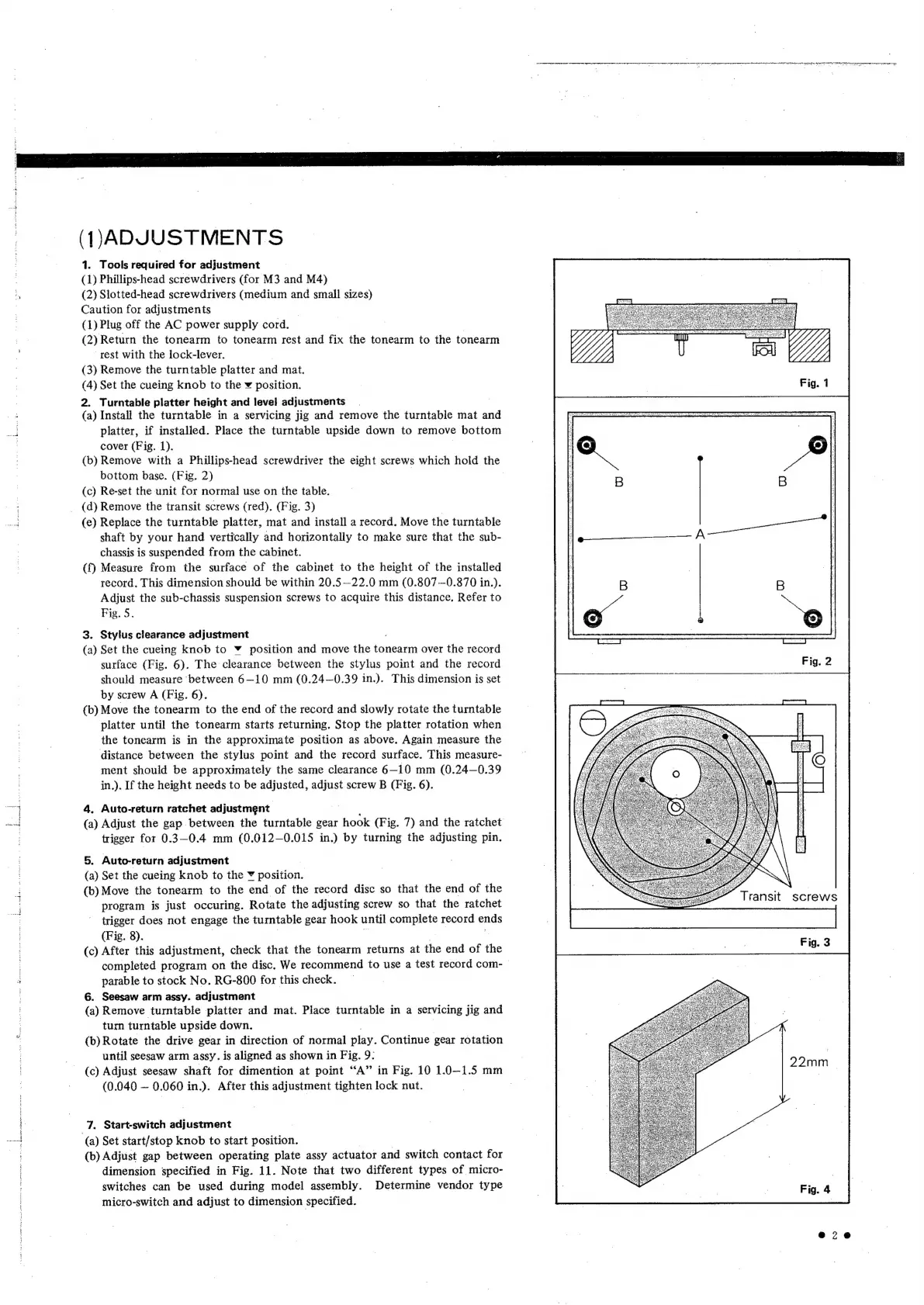
(Fig.
1).
|
(b)
Remove
with
a
Phillips-head
screwdriver
the
eight
screws
which
hold
the
bottom
base.
(Fig.
2)
(c)
Re-set
the
unit
for
normal
use
on
the
table.
(d)
Remove
the
transit
screws
(red).
(Fig.
3)
|
(e)
Replace
the
turntable
platter,
mat
and
install
a
record.
Move
the
turntable
shaft
by
your
hand
vertically
and
horizontally
to
make
sure
that
the
sub-
chassis
is
suspended
from
the
cabinet.
(f)
Measure
from
the
surface
of
the
cabinet
to
the
height
of
the
installed
record.
This
dimension
should
be
within
20.5
—22.0
mm
(0.807
—0.870
in.).
Adjust
the
sub-chassis
suspension
screws
to
acquire
this
distance.
Refer
to
Fig.
5.
3.
Stylus
clearance
adjustment
(a)
Set
the
cueing
knob
to
Y
position
and
move
the
tonearm
over
the
record
surface
(Fig.
6).
The
clearance
between
the
stylus
point
and
the
record
should
measure
between
6—10
mm
(0.24—0.39
in.).
This
dimension
is
set
by
screw
A
(Fig.
6).
(b)
Move
the
tonearm
to
the
end
of
the
record
and
slowly
rotate
the
turntable
platter
until
the
tonearm
starts
returning.
Stop
the
platter
rotation
when
the
tonearm
is
in
the
approximate
position
as
above.
Again
measure
the
distance
between
the
stylus
point
and
the
record
surface.
This
measure-
ment
should
be
approximately
the
same
clearance
6—10
mm
(0.24—0.39
in.).
If
the
height
needs
to
be
adjusted,
adjust
screw
B
(Fig.
6).
4.
Auto-return
ratchet
adjustment
(a)
Adjust
the
gap
between
the
turntable
gear
hook
(Fig.
7)
and
the
ratchet
trigger
for
0.3—-0.4
mm
(0.012—0.015
in.)
by
turning
the
adjusting
pin.
5.
Auto-return
adjustment
(a)
Set
the
cueing
knob
to
the
¥
eeodtion,
(b)
Move
the
tonearm
to
the
end
of
the
record
disc
so
that
the
end
of
the
program
is
just
occuring.
Rotate
the
adjusting
screw
so
that
the
ratchet
trigger
does
not
engage
the
turntable
gear
hook
until
poe
record
ends
(Fig.
8).
(c)
After
this
adjustment,
check
that
the
tonearm
returns
at
the
end
of
the
completed
program
on
the
disc,
We
recommend
to
use
a
test
record
com-
patable
to
stock
No.
RG-800
for
this
check.
6.
Seesaw
arm
assy.
adjustment
(a)
Remove
turntable
platter
and
mat.
Place
turntable
in
a
servicing
jig
and
turn
turntable
upside
down.
|
(b)
Rotate
the
drive
gear
in
direction
of
normal
play.
Continue
gear
rotation
until
seesaw
arm
assy.
is
aligned
as
shown
in
Fig.
9:
(c)
Adjust
seesaw
shaft
for
dimention
at
point
“A”
in
Fig.
10
1.0—1.5
mm
(0.040
~
0.060
in.).
After
this
adjustment
tighten
lock
nut.
7.
Start-switch
adjustment
(a)
Set
start/stop
knob
to
start
position.
(b)
Adjust
gap
between
operating
plate
assy
actuator
and
switch
contact
for
dimension
specified
in
Fig.
11.
Note
that
two
different
types
of
micro-
switches
can
be
used
during
model
assembly.
Determine
vendor
type
micro-switch
and
adjust
to
dimension
specified.
RE
oR,
RR
EN
I
i
RE
tt
(IE
MSM
NT
RE
NT
rg
Paar
2
iy
mm
baie
aia
eS
Le
7
b
Transit
screws
e@7ze