7
EN
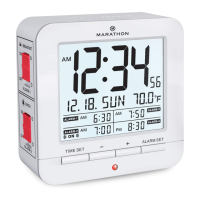
2. Setting order: Hour, Minute, Second, Year, Month,
Day, °C/°F.
3. For each setting, press the [-] and [+] buttons to adjust the
values. Press and hold the [-] and [+] buttons to advance
through the values rapidly.
4. Press the TIME SET button to conrm the value and go to
the next setting. Pressing the TIME SET button after setting
°C/°F will exit time setting mode.
5. If no buttons are pressed for 15 seconds, the values will be
saved and the clock will automatically return to time
display mode.
SETTING THE FOUR DAILY ALARMS
1. In time display mode, press the ALARM SET button to enter
alarm setting mode. The ashing alarm time is the one
currently being set.
2. Press the [-] and [+] buttons to adjust the current alarm time.
Press and hold the [-] and [+] buttons to advance through
the values rapidly.
3. Press the ALARM SET button to conrm the setting and to
go to the next setting. Pressing the ALARM SET button
after setting Alarm 4 will exit alarm setting mode.
4. If no buttons are pressed for 15 seconds, the alarm times will


 To Next Page