07
8. MINIMARK PRODUCT OVERVIEW
The Markbass Minimark is a compact, high-quality bass combo amp with a solid-state preamp and an analog power amp, which delivers 150W of power into two 6” neodymium woofers and a piezo tweeter. Connected
to an 8 ohm extension cabinet, it delivers 250W of power.
8.1 MINIMARK FUNCTIONS OVERVIEW (TOP PANEL)
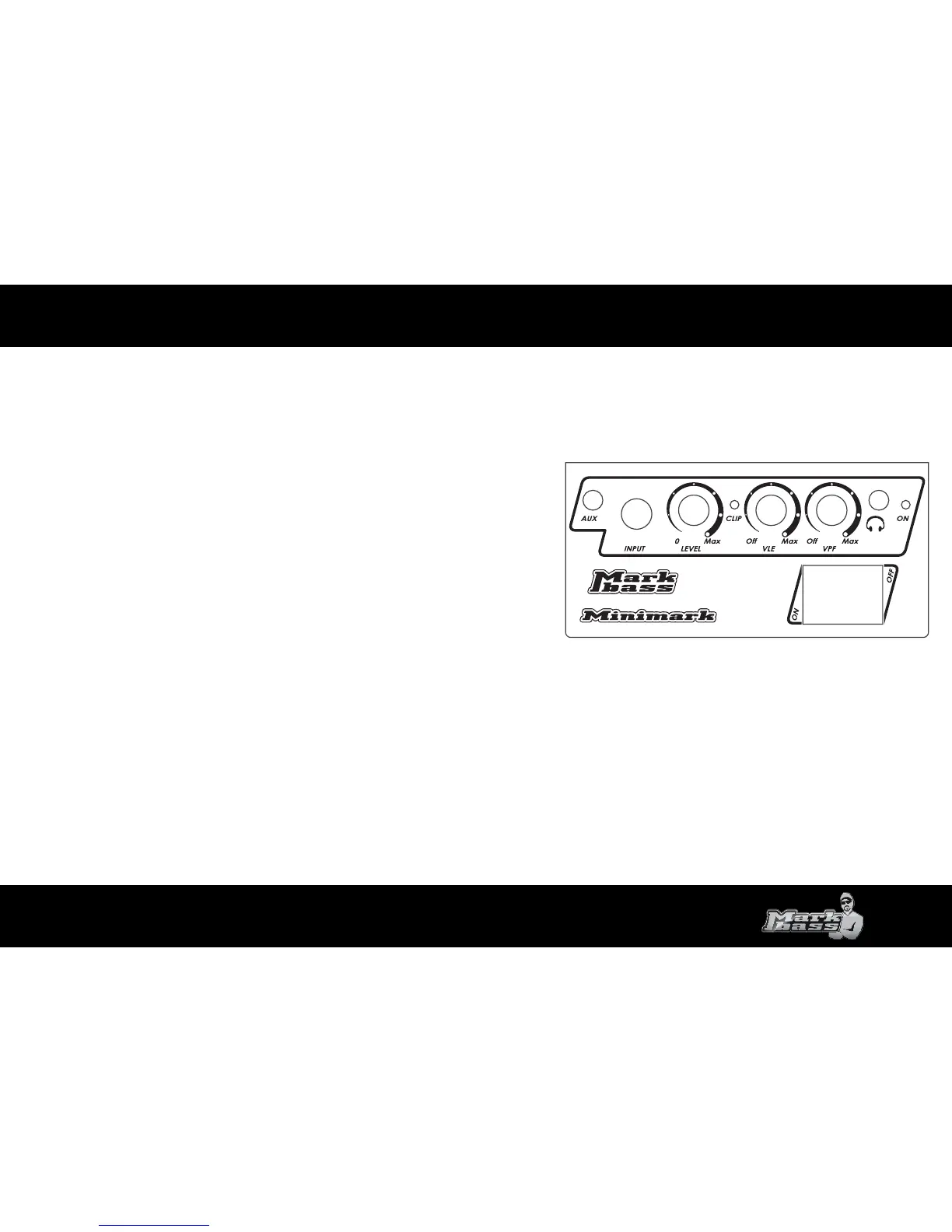
INPUT (2)
The input jack accepts an unbalanced signal from your bass (active or passive) via a standard
1/4” instrument cable.
LEVEL (3)
Start with the volume (LEVEL) o (all the way counter-clockwise) and turn clockwise until you reach
your desired volume.
CLIP (4)
The clip LED illuminates if the level of the input signal is too high. If the clip light illuminates, reduce
the volume level to avoid limiting and distortion.
VLE and VPF FILTERS (5)
The VLE (Vintage Loudspeaker Emulator) lters out high frequencies to give you a mellower,
less modern sound.
As you turn the knob clockwise, you will nd that a wider and wider range of high frequencies gets cut
(see page 7 for a graph of this lter’s function). This EQ eect is especially useful for acoustic and older styles of music.
The VPF (6) (Variable Preshape Filter) boosts lows (around 35 Hz) and highs (around 10 kHz), and cuts mids at 380 Hz. This lter sounds great for rock music and is also a favorite of many slap bass players. Note that at
higher volumes, turning the VPF up high will result in more output limiting due to the increase in low frequencies.
AUX IN (1)
Use this jack to plug in a CD player, MP3 player, iPod, drum machine, laptop, etc. using a mini plug (1/8”). The signal mixes in evenly with your instrument input. Since there is no separate level control for each input, use
the volume knobs on your bass and your CD/MP3 player to achieve the right mix.
HEADPHONE JACK (7)
For quiet practicing, plug headphones into this mini plug (1/8”) jack. If you plug in headphones, the amp’s speaker will stay on unless you turn it o using the switch (11) on the rear panel. To control the level to your
headphones, use the volume control on the amp, and/or the volume knob on your bass (and aux input device, if applicable).
1
2
3
5
6
4 8
9
7





 To Next Page