Need help?
Do you have a question about the marklin Central Station Series and is the answer not in the manual?
Mode of operation without a locomotive engineer.
Indicates fuel consumption, requiring replenishment via diesel fuel pump.
Indicates fuel consumption, requiring replenishment via diesel fuel pump.
Switches to engineer's cab view when symbol is activated for operation.
Activates the locomotive with relay. 0=off, 1=oil pressure activated, 2=motor.
Controls speed levels. Reduced to 0, locomotive idles. Affected by momentum, not ABV settings.
Must be pressed regularly. Failure triggers display request, warning, or compulsory braking.
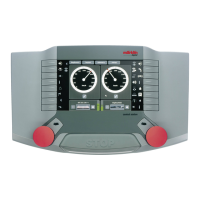
Locomotive is braked according to brake lever setting. Activated via right control knob or stylus.
Functions for the locomotive are turned on/off using this button via stylus.
Fuel and sand required. Low supply causes crawl. Replenishment differs by mode.
Provides information on running the locomotive, including dead man's switch and supplies.
Indication appears in Pro/Specialist modes when activated by feedback module contact.
Button appears in Pro/Specialist modes when pressing supplies indicator to replenish fuel.
Action for replenishing fuel and ending the refueling process.
Symbols for Configuration, Engineer's cab, and Add fuel within the control window.
 General
| Category | Controller |
|---|---|
| Manufacturer | Märklin |
| Type | Central Station |
| Locomotive Control | Yes |
| Accessory Control | Yes |
| Updateable | Yes |
| Connectivity | USB, Ethernet |
| Compatibility | Märklin Digital, DCC |
| Supported Protocols | mfx, DCC |

 To Next Page