EasyManua.ls Logo

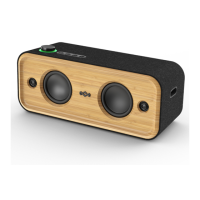
Marley GET TOGETHER 2 XL - User Manual

Marley GET TOGETHER 2 XL
12 pages
Print Icon
To Next Page IconTo Next Page
Loading...
QUICK START GUIDE
GET TOGETHER 2 XL
ATTENTION
:
PLEASE READ QUICK START GUIDE BEFORE USE
ATTENTION
:
PRIÈRE DE LIRE LE GUIDE DE
DÉMARRAGE RAPIDE AVANT UTILISATION
ATENCIÓN
:
LEA LA GUÍA DE INICIO RÁPIDO ANTES DE USARLO
BEACHTUNG
:
VOR DEM GEBRAUCH BITTE DIE SCHNELLSTARTANLEITUNG LESEN
ATTENZIONE
:
LEGGERE LA GUIDA DI AVVIAMENTO RAPIDO PRIMA DEL USO
OPGELET
:
VOOR HET GEBRUIK DE SNELSTARTGIDS LEZEN
൉纈物ֵአ獮藶褂捝盠ഠֵአ藯ก
늱넍ꩡ끞놹꾅ꠕꌭ겑녆閵넩麑ꌱ넲꽩늱겢겑꿙
意: 使
%OXHWRRWKp6SHDNHU
0RGHO(0-$
+DXWSDUOHXU%OXHWRRWK
p
0RGªOH(0-$
$OWDYR]%OXHWRRWK
p
0RGHOR(0-$
塜䓨⠖♼
⨚壮(0-$
Question and Answer IconNeed help?

Do you have a question about the Marley GET TOGETHER 2 XL and is the answer not in the manual?

Summary

Status and LED Indicators

Pairing Mode Status

Device is discoverable for Bluetooth pairing, indicated by a blinking blue LED.

Paired Device Status

Device is successfully connected, shown by a solid blue LED.

AUX Mode Status

Device is active via AUX input, indicated by a solid red LED.

Multi Pair Mode Status

For multi-speaker setups, indicated by blue LEDs (blinking/solid).

Power Status

Indicates full battery (LED off), charging (breathing red), or low battery (blinking red).

Device Components Overview

Key Ports and Controls

Identifies essential connections like AUX, USB-C, and controls like power/volume knob.

Bluetooth Pairing Process

Connecting to Your Device

Step-by-step guide to connect the speaker to a Bluetooth-enabled device.

Button Controls and Functions

Operating the Speaker

Details how to use buttons for playback, calls, track skipping, and voice assistant.

Stereo Pair Mode Setup

Creating a Stereo Pair

Instructions for pairing two speakers to create a stereo sound experience.

Equalizer (EQ) Modes

Selecting EQ Presets

Explains how to choose between Signature Sound, Bass Boost, and Acoustic EQ modes.

EQ Mode LED Indicators

Describes the LED colors (White, Green, Violet) for each EQ mode.

Multi Pair Mode Setup

Connecting Multiple Speakers

Guide for pairing three or more speakers for an enhanced audio experience.

Compliance Information

FCC and ISEDC Statements

Details regulatory compliance for FCC, IC, and general safety warnings.

RF Exposure Guidelines

Information regarding radio frequency exposure limits and device compliance.

Battery Safety and Disposal

Guidelines for battery replacement, handling, and responsible disposal (WEEE).

Safety and Usage Precautions

Hearing Protection

Advises against listening at high volumes for extended periods to prevent hearing damage.

Product Specifications and Distribution

Technical Specifications

Lists operating frequency bands and maximum transmitted power.

Distributed By Information

Contact and location details for distributors in various regions.
Summary

Status and LED Indicators

Pairing Mode Status

Device is discoverable for Bluetooth pairing, indicated by a blinking blue LED.

Paired Device Status

Device is successfully connected, shown by a solid blue LED.

AUX Mode Status

Device is active via AUX input, indicated by a solid red LED.

Multi Pair Mode Status

For multi-speaker setups, indicated by blue LEDs (blinking/solid).

Power Status

Indicates full battery (LED off), charging (breathing red), or low battery (blinking red).

Device Components Overview

Key Ports and Controls

Identifies essential connections like AUX, USB-C, and controls like power/volume knob.

Bluetooth Pairing Process

Connecting to Your Device

Step-by-step guide to connect the speaker to a Bluetooth-enabled device.

Button Controls and Functions

Operating the Speaker

Details how to use buttons for playback, calls, track skipping, and voice assistant.

Stereo Pair Mode Setup

Creating a Stereo Pair

Instructions for pairing two speakers to create a stereo sound experience.

Equalizer (EQ) Modes

Selecting EQ Presets

Explains how to choose between Signature Sound, Bass Boost, and Acoustic EQ modes.

EQ Mode LED Indicators

Describes the LED colors (White, Green, Violet) for each EQ mode.

Multi Pair Mode Setup

Connecting Multiple Speakers

Guide for pairing three or more speakers for an enhanced audio experience.

Compliance Information

FCC and ISEDC Statements

Details regulatory compliance for FCC, IC, and general safety warnings.

RF Exposure Guidelines

Information regarding radio frequency exposure limits and device compliance.

Battery Safety and Disposal

Guidelines for battery replacement, handling, and responsible disposal (WEEE).

Safety and Usage Precautions

Hearing Protection

Advises against listening at high volumes for extended periods to prevent hearing damage.

Product Specifications and Distribution

Technical Specifications

Lists operating frequency bands and maximum transmitted power.

Distributed By Information

Contact and location details for distributors in various regions.

Marley GET TOGETHER 2 XL Specifications

General IconGeneral
BrandMarley
ModelGET TOGETHER 2 XL
CategorySpeakers
LanguageEnglish

Related product manuals