EasyManua.ls Logo

Mars RG10A4(D)/BGEF - User Manual

Default Icon
16 pages
Print Icon
To Next Page IconTo Next Page
Loading...
Remote Controller Manual
DVH 09/12/18/24 Series
Inverter Single Zone
Ductless Mini-Split
www.marsdelivers.com
Question and Answer IconNeed help?

Do you have a question about the Mars RG10A4(D)/BGEF and is the answer not in the manual?

Summary

Handling the Remote Controller

Inserting and Replacing Batteries

Detailed steps for inserting and replacing batteries in the remote control.

Buttons and Functions

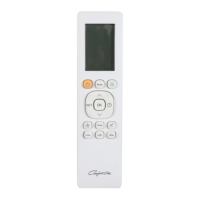
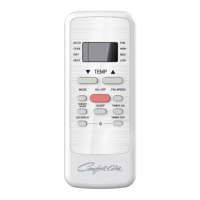
Remote Control Button Overview

Description and function of each button on the remote control.

Remote Screen Indicators

Remote Screen Indicator Overview

Explanation of various symbols and information displayed on the remote control screen.

How to Use Basic Functions

AUTO Mode Operation

Instructions for operating the air conditioner in AUTO mode.

COOL Mode Operation

Instructions for operating the air conditioner in COOL mode.

DRY Mode Operation

Instructions for operating the air conditioner in DRY mode.

FAN Mode Operation

Instructions for operating the air conditioner in FAN mode.

How to Use Advanced Functions

Overview

This document is a remote controller manual for the Comfort-Aire Century DVH 09/12/18/24 Series Inverter Single Zone Ductless Mini-Split. It provides instructions on how to use the remote controller for various functions of the air conditioning unit.

Remote Controller Specifications:

  • Models: RG10B(D)/BGEF, RG10B(D1)/BGEFU1, RG10B1(D)/BGEF, RG10B2(D)/BGCEF, RG10B10(D)/BGEF, RG10A4(D)/BGEF, RG10A4(D1)/BGEFU1, RG10A5(D)/BGEF, RG10A5(D1)/BGEFU1, RG10A5(D1)/BGCEFU1, RG10A5(D)/BGCEF, RG10A11(D)/BGEF.
  • Rated Voltage: 3.0V (Dry batteries R03/LR03×2).
  • Signal Receiving Range: 8m.
  • Environment: -5°C~60°C (23°F~140°F).

Handling the Remote Controller:

  • Inserting and Replacing Batteries: Slide the back cover downward, insert two R03/LR03 batteries, matching the (+) and (-) ends with the symbols inside the compartment, then slide the cover back into place.
  • Battery Notes: Do not mix old and new batteries or different types. Remove batteries if the device will not be used for more than 2 months. Dispose of batteries according to local laws.
  • Tips for Using Remote Control:
    • Must be used within 8 meters of the unit.
    • The unit will beep when a remote signal is received.
    • Curtains, other materials, and direct sunlight can interfere with the infrared signal receiver.
    • Remove batteries if not used for more than 2 months.
  • FCC Rules Compliance (USA): This device complies with part 15 of the FCC Rules. It must not cause harmful interference and must accept any interference received. If interference occurs, reorient/relocate the receiving antenna, increase separation between equipment and receiver, connect equipment to a different circuit, or consult a dealer/radio/TV technician. Changes or modifications not approved by the party responsible for compliance could void user's authority.
  • ICES-3(B)/NMB-3(B) Compliance (Canada): The device complies with CAN ICES-3(B)/NMB-3(B).

Buttons and Functions:

  • ON/OFF: Turns the unit on or off.
  • TEMP ▲ (Up Arrow): Increases temperature in 1°C (1°F) increments (Max. 30°C/86°F).
  • TEMP ▼ (Down Arrow): Decreases temperature in 1°C (1°F) increments (Min. 17°C/62°F).
  • MODE: Scrolls through operation modes: AUTO → COOL → DRY → HEAT → FAN. (HEAT mode not supported by cooling-only appliances).
  • FAN SPEED: Selects fan speeds: AUTO → LOW → MED → HIGH. Holding this button for 2 seconds activates the Silence feature.
  • SWING: Starts and stops horizontal louver movement. Holding for 2 seconds initiates vertical louver auto swing.
  • SET: Scrolls through operation functions (Fresh → Follow Me → AP mode → Fresh...). The selected symbol flashes; press OK to confirm.
  • OK: Confirms selected functions.
  • TIMER: Sets a timer to turn the unit on or off.
  • SLEEP: Saves energy during sleeping hours.
  • SHORTCUT: Restores current settings or resumes previous settings.
  • CLEAN: Starts/stops the Self Clean function.
  • LED: Turns the indoor unit's LED display and buzzer on and off.
  • TURBO: Enables the unit to reach preset temperature in the shortest possible time.
  • ECO (RG10A4(D)/BGEF, RG10A4(D1)/BGEFU1, RG10A5(D)/BGEF, RG10A5(D1)/BGEFU1, RG10A5(D)/BGCEF & RG10A5(D1)/BGCEFU1 models): Enters energy-efficient mode.
  • FRESH (RG10B1(D)/BGEF models): Starts/stops the Fresh feature.

Remote Screen Indicators:

  • Transmission Indicator: Lights up when the remote sends a signal.
  • TIMER ON/OFF Display: Shows timer status.
  • Silence Feature Display: Indicates Silence mode.
  • FAN SPEED Display: Shows selected fan speed (LOW, MED, HIGH, AUTO). Not adjustable in AUTO or DRY mode.
  • Fresh Feature Display: (Some units) No display when activated.
  • Sleep Mode Display: Indicates Sleep mode.
  • Follow Me Feature Display: Indicates Follow Me mode.
  • Wireless Control Feature Display: Indicates wireless control.
  • Low Battery Detection Display: Flashes when batteries are low.
  • MODE Display: Shows current mode (AUTO, COOL, DRY, HEAT, FAN).
  • ECO Display: (Some units) Displays when ECO feature is activated.
  • LOCK Display: Displays when LOCK feature is activated.
  • Temperature/Timer/Fan Speed Display: Shows set temperature (default), fan speed, or timer setting.
    • Temperature range: 17-30°C/62-86°F (20-28°C for some models).
    • Timer setting range: 0-24 hours.
    • Blank when operating in FAN mode.

How to Use Basic Functions:

  • Basic Operation (Quick Start Guide): Fit batteries, select mode, select temperature, press power button, point remote toward unit, select fan speed.
  • AUTO Mode:
    1. Press MODE to select AUTO.
    2. Set desired temperature using TEMP ▲ or ▼.
    3. Press ON/OFF to start. (FAN SPEED cannot be set in AUTO mode).
  • COOL Mode:
    1. Press MODE to select COOL.
    2. Set desired temperature using TEMP ▲ or ▼.
    3. Press FAN to select fan speed (AUTO, LOW, MED, HIGH).
    4. Press ON/OFF to start.
  • DRY Mode (Dehumidifying):
    1. Press MODE to select DRY.
    2. Set desired temperature using TEMP ▲ or ▼.
    3. Press ON/OFF to start. (FAN SPEED cannot be changed in DRY mode).
  • FAN Mode:
    1. Press MODE to select FAN.
    2. Press FAN to select fan speed (AUTO, LOW, MED, HIGH).
    3. Press ON/OFF to start. (Temperature cannot be set in FAN mode).
  • HEAT Mode:
    1. Press MODE to select HEAT.
    2. Set desired temperature using TEMP ▲ or ▼.
    3. Press FAN to select fan speed (AUTO, LOW, MED, HIGH).
    4. Press ON/OFF to start. (Performance may be affected by outdoor temperature; consider other heating appliances).

Setting the TIMER:

  • TIMER ON Setting:
    1. Press TIMER to initiate the ON time sequence.
    2. Press TEMP ▲ or ▼ multiple times to set the desired ON time.
    3. Point remote to unit and wait 1 second to activate.
  • TIMER OFF Setting:
    1. Press TIMER to initiate the OFF time sequence.
    2. Press TEMP ▲ or ▼ multiple times to set the desired OFF time.
    3. Point remote to unit and wait 1 second to activate.
  • Notes:
    • Time increases by 30-minute increments up to 10 hours, then 1-hour increments up to 24 hours.
    • Cancel by setting timer to 0.0h.
  • TIMER ON & OFF Setting (Example): Set both ON and OFF times relative to the current time.

How to Use Advanced Functions:

  • Swing Function:
    • Press SWING to start/stop horizontal louver movement.
    • Hold SWING for 2 seconds to activate vertical louver auto swing (model dependent).
  • LED Display:
    • Press LED to turn the indoor unit's display on/off.
    • Hold LED for more than 5 seconds (some units) to display the actual room temperature. Press again for more than 5 seconds to revert to the setting temperature.
  • Silence Function:
    • Hold FAN for more than 2 seconds to activate/disable Silence function (some units).
    • May result in insufficient cooling/heating capacity.
    • Press ON/OFF, Mode, Sleep, Turbo, or Clean to cancel.
  • ECO Function (Some units):
    • Press ECO to enter energy-efficient mode (only available in COOL mode).
    • Under COOL mode, it automatically adjusts temperature to 24°C/75°F and fan speed to AUTO (if set temperature is below 24°C/75°F). If above, fan speed changes to AUTO, temperature remains unchanged.
    • Note: Pressing ECO again, changing mode, or adjusting temperature below 24°C/75°F stops ECO. May result in insufficient cooling.
  • FP Function (Heat pump air conditioner only):
    • Press TEMP ▼ twice within one second under HEAT mode with setting temperature of 17°C/62°F or 20°C/68°F (for RG10B10(D)/BGEF, RG10A11(D)/BGEF models) to activate.
    • Unit operates at high fan speed with temperature automatically set to 8°C/46°F.
    • Press On/Off, Sleep, Mode, Fan, or Temp. to cancel.
  • LOCK Function:
    • Press CLEAN and TURBO simultaneously for more than 5 seconds to activate.
    • All buttons will be unresponsive except pressing CLEAN and TURBO again for 2 seconds to disable.
  • SHORTCUT Function (Some units):
    • When the remote is on, press SHORTCUT to revert to previous settings (mode, temperature, fan speed, sleep feature).
    • Hold SHORTCUT for more than 2 seconds to restore current operation settings.
  • Clean Function:
    • Press CLEAN to start the Self Clean function. The unit will clean itself and then turn off.
    • Can be used as often as desired. Pressing CLEAN mid-cycle cancels the operation.
    • Only available in COOL or DRY mode.
  • TURBO Function:
    • In COOL mode, blows cool air with strongest wind for rapid cooling.
    • In HEAT mode (for units with electric heat elements), activates the electric heater for rapid heating.

SET Function:

  • Press SET to enter function setting, then SET or TEMP ▲/▼ to select desired function. Selected symbol flashes; press OK to confirm.
  • To cancel, repeat the same procedure.
  • Scrolls through functions: Fresh → Sleep → Follow Me → AP mode.
  • Fresh Function (Some units): Energizes ion generator to purify air.
  • Sleep Function: Decreases energy use during sleep. Only activated via remote control. Not available in FAN or DRY mode.
  • AP Function (Some units): For wireless network configuration. For some units, press LED seven times in 10 seconds to enter AP mode.
  • Follow Me Function: Remote control measures temperature at its current location and sends it to the air conditioner every 3 minutes. Optimizes temperature in AUTO, COOL, or HEAT modes.
    • Note: Hold Turbo for seven seconds to start/stop memory feature. "On" or "OF" displays for 3 seconds.
    • While activated, ON/OFF, mode shift, or power failure will not cancel Follow Me.

Mars RG10A4(D)/BGEF Specifications

General IconGeneral
BrandMars
ModelRG10A4(D)/BGEF
CategoryRemote Control
LanguageEnglish

Related product manuals