Cutting the Oilboard
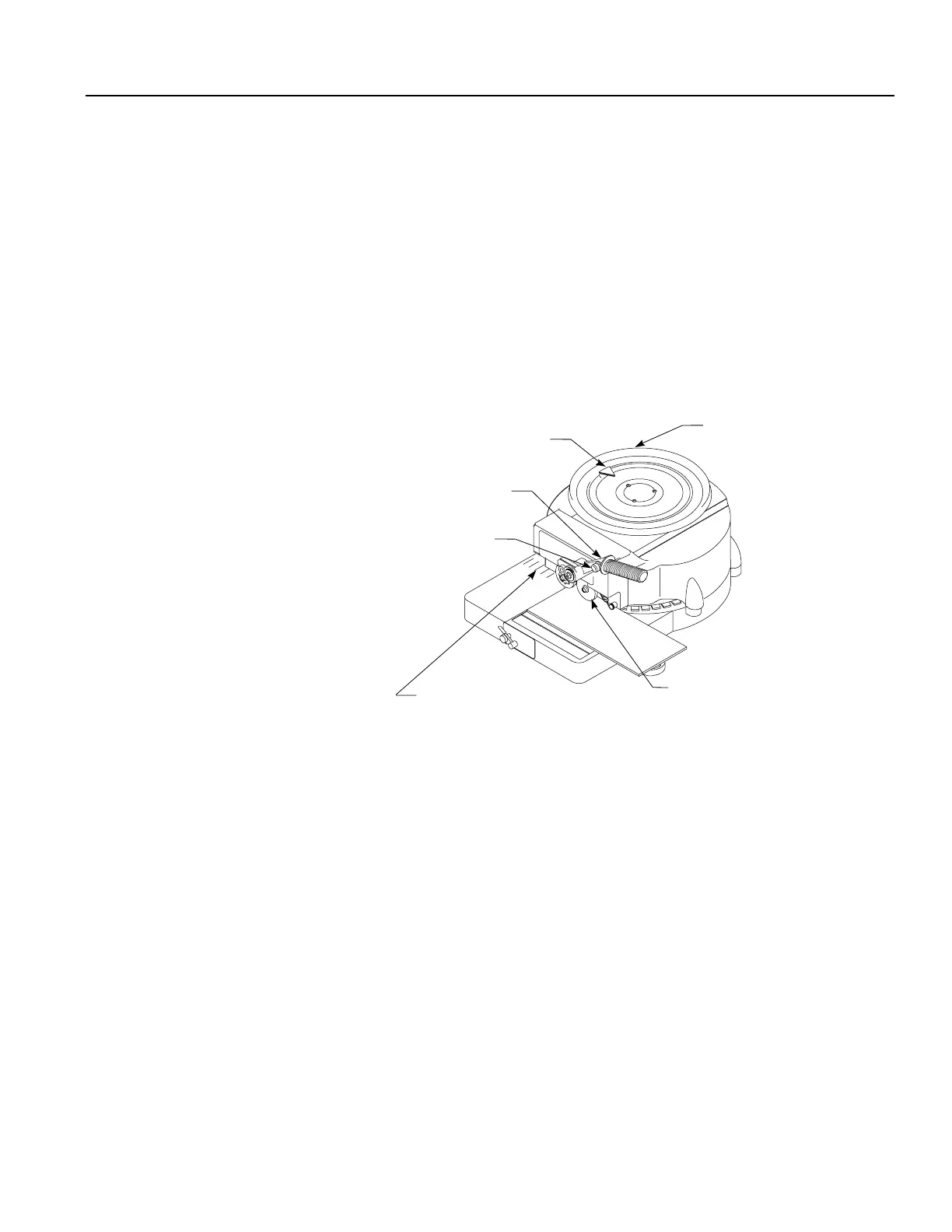
To cut and space characters follow the steps below and refer to Figure C.
1. Move the hand wheel and align the indicator with the desired character.
2. When the indicator is aligned, push the handle down.
3. To create a space between words, press the word space button on the handle as you
push down. See Figure C.
4. When a line of stenciling is complete, swing the release lever to the right to release
the lower feed rollers.
5. Align the oilboard in the starting position. Advance the top of the oilboard into the
machine and align the bottom of the oilboard with an appropriate guide line.
Figure C
Figura C
Upper Feed Wheel
Roue d’alimentation supérieure
Rueda de avance superior
Handle
Poignée
Manivela
Punch Center Lines
Repères de centrage de la découpe
Líneas centrales de punzonado
Word Space Button
Bouton d’espacement de mots
Botón de espa ciamiento de palabras
Hand Wheel
Cadran manuel
Rueda manual
Indicator
Flèche
Indicador


 To Next Page