8
• Calibrate temperature and
conductivity
• Assign and set alarm points
• Assign and set recorder outputs
• Set a password
• Set up an analyzer ID, serial
output, and auto-ranging
functions
Once the sensors have been connected
to the Mark 25, the power cord can be
plugged into any outlet supplying 97-240
V AC 50/60 Hz power. When the Mark
25 is switched on, it will immediately
start monitoring temperature.
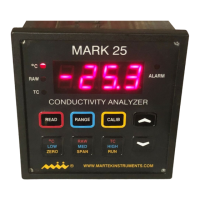
Pressing the <CALIB> key will cause
the Mark 25 to display a flashing
o
C.
If you continue pressing the <DOWN
ARROW> key the display will flash the
following prompts: CON, ALA, rEC,
PAS, uSr. After uSr, the Mark 25
returns to monitoring temperature.
Here are two basic rules to remember
when using the <CALIB> key:
1. Pressing the <UP ARROW> key will
select any flashing prompt.
2. Pressing the <RUN> key will return
the Mark 25 to the monitoring mode.
3.3 Calibrating Temperature
The Mark 25 can be calibrated
automatically or manually for
temperature.
NOTE: Automatic, electronic calibration
is a less accurate method of calibration.
For best results, the Mark 25 should be
calibrated to ASTM or NIST- traceable
standards.
To calibrate temperature, press the
<CALIB> key. The display will flash
o
C.
To select temperature, press the <UP
ARROW> key. The flashing will stop.
Next, press the <ZERO> key. The Mark
25 will display three calibration bars and
automatically zero the temperature
before returning to the monitoring mode.
To span temperature, press the
<CALIB> key, then the <UP ARROW>
key when the temperature prompt is
displayed. Next, select the <SPAN> key.
The Mark 25 will display Aut which is
short for Automatic.
To automatically calibrate temperature,
press the <UP ARROW> key. After the
calibration bars appear, the Mark 25 will
briefly display a span temperature of
50.0 before returning to monitor mode.
The Mark 25 has now been calibrated
for temperature.
To manually span calibrate temperature,
simply press the <DOWN ARROW> key
when Aut is displayed. The Mark 25 will
momentarily display three lines, then a
number indicating the input voltage will
appear in the display. Once this number
has stabilized, press the <CALIB> key
and select the appropriate span value
using the up or down arrow keys (the
display defaults to 25 deg. C). When
complete, press the <CALIB> key to
enter the data into the Mark 25’s
memory.


 To Next Page