15
To measure pressure, follow these steps:
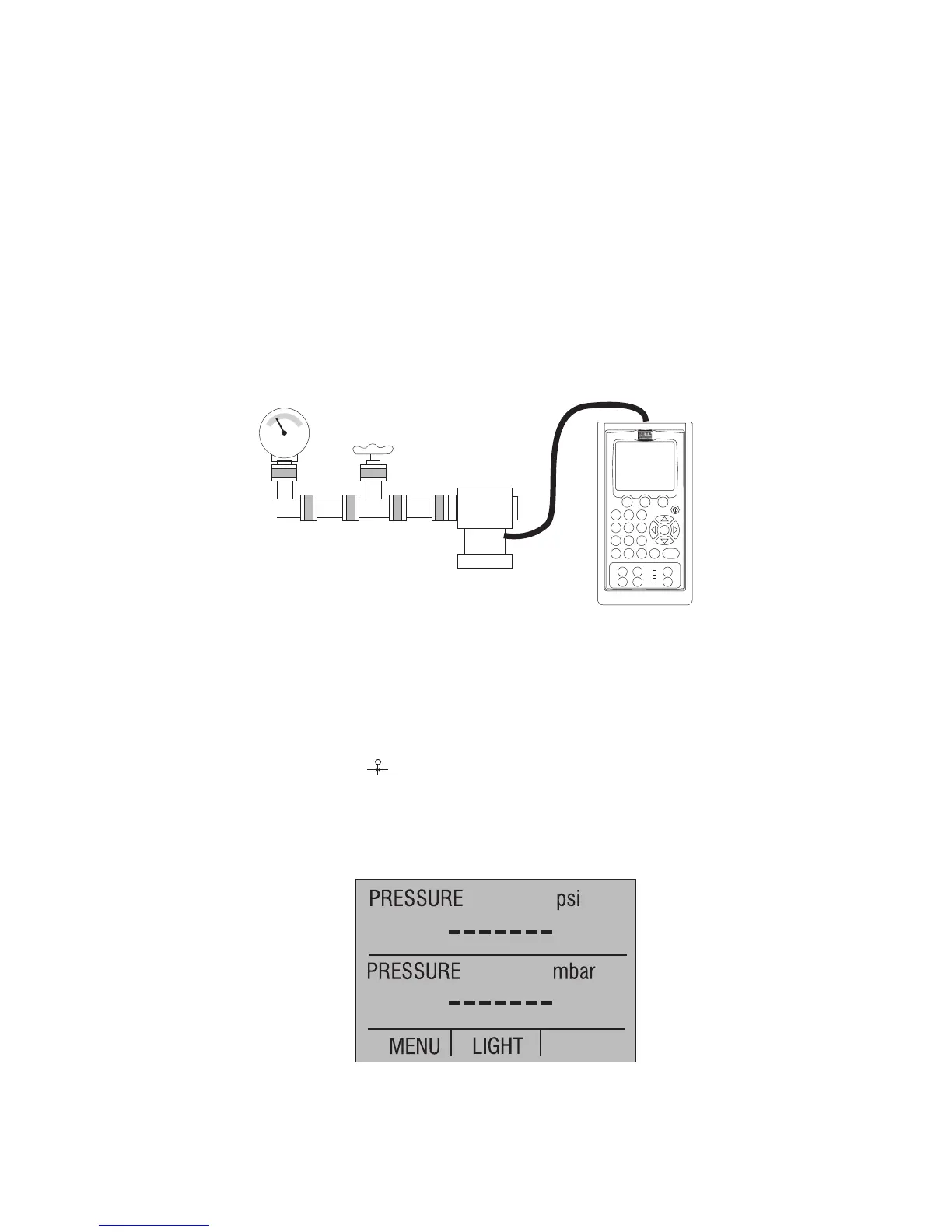
1. Connect the pressure module to the calibrator as shown in Figure 9.
The calibrator can measure pressure on both the upper and the lower display. This
makes it possible to measure pressure in two different units at the same time.
Note: Make sure the calibrator is on before you plug in the pressure module.
2. Switch to either upper or lower display from the Main Menu.
3. Select [PRESSURE] from the primary parameters.
4. Select the desired measuring unit.
5. Zero the pressure module. The zero function on the calibrator can be found in the
pressure zeroing menu.
Figure 9. Connections for Measuring Pressure
3.4-1 Zeroing with Absolute Pressure Modules.
To zero, adjust the calibrator to read a known pressure, such as barometric pressure.
To adjust the calibrator, follow these steps:
1. Enter the pressure zeroing menu.
2. Select [ZERO ]. [SET REFERENCE ABOVE] will appear. Enter the pressure
using the keypad.
3. The calibrator stores the Barometric zero offset in non-volatile memory.
The zero offset is stored for one absolute pressure module at a time. If a new absolute
module is connected this process must be repeated.


 To Next Page