EasyManua.ls Logo

Masibus TC-12 - User Manual

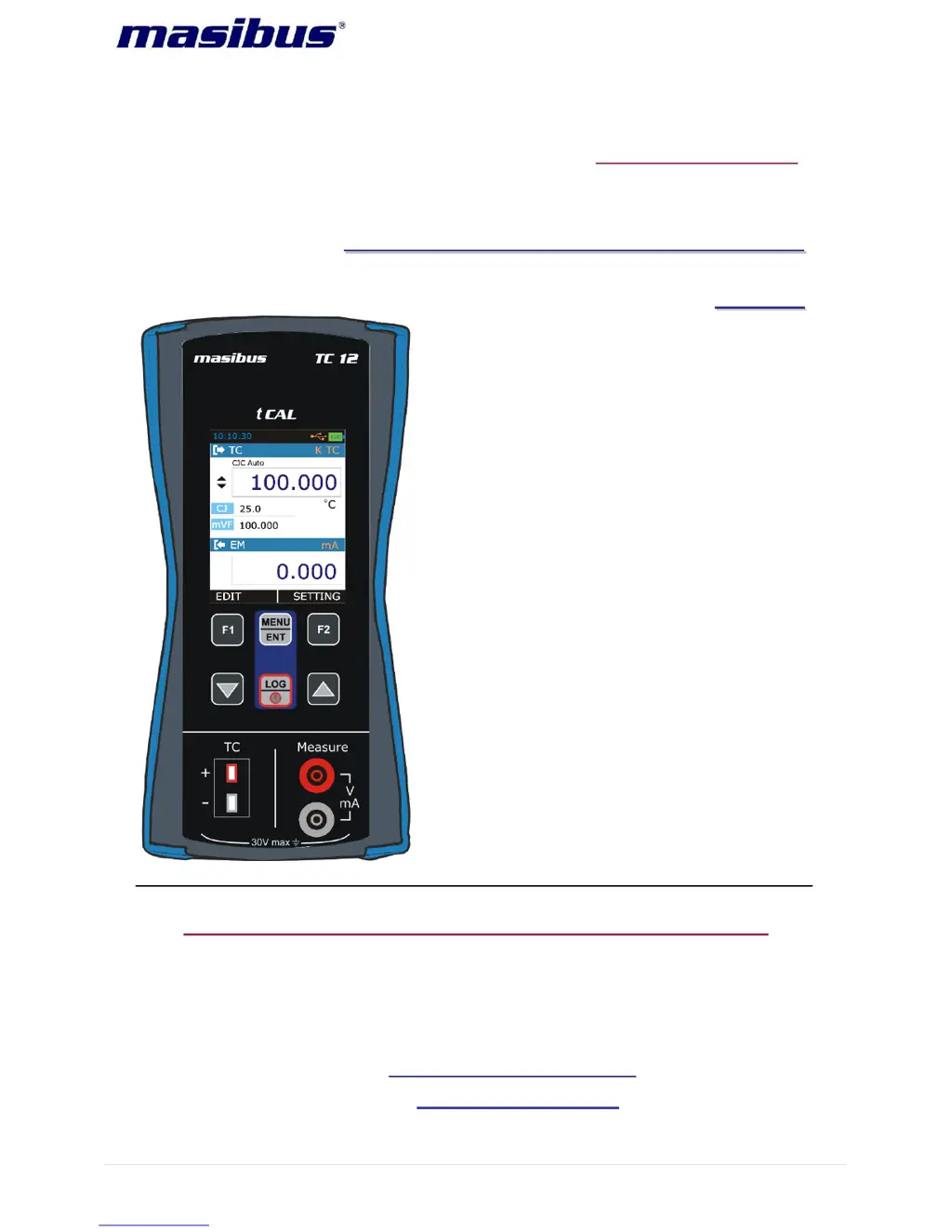
Masibus TC-12
49 pages
Print Icon
To Next Page IconTo Next Page
Loading...
User’s Manual
T
T
H
H
E
E
R
R
M
M
O
O
C
C
O
O
U
U
P
P
L
L
E
E
C
C
A
A
L
L
I
I
B
B
R
R
A
A
T
T
O
O
R
R
T
T
C
C
-
-
1
1
2
2
Masibus Automation & Instrumentation Pvt. Ltd.
B/30, GIDC Electronics Estate,
Sector-25, Gandhinagar-382044, Gujarat, India
+91 79 23287275-79 +91 79 23287281-82
Email: support@masibus.com
Web: www.masibus.com
Doc. Ref. no.:mL12/om/201 Issue no. 02

Questions and Answers

  • R
    ruiztashaAug 3, 2025
    What to do if the Masibus Test Equipment shows an error code?
    • J
      John FrostAug 3, 2025
      If the Masibus Test Equipment shows an error code on the status bar, it indicates that one of the peripheral devices is not working correctly. Try restarting the device. If the error code persists, contact the factory for further assistance.
  • J
    joseph85Aug 10, 2025
    Why is my Masibus Test Equipment battery not charging?
    • E
      evansevelynAug 10, 2025
      If your Masibus Test Equipment battery is not charging, there are a couple of potential reasons. First, check the battery connections to ensure they are secure. If the connections are good, the battery may be dead and need to be replaced.
  • F
    foxjuliaAug 18, 2025
    How to fix calibration issues on Masibus TC-12 Test Equipment?
    • A
      Angel BeckAug 18, 2025
      If the Masibus Test Equipment shows calibration issues, it might be due to distortion from external noise in the connection. Check the connection to ensure it is secure and free from interference. If the problem persists, contact the factory or recalibrate the device in an authorized calibration laboratory.
  • W
    wardjuliaAug 25, 2025
    What to do if Masibus TC-12 Test Equipment reading fluctuates or shows 'OPEN'?
    • J
      Jason HallAug 26, 2025
      If the Masibus Test Equipment displays fluctuating readings or shows 'OPEN', you should check the connections to ensure they are properly secured.

Summary

Introduction

Safety

General safety precautions and instructions before operating the instrument.

General Warnings

Critical warnings about instrument limits, proper usage, and hazardous environments.

Electrical Warnings

Safety warnings related to electrical shock hazards and battery handling.

TC-12 Hardware Parts & Accessories

The Terminal Connections

Detailed explanation of the TC and EM measurement terminal connections.

TC Terminals

Details on connecting thermocouple/mV plugs and supported types.

Start Up & Basic Operations

Menu Layout

STEP Page

Configuration of step functions for source output, including step definition and repeat.

RAMP Page

Configuration of ramp functions for source output, including rise and fall times.

DATA LOGGING Page

Instructions on how to log readings with time and date.

Calibration

Procedure for calibrating the instrument, including password entry.

Calibrating mA Input

Step-by-step guide for calibrating mA input ranges and sub-ranges.

Procedure for Calibration of TC Measure

Detailed steps for calibrating Thermocouple and mV measurements.

Calibrating Group-1

Specific instructions for calibrating TC Group 1, including zero and span.

Procedure of Calibration of TC Source

Detailed steps for calibrating Thermocouple and mV source functions.

Auto Calibration for TC Source

Guide for performing fast, automatic calibration of TC source functions.

Calibrating CJ Temperature

Procedure for calibrating the Cold Junction (CJ) temperature reading.

Maintenance & Troubleshooting

Common Problems

Lists common issues with the device and their potential causes.

Replacing the Battery

Step-by-step guide for safely replacing the instrument's battery.

General Specifications

General Specifications

Detailed technical specifications including display, keys, and special features.

Electrical Measurement Parameters and Accuracy

Accuracy specifications for V and mA electrical measurements.

Thermocouple;mV Parameter and Accuracy

Accuracy specifications for Thermocouple and mV measurements across different types.

Masibus TC-12 Specifications

General IconGeneral
Input TypeThermocouple
Weight500g
Output4-20mA
Display4-digit LED
Accuracy±0.25% of span (for TC, RTD, Linear V & I)

Related product manuals