Page 21
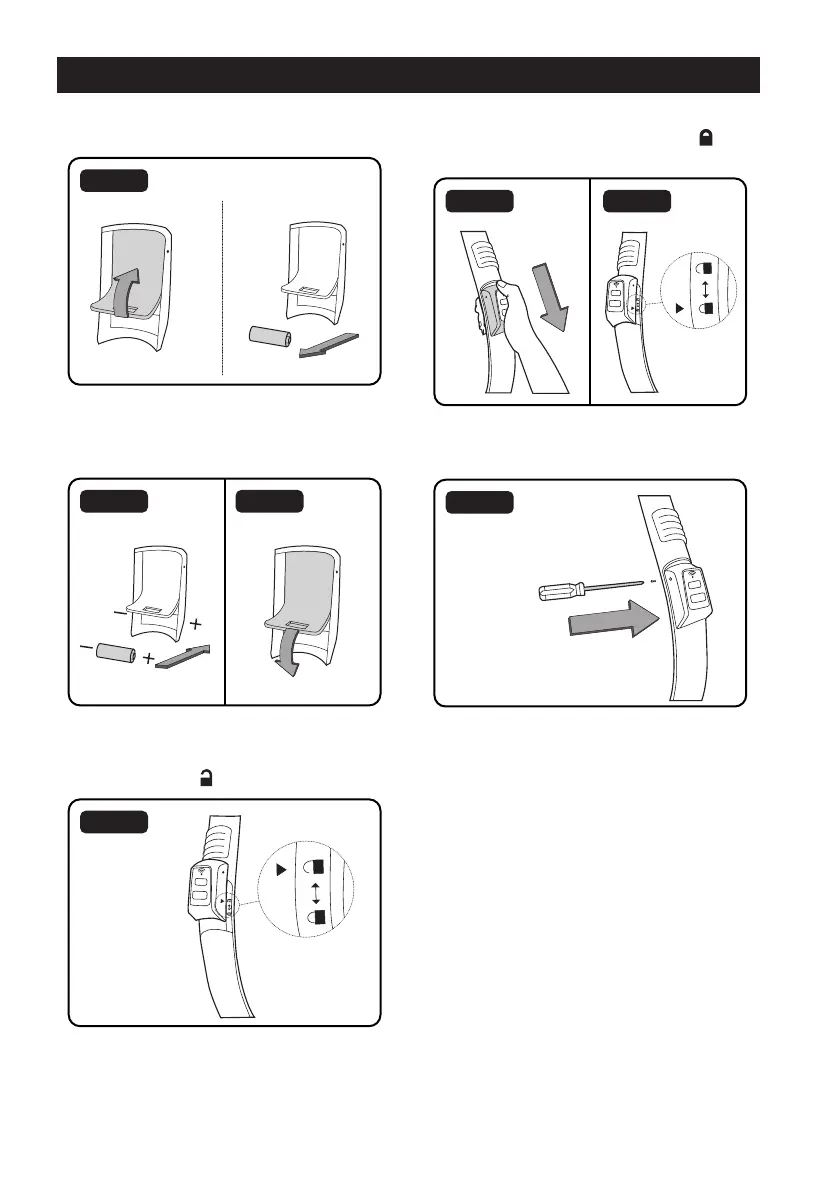
4. Lift the foam cover to expose the battery
and remove the old battery (Fig. 5).
Fig. 5
5. Insert the new battery with the terminals
in the direction shown and make sure to
replace the foam cover (Fig. 6 & 7).
Fig. 6 Fig. 7
6. Replace the remote control by aligning the
white triangle on the side cover to the
unlock symbol “ ” on the handle (Fig. 8).
Fig. 8
ON
OFF
7. Slide the remote cover so that the white
triangle is over the locked symbol “ ” (Fig.
9 & 10)
Fig. 9 Fig. 10
ON
OFF
ON
OFF
8. Secure the cover with the screws. Do not
over-tighten (Fig. 11).
Fig. 11
ON
OFF
RESETTING THE REMOTE CONTROL


 To Next Page