Page 22
TROUBLESHOOTING
WARNING:
ALWAYS DISCONNECT THE PLUG FROM THE POWER OUTLET BEFORE
REMOVING THE POWER HEAD FROM THE COLLECTION TANK.
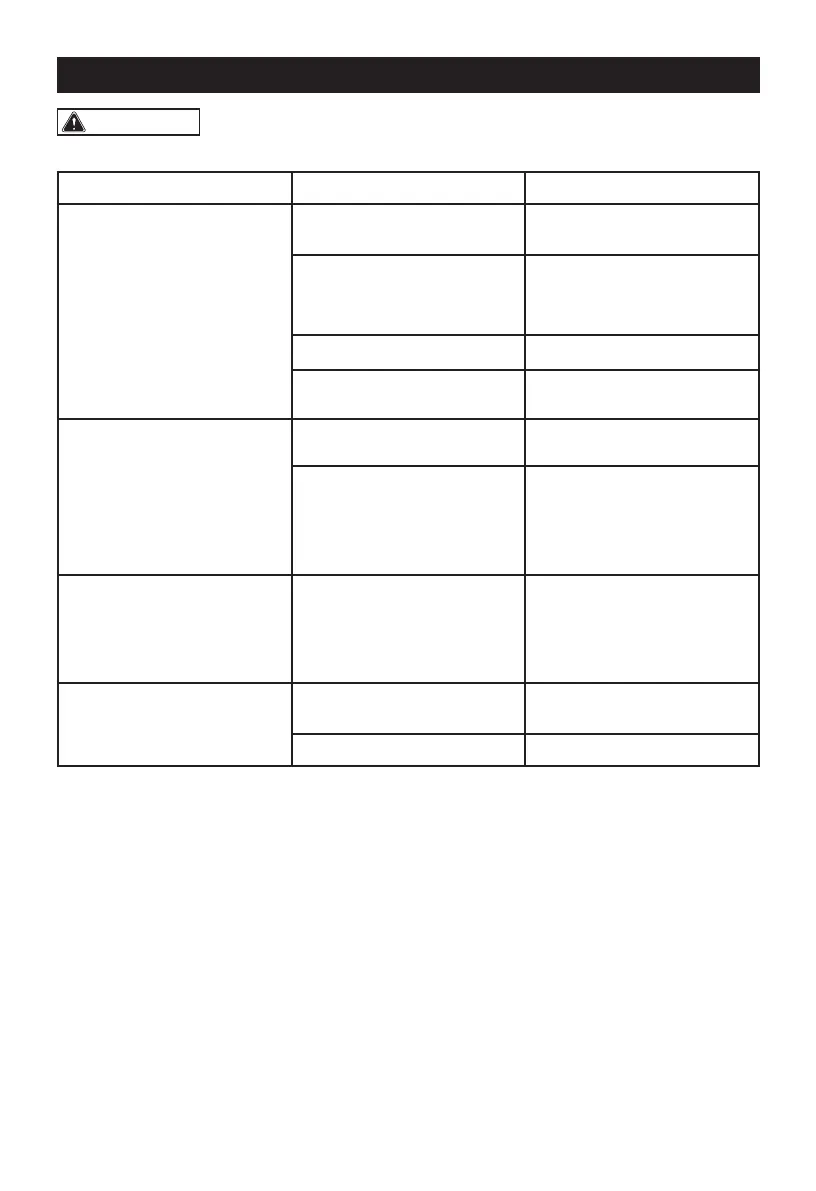
Symptom Possible Causes Corrective Action
Vacuum will not operate
1) No power supply.
1) Check power supply – cord,
breakers, fuses.
2) Faulty power cord.
2) Unplug and check the
power cord. If damaged,
have it repaired by a
professional.
3) Collection tank full. 3) Empty collection tank.
4) Switch in the wrong position
4) Press the ON ‘I’ button on
the power head.
Dust comes out from
motor cover.
1) The cartridge filter is
missing or damaged.
1) Attach or replace cartridge
filter.
2) Vacuum has been used to
collect fine dust, such as
drywall dust, fireplace soot,
or ash, without a fine dust
filter equipped.
2)Remove the standard
cartridge filter and install
the appropriate fine dust
cartridge filter.
Reduced efficiency and
motor/speed vibration.
1) There is a blockage in
the nozzle, hose, or the
collection tank inlet. The
cartridge filter is clogged by
fine dust.
1) Check nozzle, hose and
collection tank inlets for
blockage. Take off the filter
and clean it. Or install new
cartridge filter.
Remote will not operate
1) Remote is not paired with
the vac.
1) Reset the remote using the
instructions on page 20.
2) Battery is dead. 2) Replace the battery.
Changes or modifications not expressly approved by the party responsible for compliance could
void the user's authority to operate the equipment.


 To Next Page