14
Li-ion
Use only with charger 252-8036.
Model #: 252-8028
HOW TO CHARGE THE BATTERY PACK
NOTE: This Lithium-Ion battery pack is shipped partially charged. Before
using it the first time, fully charge the battery pack.
A fully discharged battery pack will charge in about 45 minutes (for included
battery pack 252-8028) in a surrounding temperature between 41° F (5° C) and
122° F (50° C).
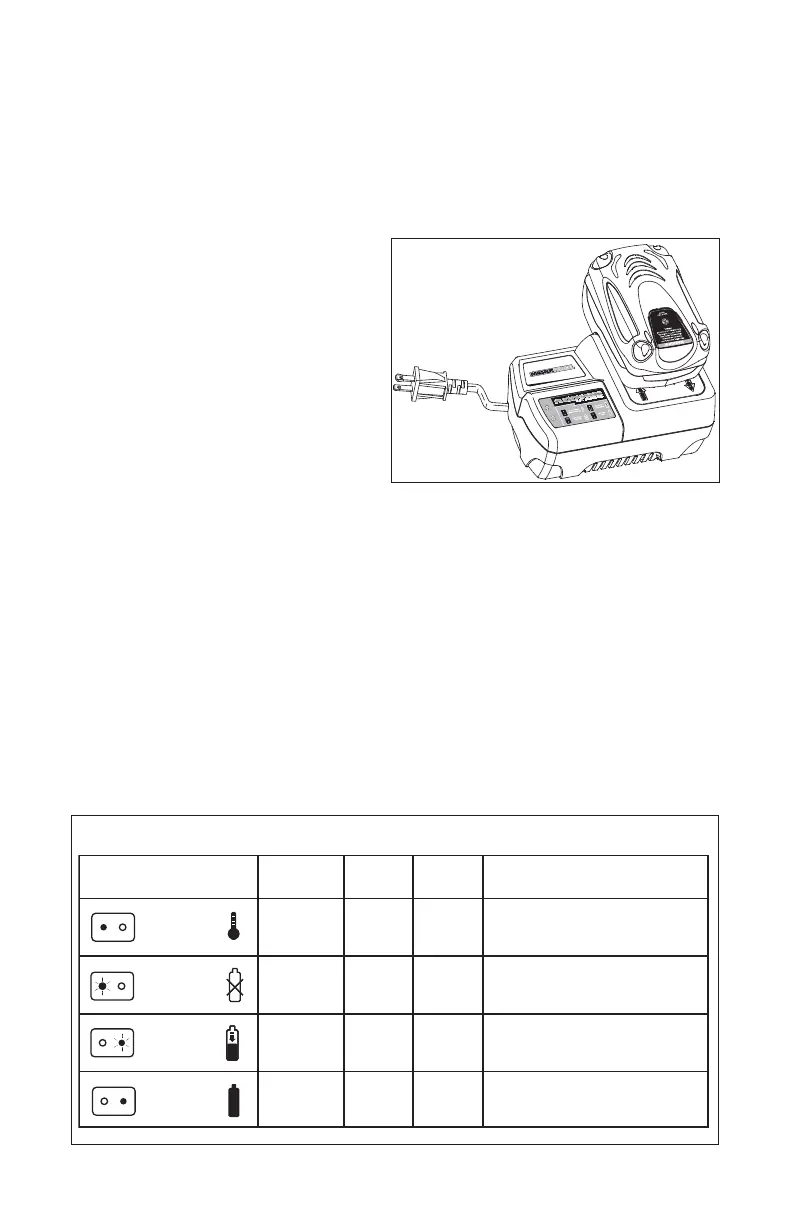
1. Charge the Lithium-Ion battery
pack with the correct charger.
2. Connect the charger to a power
supply.
3. Attach the battery pack to the
charger by aligning the raised ribs
of the battery pack with the slot in
the charger. Slide the battery pack
onto the charger (Fig. 3)
4. The Charger will communicate with the battery pack’s circuitry to evaluate
the condition of the battery pack.
5. The power indicator LED lights will cycle from right to left during charging.
This is part of the normal charging operation.
6. After charging is complete, the green LED on the charger will be on and
the power indicator LED lights will go off. The power indicator LED lights
will not be displayed when the power indicator button is pressed while the
battery pack is on the Charger.
7. The battery pack will fully charge, but will not overcharge, if left on the Charger.
LED FUNCTIONS OF CHARGER (Fig. 4)
LED INDICATOR
BATTERY
PACK
Defective
Charging
Fully
charged
RED
LED
On
Off
Off
GREEN
LED
Off
Off
Flashing
Flashing
On
ACTION
Hot/cold
battery
DEFECTIVE
BATTERY
BATTERY
CHARGING
BATTERY
FULL
Fast charge will begin when
battery returns to 41°F (5°C)
and 122°F (50°C).
Battery pack or charger
is defective.
Charging
Charging is complete.
HI / LO TEMP.
Fig. 4
Fig. 3


 To Next Page