FUSION TOUCH SOUND (if equipped)
The Balboa BT Audio option offers Bluetooth connection to play audio from a mobile Bluetooth
audio capable device. The functions of the BBA system such as power, volume and skipping tracks
can be performed from the spa topside control panel within the Music menu.
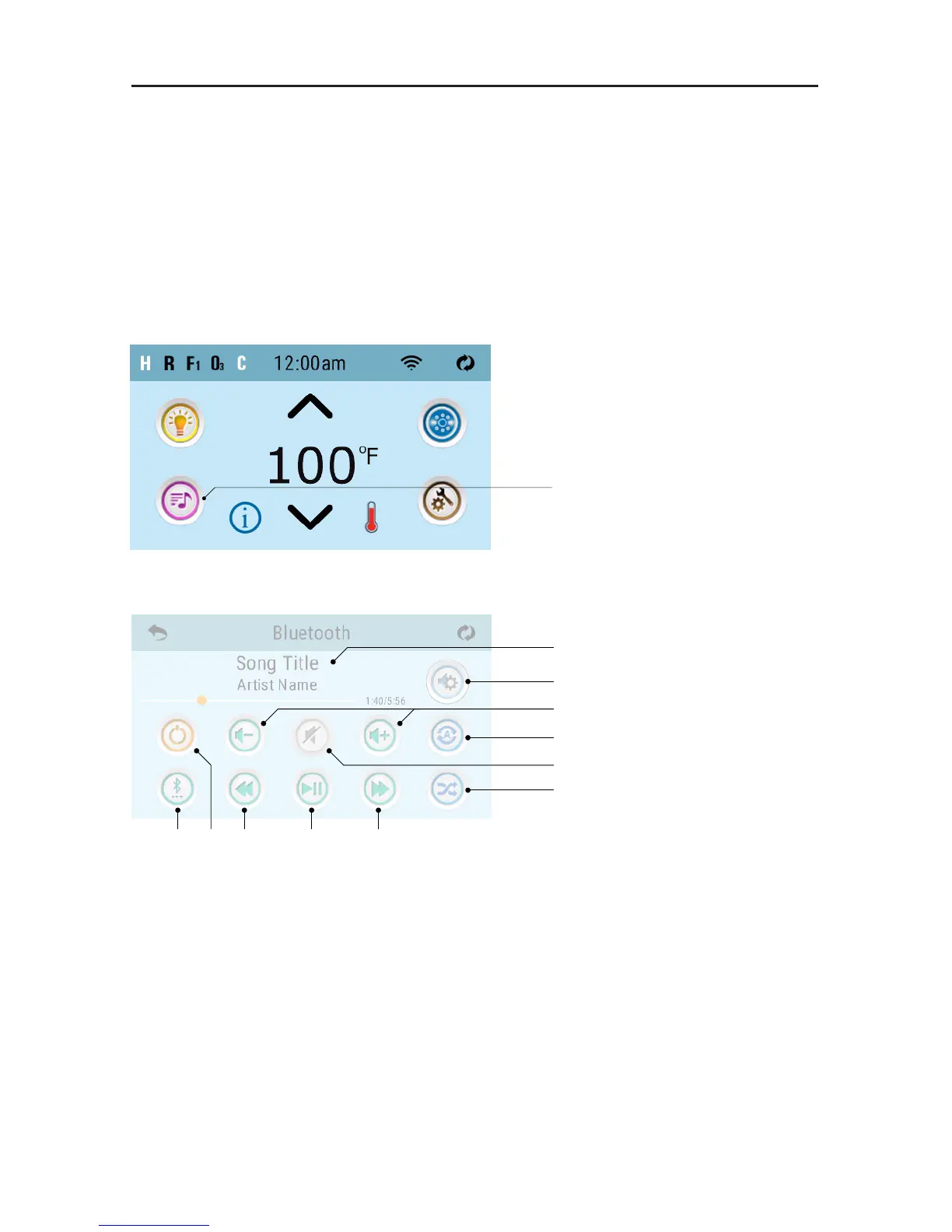
These are spaTouch 2
screens. spaTouch 1 (“Icon”
GUI) has the same icons, but
some icons are in different
positions.
A - Song, Artist, Song
Length, Elapsed Time
B - Settings
C - Volume + / -
D - Repeat (one song or
all songs)
E - Mute On/Off
F - Shuffle
G - Track Forward
H - Play/Pause
I - Track Back
J - Power On/Off
K - Input Modes:
Bluetooth, USB*,
Line In*
Press this button
A
B
C
D
E
F
K J I H G
Some icons such as “Repeat” may not appear if music isn’t playing.
* Internal audio module has capabilities for Bluetooth, Line In and USB. There is no external capabilities for
Line In and USB. For this reason, these inputs will not be applicable when seen. Simply use Mode to rotate
back to Bluetooth input.
WARNING: Never remain in your spa longer than 15 minutes per session when the water temperature is above
98˚F (36˚C). If you wish to spend more time in your spa, whether enjoying music or just lounging, be sure to keep
the spa water at or below body temperature (98.6˚F / 37˚C).
42296-D, bba2 Manual
© 2017 Balboa Water Group. Single Source Solution. All rights reserved.
1382 Bell Avenue | Tustin, CA 92780 | p 714.384.0384 | www.balboawater.com
We reserve the right to change technical data without further notice.
10
Page
Topside Panel Interface
(Topside panels with “Icon” GUI)
Press this button
These are spaTouch 2 screens.
spaTouch 1 (“Icon” GUI) has
the same icons, but some icons
are in different positions.
Some icons such as “Repeat” may not appear if music isn’t playing.
K J I H G
F
E
D
C
B
A
Home Screen
Bluetooth Screen
A - Song, Artist, Song
Length, Elapsed Time
B - Settings
C - Volume + / -
D - Repeat
· Repeat one song
· Repeat all songs
E - Mute On/Off
F - Shufe
G - Track forward
H - Play/Pause
I - Track back
J - Power On/Off
K - Input Modes:
Bluetooth, USB, Line in
42296-D, bba2 Manual
© 2017 Balboa Water Group. Single Source Solution. All rights reserved.
1382 Bell Avenue | Tustin, CA 92780 | p 714.384.0384 | www.balboawater.com
We reserve the right to change technical data without further notice.
10
Page
Topside Panel Interface
(Topside panels with “Icon” GUI)
Press this button
These are spaTouch 2 screens.
spaTouch 1 (“Icon” GUI) has
the same icons, but some icons
are in different positions.
Some icons such as “Repeat” may not appear if music isn’t playing.
K J I H G
F
E
D
C
B
A
Home Screen
Bluetooth Screen
A - Song, Artist, Song
Length, Elapsed Time
B - Settings
C - Volume + / -
D - Repeat
· Repeat one song
· Repeat all songs
E - Mute On/Off
F - Shufe
G - Track forward
H - Play/Pause
I - Track back
J - Power On/Off
K - Input Modes:
Bluetooth, USB, Line in
HOME SCREEN
BLUETOOTH SCREEN



 To Next Page