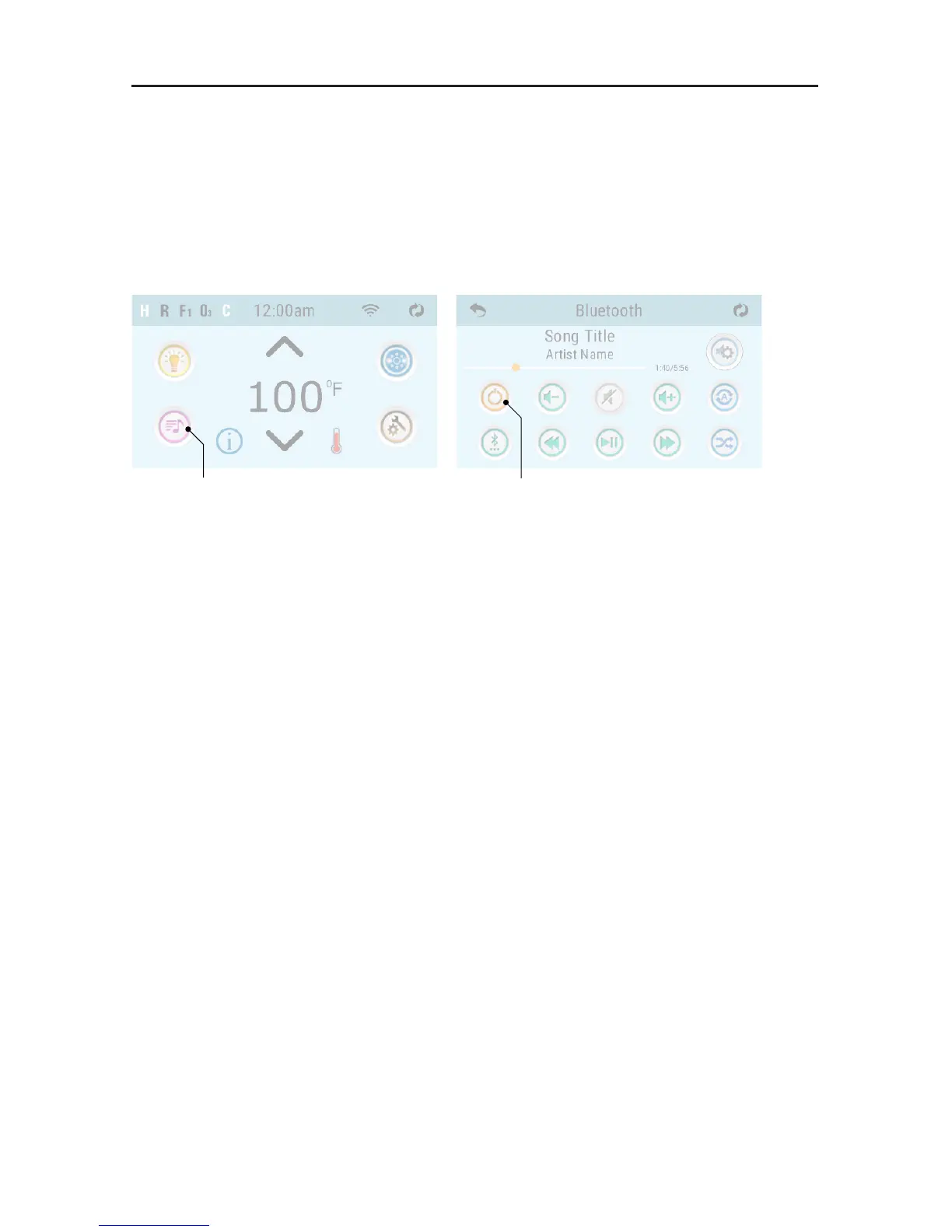
1. On the topside panel, press the music button.
2. Next, press the power button.
3. Turn on Bluetooth function of your smart device or music device.
4. On your smart device or mobile device, click search for Bluetooth device. Make sure you are
close to the spa. Operating Range is up to 50’ (will vary, dependent on installation and objects
between spa Bluetooth module and your Bluetooth device).
5. Select “PPME70BT” from the pairing list.
6. Click “Connect”. Once connected, you can now play your favorite music from your smart device
or mobile device.
WARNING: Never remain in your spa longer than 15 minutes per session when the water temperature is above
98˚F (36˚C). If you wish to spend more time in your spa, whether enjoying music or just lounging, be sure to keep
the spa water at or below body temperature (98.6˚F / 37˚C).
BLUETOOTH CONNECTION
42296-D, bba2 Manual
© 2017 Balboa Water Group. Single Source Solution. All rights reserved.
1382 Bell Avenue | Tustin, CA 92780 | p 714.384.0384 | www.balboawater.com
We reserve the right to change technical data without further notice.
9
Page
Bluetooth Connection
(Topside panels with “Icon” GUI)
1 - Power up the system pack with bba2
already connected to the system pack.
2 - On the topside panel press the music
button. Next, press the power button.
3 - Turn on Bluetooth
function of your smart
device or music device.
4 - On your smart device or music device,
click search for Bluetooth device. Make sure
you are close enough to the spa tub.
5 - Select “PPME70BT” from the pairing list.
6 - Click “Connect.” Once connected, you
can now play your favorite music from your
smart device or music device.
bba2 operates up to 100 feet in open air.
Ranges vary as they are dependant
on installations.
Music Button Power Button
Topside Panel Options
Topside Panel: spaTouch 1
Graphical User Interface: “Icon”
(software version 3.36 or above)
Topside Panel: spaTouch 2
Graphical User Interface: “Icon”
(software version 2.0 or above)
FUSION TOUCH SOUND (if equipped)



 To Next Page