10
(2) Using the straight guide (2) Using the straight guide
(2) Using the straight guide
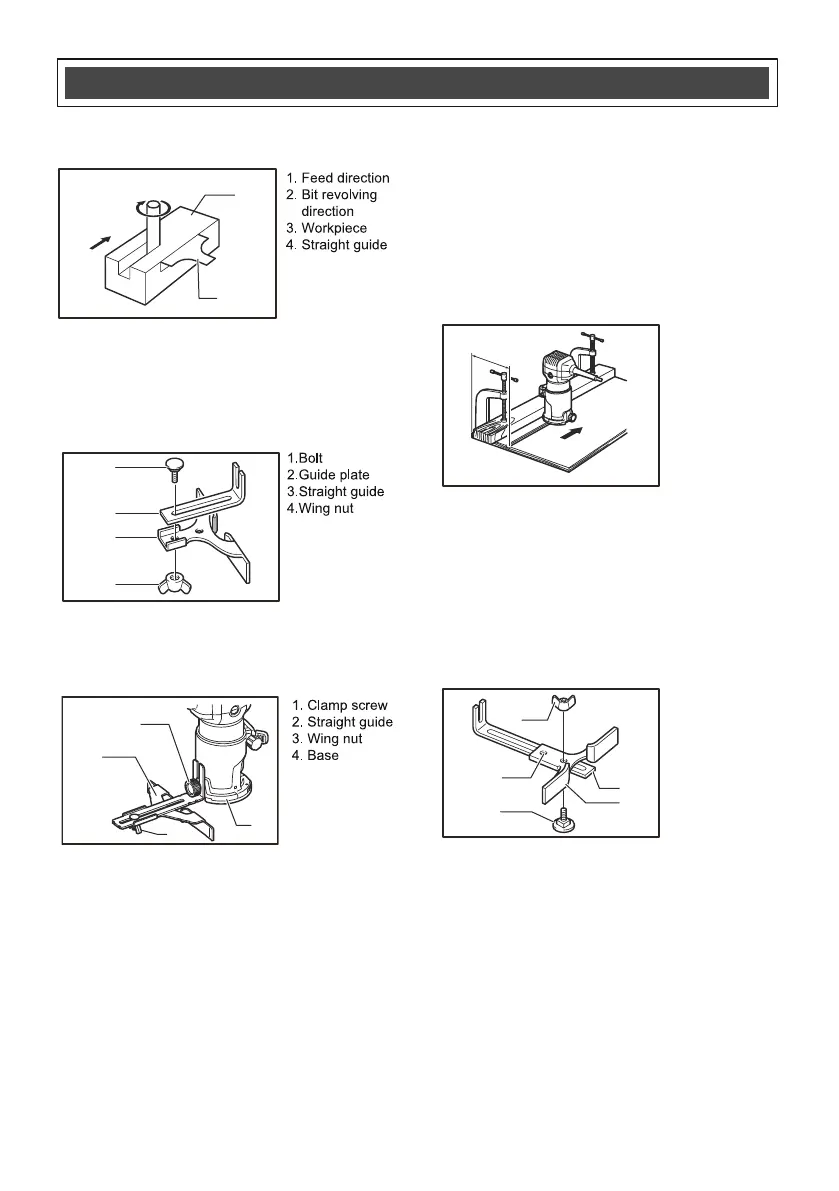
The straight guide is effectively used for straight cuts
when chamfering or grooving.
Attach the guide plate to the straight guide with the bolt
and the wing nut.
Attach the straight guide with the clamp screw (1).
Loosen the wing nut on the straight guide and adjust
the distance between the bit and the straight guide. At
the desired distance, tighten the wing nut securely.
When cutting, move the tool with the straight guide
flush with the side of the workpiece.
If the distance betwe
en the side of the workpiece
and the cutting position is too wide for the straight
guide, or if the side of the workpiece is not straight, the
straight guide cannot be used. In this case, firmly
clamp a straight edge to the workpiece and use it as a
guide against the router base. Feed the tool in the
direction of the arrow.
ASSEMBLY
ASSEMBLY
ASSEMBLY
ASSEMBLY AND
AND
AND
AND OPERATING
OPERATING
OPERATING
OPERATING
1. Feed direction
2. Bit revolving
direction
3. Workpiece
4. Straight guide
1.Bolt
2.Guide plate
4.Wing nut
1. Clamp screw
2. Straight guide
3. Wing nut
4. Base
Min.: 2-1/2"
Max.: 8-11/16"
For cutting circles between 2-1/2" and 4-5/8"
in radius.
1. Wing nut
2. Guide plate
3. Straight guide
4. Center hole
5. Bolt
(3) Circular work(3) Circular work(3) Circular work(3) Circular work
Circular work may be accomplished if you assemble
the straight guide and guide plate as shown below.
Min. and max. radius of circles to be cut
(distance
between the center of circle and the thethe center of
bit) are as follows:
1
2
3
4
1
2
3
4
1
2
3
4
5
1
2
3
4


 To Next Page
 Loading...