50
4. Installation and Operation
LIO-4805/LIO-4810-150A/ESS LIO-I 4810
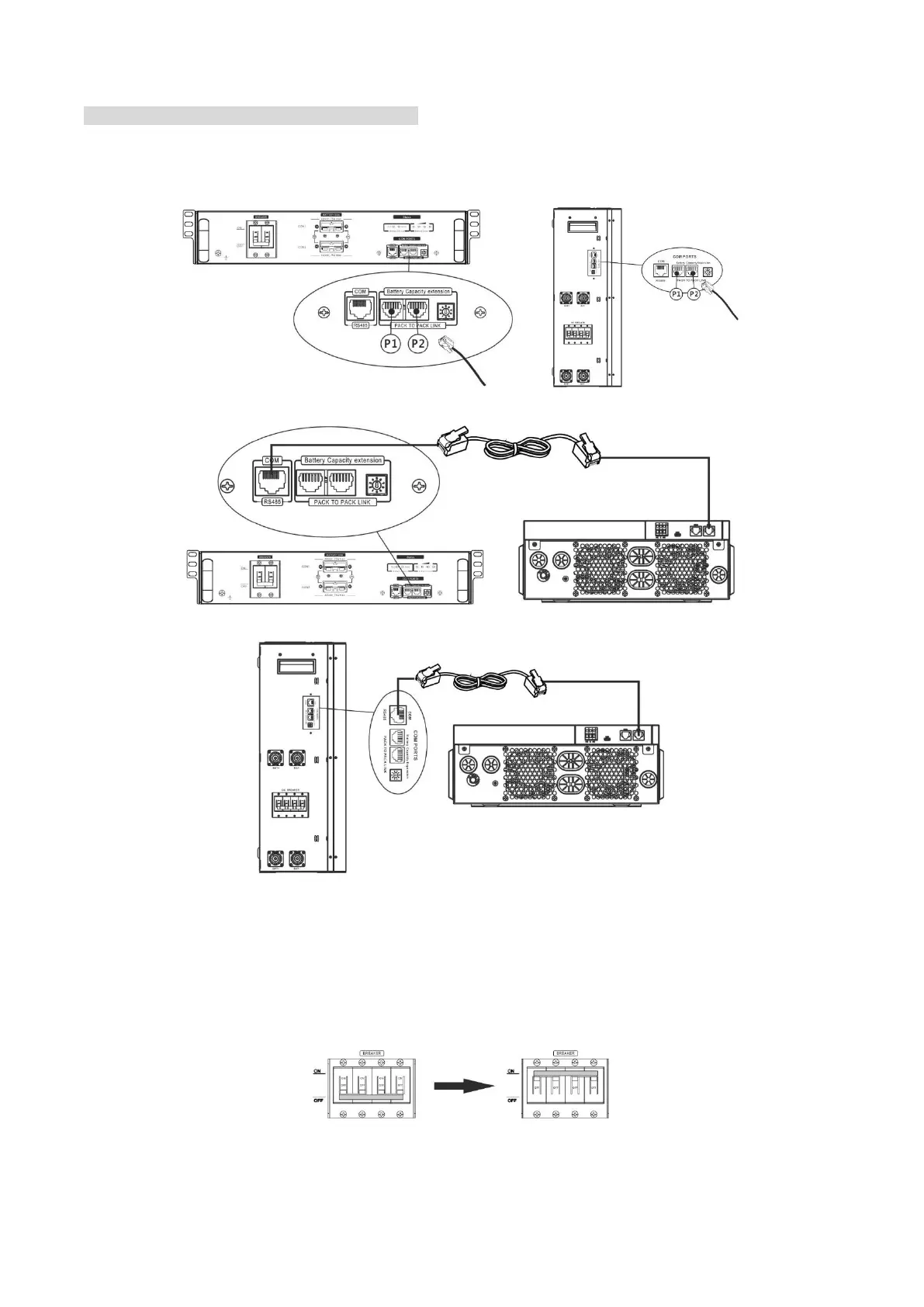
After ID no. is assigned for each battery module, please set up LCD panel in inverter and install the wiring
connection as following steps.
Step 1: Use supplied RJ11 signal cable to connect into the extension port ( P1 or P2 ).
Step 2: Use supplied RJ45 cable (from battery module package) to connect inverter and Lithium battery.
Note for parallel system:
1. Only support common battery installation.
2. Use custom-made RJ45 cable to connect any inverter (no need to connect to a specific inverter) and
Lithium battery. Simply set this inverter battery type to “LIB” in LCD program 5. Others should be “USE”.
Step 3: Turn the breaker switch “ON". Now, the battery module is ready for DC output.
Step 4: Press Power on/off button on battery module for 5 secs, the battery module will start up.
*If the manual button cannot be approached, just simply turn on the inverter module. The battery module will
be automatically turned on.


 To Next Page